Discover top M.2 to SATA/SATA Express adapters that let you convert M.2 slots to SATA or add NVMe-to-PCIE expansion for faster storage setups. This guide highlights versatile options from trusted brands, emphasize heat management, compatibility, and ease of installation to help you choose the right solution for desktops, NAS, or portable enclosures.
| Product | Brand | Interface | Key Feature |
|---|---|---|---|
| Dual M.2 PCIe Adapter with Heatsink | MHQJRH | M.2 NVMe (M Key) to PCIe x4 + M.2 SATA (B Key) to SATA | Dual slots with advanced heat dissipation |
| NVMe to PCIe M.2 Adapter with Aluminum Heatsink | SABRENT | M.2 NVMe to PCIe x16/x8/x4 | High-speed NVMe support with aluminum heatsink |
| 9-Port M.2 NVMe to SATA Adapter | xiwai | NVMe M.2 to 9x SATA 3.0 | Expanded SATA for NAS or storage racks |
| M.2 to SATA Adapter with ASMedia ASM1166 | 10Gtek | M.2 to SATA3.0 (M Key to SATA) | LED indicator and front-end plug-and-play |
| NGFF NVMe to 9 Ports SATA Adapter | NGFF | M.2 NVMe to 9x SATA 3.0 | Multiple SATA connections for large storage arrays |
These selections emphasize compatibility with both NVMe and SATA drives, robust heat management, and straightforward installation. Use the table as a quick reference to compare core capabilities before diving into detailed product sections.
Dual M.2 PCIe Adapter With Heat Sink

The MHQJRH dual M.2 adapter combines M.2 NVMe (M Key) to PCIe 3.0 x4 with a separate M.2 SATA (B Key or B+M Key) to SATA interface. It supports two M.2 SSDs simultaneously, enabling a mixed configuration that can boost overall storage flexibility in a single PCIe slot. An advanced heat sink and PCB copper venting help manage thermal load during sustained transfers. This board is suitable for desktop builds needing both NVMe performance and extra SATA capacity in one card.
NVMe to PCIe Adapter With Aluminum Heatsink

The SABRENT M.2 NVMe to PCIe adapter provides compatibility with M.2 NVMe SSDs in 2230/2242/2260/2280 sizes. It requires a PCIe x16/x8/x4 slot and does not support SATA drives or PCIe x1 slots. A durable aluminum heatsink and thermal pad ensure efficient cooling for sustained NVMe workloads, making it a strong choice for expanding high-speed storage in a desktop or workstation.
9-Port NGFF NVMe to SATA Adapter

The Xiwai M.2 to SATA 9-port adapter enables expansion of nine SATA 3.0 interfaces from a single M.2 NVMe source. It’s designed for NAS-like setups or storage arrays where multiple SSDs are managed from one motherboard, providing 6.0Gbps, 3.0Gbps, and 1.5Gbps transfer rates depending on the interface. The unit includes an advanced heatsink to promote stable operation at higher workloads. Note that it does not support hot-swapping and requires compatible high-speed backplane integration.
ASMedia ASM1166 Based M.2 To SATA Card

This card leverages the ASMedia ASM1166 controller to connect a selected M.2 drive as a SATA device. It’s positioned for desktop builders who want straightforward, tool-free integration without software installation. The adapter supports standard SATA operation with typical 6Gbps performance and is designed to fit into standard 2.5-inch drive bays or dedicated PCIe expansion slots depending on the host system layout.
NGFF 9-Port NVMe To SATA Adapter

This NGFF-branded adapter focuses on expanding storage capacity with nine SATA 3.0 interfaces for NAS or professional storage setups. It supports 6.0Gbps, 3.0Gbps, and 1.5Gbps interfaces, driven by a high-speed chipset and an integrated heatsink to minimize thermal throttling. It’s suited for users who need dense, multi-drive configurations from a single M.2 NVMe source, though hot-swapping is not supported.
Sabrent USB-C NVMe And SATA Enclosure

Beyond adapters, Sabrent offers tool-free enclosures that support M.2 NVMe or SATA drives in a compact USB-C enclosure. While not a direct motherboard-to-SATA adapter, it represents a practical solution for portable M.2 storage that remains compatible with multiple drive formats and speeds. This option is ideal for users prioritizing portability and plug-and-play compatibility across devices without internal installation.
StarTech.com M.2 to U.2 PCIe NVMe Adapter
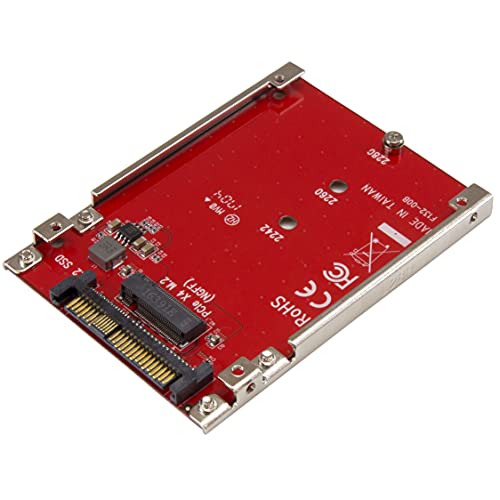
The StarTech adapter converts M.2 PCIe NVMe or AHCI SSDs to a U.2 (SFF-8639) interface for 2.5″ drive bays, enabling high-speed data transfer in systems that support U.2. It’s capable of pushing up to 7.8GBps with compatible PCIe Gen 4 systems and provides straightforward installation with native OS support, suitable for servers or high-end desktops that leverage U.2 storage paths.
Buying Guide: Key Considerations for M.2 To SATA Express Adapters
- Interface compatibility: Determine whether you need NVMe-to-PCIe, M.2 SATA to SATA, or multi-port adapters. Some cards support both NVMe and SATA drives, while others are strictly NVMe or pure SATA configurations.
- Form factor and slot requirements: Check whether your motherboard or NAS backplane has PCIe x4/x8/x16 slots, and confirm that the adapter’s physical interface fits your system. Some models demand PCIe x16 sockets for full NVMe performance, while others work with x4 slots.
- Thermal management: NVMe drives generate heat under load. Heatsinks and copper ventilation improve reliability and sustained performance, particularly in compact desktops or dense NAS enclosures.
- Power and data considerations: Some adapters integrate multiple SATA ports or require external power for high-drive-count configurations. Verify power requirements and cable needs, especially for dense storage arrays.
- Hot-swap and operating system support: Many adapters do not support hot-swapping. Ensure your use case aligns with the device’s capabilities and supported operating systems.
- Expansion goals: If you’re expanding storage for NAS, media servers, or professional workstations, prioritize adapters with multiple ports and robust cooling. For portable use, consider tool-free enclosures for easy swap.
- Warranty and compatibility notes: Review manufacturer documentation for caveats like supported M.2 key types (M Key, B Key, or B+M Key) and any limitations on specific motherboard models or PCIe generations.