The demand for fast, flexible NVMe storage has driven demand for M.2 add-in cards that transform a single PCIe slot into multiple high-speed NVMe drives. This guide highlights five top options, detailing what each card does, key features, and how they compare for different setups—from home labs to high-demand workstations. Whether you want to add extra NVMe slots, boost NAS performance, or enable RAID configurations, these cards offer scalable solutions for modern PCs and workstations.
| Product | Brand | Key Benefit | Form Factor / Slots |
|---|---|---|---|
| SABRENT M.2 NVMe SSD to PCIe x16 AIC (EC-TFPE) | SABRENT | Gen5-ready with tool-free design and heatsink | PCIe x16, supports 2230–2280 M.2 NVMe |
| ASUS Hyper M.2 X16 PCIe 3.0 X4 Expansion Card V2 | ASUS | Supports four NVMe M.2 drives with VROC/RAID readiness | PCIe 3.0 x4, supports four NVMe M.2 |
| SABRENT PCIe 3.0 x4 Add-In Card with 10GbE + 3 M.2 Slots (EC-PM2L) | SABRENT | Triple M.2 NVMe slots plus 10GbE in one card | PCIe 3.0 x4, 3 M.2 NVMe slots |
| RIITOP Quad NVMe PCIe Adapter (4 x NVMe) | RIITOP | Quad NVMe support with heatsink for thermal management | PCIe x16, 4x NVMe M.2 slots |
| GLOTRENDS PA09-HS M.2 NVMe to PCIe 4.0 X4 Adapter | GLOTRENDS | Heatsinked M.2 to PCIe 4.0 X4 with broad M.2 support | PCIe 4.0 x4, single M.2 NVMe |
Product performance varies by PCIe version, slot availability, and motherboard support for bifurcation and RAID functionality. The following sections provide objective overviews of each selected card’s use cases, installation considerations, and technical nuances to help you choose the best option for your system.
SABRENT M.2 NVMe to PCIe x16 AIC (EC-TFPE)

This tool-free PCIe to M.2 card supports modern Gen5 SSDs while remaining backward compatible with older PCIe interfaces. Its design emphasizes easy installation and effective cooling for NVMe drives through a robust aluminum heatsink. The card’s x16 connector provides maximum physical stability, though it remains compatible with x4/x8 slots where space or motherboard lane configuration dictates. It is suitable for expanding high-speed NVMe storage in desktops, workstations, and test rigs where quick upgrades are desired without BIOS-level or complex bifurcation setup.
Key considerations: It supports M.2 drives in 2230/2242/2260/2280 form factors and is designed for high-speed transfers up to PCIe 5.0 x4 (up to 16 GB/s bi-directional). Backward compatibility allows use with older systems, expanding utility across generations. Potential limitations include varying airflow requirements in compact builds and the need to verify motherboard slot bifurcation capabilities for optimal multi-drive performance.
ASUS Hyper M.2 X16 PCIe 3.0 X4 Expansion Card V2
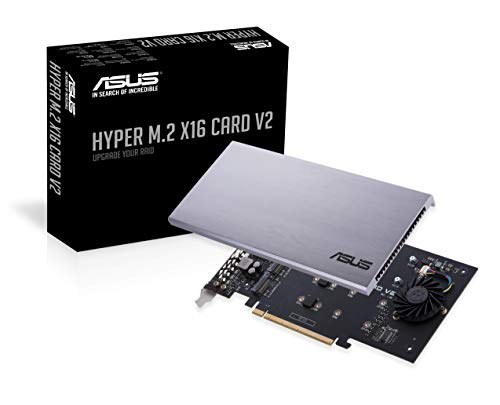
This expansion card adds four NVMe M.2 drives, enabling RAID configurations and high-throughput storage expansions in systems supporting Intel VROC and AMD Ryzen Threadripper platforms. It features a two-phase power solution capable of delivering up to 14W, which helps stabilize power delivery to multiple NVMe drives. The card’s four M.2 slots accept common sizes (2230–2280) and are designed to deliver up to 128 Gbps aggregate bandwidth in supported configurations. It’s an excellent pick for enthusiasts building NAS-like storage or media editing workstations requiring multiple NVMe volumes.
Key considerations: You’ll need a motherboard with enough PCIe lanes and, for RAID-like setups, compatible software/firmware support. The card’s power design and thermal management are important if you populate all four drives under sustained load. Compatibility with older platforms may vary, so confirm your BIOS and PCIe bifurcation support before purchasing.
SABRENT PCIe 3.0 x4 Add-In Card with 10GbE + 3 M.2 Slots (EC-PM2L)
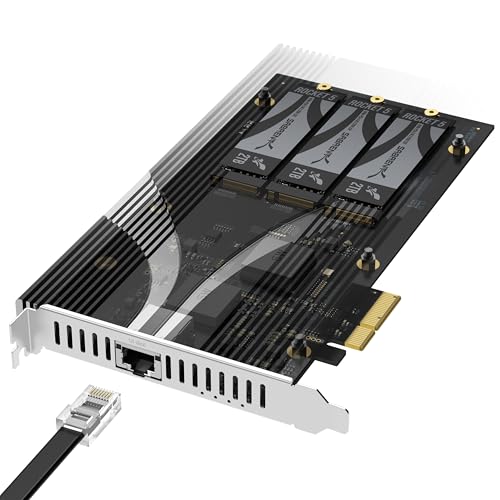
This all-in-one card delivers three M.2 NVMe slots plus a built-in 10GbE network port on a single PCIe 3.0 x4 card. It is particularly well-suited for NAS setups, homelabs, or compact builds that require both expanded fast storage and high-speed networking. The design avoids the need for bifurcation, allowing installation in any physical x4 or larger slot without specialized BIOS configurations. The wide compatibility with 2230–2280 NVMe drives enhances versatility for various workloads and upgrade paths.
Key considerations: The card consolidates storage and networking, which is ideal for compact servers, but the integrated 10GbE may introduce network configuration requirements. Ensure your motherboard supports the card in the desired slot and confirm that the NAS-like workloads align with the available drive capacities for continued performance gains.
RIITOP Quad NVMe PCIe Adapter (4 x NVMe)

The RIITOP quad NVMe adapter is designed to turn a single PCIe x16 slot into four NVMe M.2 drives, enabling parallel storage volumes for high-throughput workloads. The card includes a heatsink to manage temperatures across all four drives and is compatible with M.2 PCIe NVMe SSDs sized 80x22mm, 60x22mm, and 42x22mm. It requires a motherboard that supports PCIe x16 bifurcation (often labeled in BIOS settings as PCIe x16 > x4 x4 x4 x4). This makes it a strong choice for advanced workstation builds, content creation rigs, and server-class environments where multiple fast NVMe volumes are beneficial.
Key considerations: Achieving full speed across all four drives depends on the motherboard’s bifurcation support and the CPU’s PCIe lanes. Proper cooling is essential to avoid throttling during sustained workloads. Verify that your system’s firmware can configure the required bifurcation topology and that the chassis allows adequate airflow for the heatsinked layout.
GLOTRENDS PA09-HS M.2 NVMe to PCIe 4.0 X4 Adapter
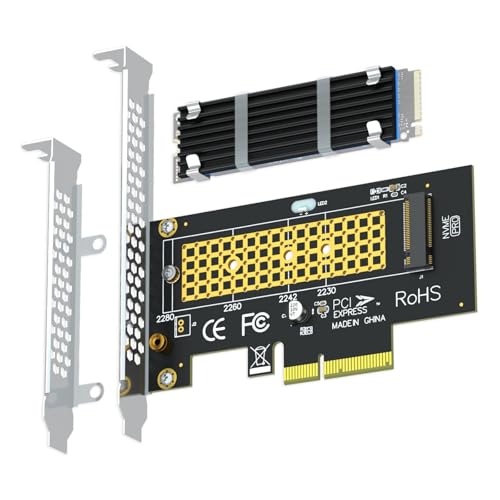
This adapter turns a PCIe X4/X8/X16 slot into an M.2 Key M NVMe installation point. It includes a heatsink to improve thermal performance and supports PCIe 4.0/3.0 NVMe SSDs across 2230–2280 sizes. It is designed for users who need a straightforward upgrade path to add a single high-speed NVMe drive in systems lacking an M.2 slot, or when expanding storage in a PCIe-based server, workstation, or enthusiast build. Note that PCIe 4.0 x4 performance is contingent on system-level support, including motherboard slot, CPU, and NVMe drive capabilities.
Key considerations: The PA09-HS focuses on one NVMe drive with robust thermal management. If your goal is to maximize concurrent NVMe throughput, you may need a multi-slot solution or a motherboard that supports PCIe bifurcation. It’s a practical option for users upgrading legacy systems or creating dedicated NVMe drives for scratch disks, caches, or OS installations.
ASUS Hyper M.2 X16 PCIe 4.0 X4 Expansion Card
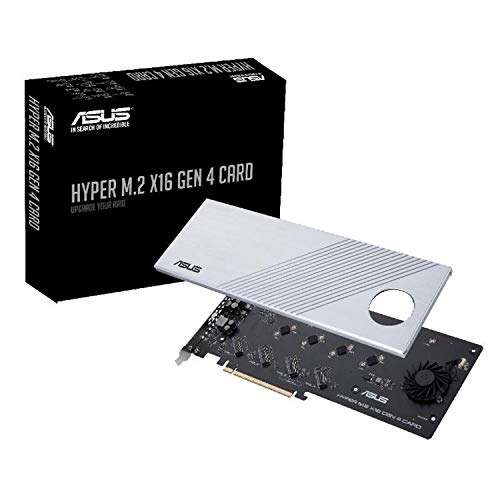
This ASUS card enables four NVMe M.2 drives via a PCIe 4.0 x16 interface, delivering high aggregate bandwidth for demanding storage configurations, including high-speed RAID setups or large-scale NAS deployments. The board is built with server-grade materials to optimize power delivery and thermal performance, featuring generous heatsinking and a dedicated fan option for sustained workloads. It’s compatible with 2242/2260/2280/22110 drives and supports up to 256 Gbps total bandwidth across all connections in optimal configurations. It is ideal for users aiming to maximize throughput in multi-drive NVMe environments.
Key considerations: The card requires a motherboard and CPU that fully support PCIe 4.0 x16 bifurcation and substantial PCIe lane allocation. Sufficient cooling and chassis clearance are essential due to the dual heatsink design and potential airflow implications. This card is particularly well-suited for workstation builds and high-end NAS systems where raw NVMe bandwidth is a priority.
ASUS Hyper M.2 x16 Gen5 Card (PCIe 5.0/4.0)

The ASUS Hyper M.2 x16 Gen5 card is designed for high-end configurations, supporting up to four NVMe M.2 drives with PCIe 5.0/4.0 performance. It features a 6-pin PCIe power connector and a two-phase power solution capable of delivering up to 14 watts, ensuring stable operation for next-generation NVMe drives. A large heatsink, thermal pads, and an active cooling option help reduce temperatures and minimize throttling during sustained data transfers. The design targets enthusiasts and professionals who need top-tier multi-drive NVMe performance for tasks like 4-drive RAID arrays, video editing, and large-scale data processing.
Key considerations: Ensure your motherboard and BIOS support PCIe bifurcation for multiple NVMe channels and verify that the system’s power supply and chassis provide adequate cooling for the added heat. The Gen5 support is most beneficial with compatible Gen5 NVMe drives and a platform that can sustain the higher bandwidth demands.
Buying Guide: Key Purchase Considerations
- PCIe Version and Lane Availability: Gen4/Gen5 support yields higher throughput, but real-world gains depend on motherboard lane allocation and bifurcation support. Confirm BIOS options and CPU lane counts before selecting a card.
- Number of nvme Drives: If you need multiple NVMe drives, choose cards designed for multi-slot configurations (2–4 drives) and verify cooling solutions to prevent throttling during sustained loads.
- Thermal Management: Heatsinks and active cooling are critical for maintaining peak performance across multiple drives. Ensure adequate case airflow and consider additional fans if required.
- Form Factor Compatibility: Check PCIe slot type (x4/x8/x16) on your motherboard and clearance within the case. Some cards require bifurcation-enabled slots or specific motherboard generations.
- RAID and VROC Support: If you plan RAID or RAID-like setups, verify compatibility with your motherboard and driver/firmware support (e.g., VROC readiness) and any necessary licenses or software.
- Drive Form Factor Support: Most adapters support 2230–2280 NVMe M.2 drives; confirm the drive sizes you intend to install align with the card’s support.
- Power Requirements: High-end multi-drive cards may draw more power. Check whether an external power connection is required or recommended by the card manufacturer.
- Use Case Alignment: For NAS-like setups, prioritize cards with integrated network options or connectors if needed. For pure storage expansion, multi-slot NVMe adapters are typically best.
In summary, the best choice depends on your motherboard capabilities, desired number of NVMe drives, and the workload you intend to run. For single-drive upgrades in older systems, a high-quality PCIe 4.0/3.0 adapter with a solid heatsink may suffice. For advanced workstations and servers that demand parallel NVMe performance, a quad-slot card with bifurcation support and robust cooling is often the more effective solution.