Finding a reliable lockable USB charging station helps keep devices secure while ensuring they stay powered. This guide reviews five top options, highlighting capacity, security features, and suitability for schools, libraries, and offices. Each product section includes a quick overview and key specs drawn from buyer-relevant features.
| Product | Brand | Device Capacity | Locking Security | Port Type |
|---|---|---|---|---|
| Belkin Secure and Charge | Belkin | Up to 10 devices | Lockable / surge protected | AC outlets for adapters |
| Plugsharge 8-Device | Plugsharge | Up to 8 devices | Lock & key | AC adapters / dividers |
| Learniture Structure Series | Learniture | 12 devices | One-point lock | 12-outlet strip with dividers |
| Copernicus Premium Tech Tub2 | Copernicus Educational Products | Up to 10 devices | Lockable doors | USB-A port hub |
| DNYSYSJ 12-Slot Cabinet | DNYSYSJ | 12 devices | Dual unlock methods | USB charging and cables |
Belkin Secure And Charge Classroom Charging Station

The Belkin Secure and Charge station is designed for classrooms needing organized device charging for up to 10 items. Each device slot accommodates a wide range of tablets and laptops, with labeling space to help students identify assignments and devices quickly. Built-in surge protection guards eleven outlets against voltage spikes and provides stable power delivery across devices. This unit emphasizes compact footprint while ensuring secure, simultaneous charging for a full class set of devices.
Key features
- Charges up to 10 devices at once with individual cables or adapters
- Wide-angle slots with label space for quick device identification
- 10 AC outlets with automatic surge protection
Plugsharge 8-Device Tablet Charging Station

This lockable steel cabinet holds and charges up to eight devices, with adjustable divider slots to fit iPads, Chromebooks, laptops, and more. It fits devices up to 14″ screens, making it versatile for classrooms and offices. Security is provided by a two-key system and a secure lock, ideal for environments requiring controlled access. The compact design supports mobile deployment in hallways or shared spaces.
Key features
- 8-device charging with adjustable dividers
- Supports devices up to 14″ screens
- Lock and key security with two keys
Learniture Structure Series 12-Device Charging Station

The Learniture Structure Series is a wall-mountable lockable charging cabinet designed for 12 devices. Its interior steel dividers help fit Chromebooks, laptops, and tablets securely, while a rotated outlet orientation ensures all outlets are utilized efficiently. Cable management clips prevent tangling, and a one-point locking system provides secure storage, with grommet holes for convenient cable routing while devices stay locked.
Key features
- Large storage area with interior dividers for multiple devices
- 12-outlet strip with efficient outlet orientation
- One-point lock and cable management for organized storage
DNYSYSJ 12-Slot Cabinet With Lockable USB Charging

This cabinet provides 12 slots with lockable access and dual unlocking methods. It includes 3-in-1 cables to simplify device connections and minimize clutter. The design supports efficient organization for classrooms, clinics, and facilities requiring secure, centralized charging for multiple devices.
Copernicus Premium Tech Tub2 10-Device USB Charging Station
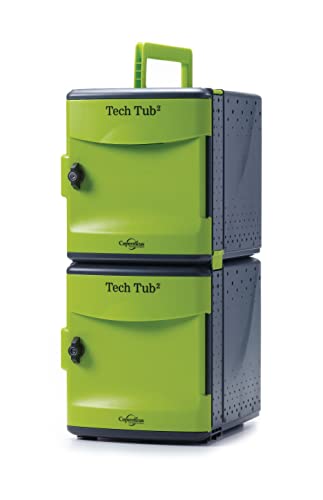
The Copernicus Tech Tub2 uses a built-in 10-port USB-A hub to directly charge up to ten devices. It’s designed for safe storage with lockable doors, ensuring devices are protected when not in use. The setup targets classrooms and schools that require compact, organized, and secure charging for tablets, Chromebooks, and other USB-powered devices.
Buying Guide: Key Considerations For Lockable USB Charging Stations
- Device capacity and layout: Assess how many devices will charge simultaneously and whether the cabinet design uses shelves, tubs, or fixed dividers to minimize cable clutter.
- Security features: Look for lockable doors, two-key systems, and tamper-resistant construction to deter theft in shared environments.
- Power delivery and outlets: Check total wattage, presence of USB-C and USB-A ports, and the arrangement of outlets to support a mix of devices and chargers.
- Cable management: Favor solutions with integrated cable clips, grommets, or removable dividers to prevent tangling and facilitate efficient charging.
- Access and setup: Consider whether devices should be accessible to users during charging, or if storage occurs behind locked doors. Wall-mount options save floor space for classrooms.
- Durability and materials: Steel construction with reinforced hinges and powder-coated finishes perform better in high-traffic environments like schools and libraries.
- Security vs. convenience: Balance the need for rapid access against theft prevention. Some units offer dual unlock methods for flexible use in busy spaces.
- Portability: For shared facilities, mobile charging carts with wheels can improve deployment efficiency and reconfiguration speed.
- Compatibility: Ensure compatibility with existing devices (tablets, Chromebooks, iPads, laptops) and their charging cables or adapters.
- Maintenance: Consider ease of cleaning, venting for heat dissipation, and serviceability when evaluating long-term use.