When moving from single-camera broadcasts to multi-camera live streams, a reliable live video production switcher is essential. This guide highlights top Amazon-listed switchers that help you manage inputs, transitions, and on-the-fly graphics with ease. Explore 5 diverse options that fit classrooms, small studios, gaming setups, and enterprise presentations. Each entry includes core features and ideal use cases to help you compare performance, compatibility, and control needs.
Summary of Selected Products
- Blackmagic Design ATEM Mini Pro HDMI Live Stream Switcher
- Osee GoStream Deck HDMI Pro Live Streaming Multi Camera Video Mixer Switcher
- RGBlink Mini V3 Video Switcher
- Osee GoStream Duet Multiple Camera SDI and HDMI Live Stream Video Mixer Switcher
- FEELWORLD LIVEPRO L1 V1 Multi Camera Video Mixer Switcher
Blackmagic Design ATEM Mini Pro HDMI Live Stream Switcher

Blackmagic Design’s ATEM Mini Pro offers a feature-rich configuration ideal for education, corporate presentations, and live events. It includes a 4-camera multiview, a suite of transitions (cut, mix, dip, wipe, and DVE), and upstream/downstream keyers for graphics and overlays. A built-in 6-input, 2-channel audio mixer supports professional audio control, while Ethernet connectivity enables streaming. With multiple HDMI inputs and both embedded audio and analog ports, this device supports compact, high-quality multi-camera productions for live streaming to the internet or broadcast environments.
Osee GoStream Deck HDMI Pro Live Streaming Multi Camera Video Mixer Switcher

The Osee GoStream Deck provides a rich set of connections and control options suited for multi-source productions. It features 4 HDMI inputs and 2 HDMI outputs, plus Type-C ports for webcam, SSD, and PC connectivity. An Ethernet port supports streaming and NDI HX input, while dual audio inputs and a headphone output facilitate monitoring and live sound. The device supports on-device recording to SD cards or USB SSD, and offers professional audio effects with EQ and limiter. It is compatible with multi-platform streaming setups, including RTMP servers and software like OBS or vMix, and supports both landscape and portrait streaming to adapt to different viewing formats.
RGBlink Mini V3 Video Switcher
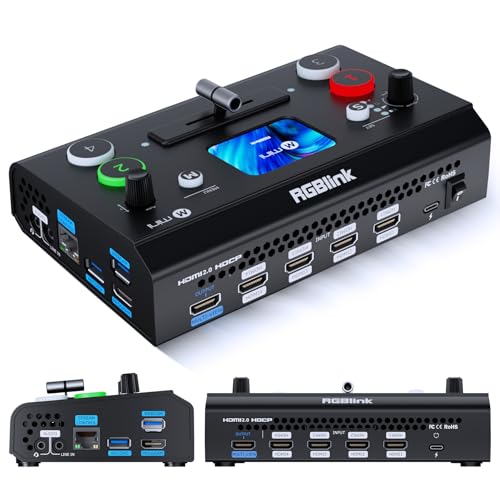
The RGBlink Mini V3 emphasizes a balance of portability and capability with TAO Cloud activation for premium features, including PTZ control and logo overlays. It includes 4 HDMI inputs and dual HDMI outputs, plus a 2.1″ touchscreen and professional T-bar control. This model is designed for multi-cam live streaming in compact setups and offers flexible feature activation through cloud-based plans, making it suitable for small studios, classroom use, and on-the-go productions that require quick, reliable switching and monitoring.
Osee GoStream Duet Multiple Camera SDI and HDMI Live Stream Video Mixer Switcher

The GoStream Duet expands inputs and control with support for both SDI and HDMI sources, plus USB-C, NDI HX, and SD/SSD playback options. It provides multiple control methods via built-in GUI, PC software, and Bitfocus Companion, making it flexible for different operator setups. Key features include multisource transitions (Luma, Chroma, Pattern Key, PIP, DSK), and a blend of mix, dip, wipe, and T-bar transitions to suit dynamic live production environments. It is well-suited for multi-camera event productions, broadcasts, and online streams that require robust input versatility.
FEELWORLD LIVEPRO L1 V1 Multi Camera Video Mixer Switcher

The FEELWORLD L1 V1 focuses on a compact, user-friendly live production workflow. It offers 4 HDMI inputs with 1080p support and a USB 3.0 output for direct computer streaming. The device emphasizes single-operator usability, with built-in effects, quick switching, and a stand-alone form factor suitable for education, field reporting, or small studios. Its straightforward layout makes it a practical choice for solo operators who need reliable real-time switching and simple streaming integration without complex setup.
Buying Guide: Key Purchase Considerations For Live Video Switchers
- Input and output options: Check the number and type of inputs (HDMI, SDI, USB) and outputs you need for cameras, displays, and recorders. Consider whether you need built-in multiview, downstream keys for overlays, or PTZ control for remote cameras.
- Video and audio quality: Look for devices with 1080p or 4K support, 4:2:2 color, and embedded audio mixing. Evaluate whether you need external audio boards or onboard mixing capabilities.
- Transition effects and keys: Assess the availability of transitions (cut, mix, dip, wipe, DVE) and keying options (luma, chroma, pattern) for overlays and graphics.
- Portability and setup: For field or classroom use, prioritize compact form factors, built-in screens, and easy tripod or rack mounting options.
- Software and ecosystem: Some switchers offer cloud activation, software control, PTZ control via IP, or compatibility with popular streaming software (OBS, vMix). Consider future expansion and remote control needs.
- Storage and media: If on-device recording or playback is important, verify SD card/SSD support and file formats, along with USB streaming compatibility.
- Network capabilities: Ethernet streaming, RTMP support, and ND I HX input/outputs enable reliable live distribution. Ensure your network can handle the expected bandwidth.
- Compatibility with existing equipment: Ensure your cameras, displays, and audio gear work seamlessly with your chosen switcher and any required adapters.
- Budget and scalability: Prices vary widely. Consider long-term value, feature need versus cost, and whether a scalable platform can grow with your production goals.
- User experience and support: Look for intuitive menus, helpful manuals, and responsive customer support or user communities to reduce setup time and troubleshooting.