Finding a reliable lightning to video cable helps you mirror iPhone or iPad screens to TVs, projectors, or monitors with ease. This guide highlights top picks that support up to 1080p HD, are plug-and-play, and work across a range of Apple devices. Each product is evaluated for compatibility, performance, and user experience to help you choose the right adapter for meetings, presentations, or home entertainment. Below is a quick summary table of the showcased options.
| Product | Brand | Key Benefit |
|---|---|---|
| Apple MFi Certified Lightning to HDMI Digital AV Adapter | Kinhaly | 1080p mirroring with charging port |
| lulaven Lightning to HDMI Adapter | lulaven | 1080p HD, compact, 6.6ft |
| lulaven 2-in-1 Lightning & Type C to HDMI Cable | lulaven | Dual interface, single cable for multiple devices |
| [Apple MFi Certified] Lightning to HDMI Adapter | IDiSONCABLE | Stable output, lag-free, 1080p |
| Lightning to HDMI Adapter for iPhone | Microwoo | No power needed, 1080p mirroring |
Kinhaly Lightning to HDMI Digital AV Adapter

This MFi-certified adapter mirrors iPhone or iPad content on HDMI displays up to 1080p without delay. It supports apps, websites, and presentations, and includes a charging port for extended use. The plug-and-play design requires no drivers or Wi-Fi; simply connect, trust the device, and mirror. It lists broad compatibility across iPhone models—from older generations to the latest, plus iPad variations. Ideal for home streaming, classroom setups, and office demos that require reliable, high-definition output.
lulaven Lightning to HDMI Adapter

lulaven’s HDMI adapter delivers 1080p HD video and audio from iPhone to TV or projector, with a 6.6-foot cord for added reach. The product notes copyright-related limitations for certain apps and devices, and it excludes some newer iPhone and iPad models. It emphasizes a straightforward, cable-only connection that doesn’t require extra HDMI cables or software, making it a convenient choice for quick screen mirroring in living rooms or classrooms.
lulaven 2-in-1 Lightning & Type C to HDMI Cable
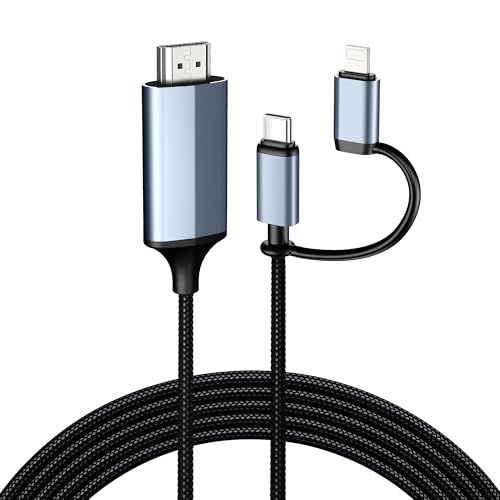
This 2-in-1 cable supports Lightning devices (iPhone 14/13/12 etc.) and Type-C devices, enabling HDMI connections through a single cord. It aims to simplify setups where multiple Apple devices exist in the same space, reducing clutter. The cable promises seamless plug-and-play use with up to 1080p HD output and audio transmission, suitable for meetings, home entertainment, or educational settings where diverse devices are in use.
[Apple MFi Certified] IDiSONCABLE Lightning to HDMI Adapter

The IDiSONCABLE adapter features an MFi certified chip for stable video output and 1080p display with iPhone, iPad, and iPod. It emphasizes a lag-free experience for presentations, gaming, streaming, and conferencing. It is designed as a plug-and-play solution with no extra software or power supply required, enabling direct connection to HDMI-equipped TVs, displays, or projectors. The description highlights broad compatibility across multiple iOS devices and generations.
Microwoo Lightning to HDMI Adapter

This adapter provides full 1080p HD mirroring from iPhone or iPad to HDMI displays. It is designed to be plug-and-play with no need for power supply or Wi-Fi, offering a simple, portable solution for viewing content on larger screens. The setup is intended to be straightforward for quick demonstrations, streaming, and on-the-go presentations in both home and business environments.
Buying Guide
- Compatibility: Verify that the adapter supports your specific iPhone or iPad model, iOS version, and whether you need Lightning-only or dual Lightning/Type-C support. MFi certification is a strong indicator of broad compatibility and stable output.
- Resolution and Audio: Look for 1080p HD video with synchronized audio. Some adapters specify 1080p only, while others may vary by device and content restrictions. Consider whether you need 4K in the future and whether the adapter handles audio passthrough.
- Power Requirements: Some adapters require no external power, while others include a USB-C or Lightning charging port to keep the source device charged during use. If you plan long sessions, a charging port can be important.
- Cable Length: A longer cable (around 6.6 feet) provides flexibility for seating arrangements and layouts in classrooms or living rooms, but may affect portability.
- DRM and App Restrictions: Be aware that some apps (Netflix, Disney+, etc.) may block output due to digital rights management. Check product notes for any streaming limitations before purchase.
- Build and Support: Durable construction and clear return/warranty policies help if you encounter compatibility issues after iOS updates. Some manufacturers offer firmware upgrades to adapt to new iOS versions.
- Ease of Use: Plug-and-play operation with minimal setup is preferred for quick presentations. Apps or network requirements can complicate connections, so prioritize simple, driver-free options when possible.
- Multi-Device Scenarios: If you have multiple Apple devices (iPhone, iPad, iPod) or mixed devices (Lightning and Type-C), consider a 2-in-1 solution to reduce cable clutter and simplify switching.