Discover top-rated lightning-to-micro-SD readers that expand storage, simplify transfers, and work plug-and-play with Apple devices. This guide reviews five highly compatible options, highlighting performance, compatibility, and ease of use to help photographers, travelers, and everyday users move photos and videos quickly. Each product supports SD, Micro SD, or TF cards and requires no app, making it simple to access files directly on iPhone or iPad.
The following table summarizes the selected products, focusing on key compatibility and features to help you compare quickly.
| Product | Brand | Card Types | Connector Type | Notes |
|---|---|---|---|---|
| SZHAIYIJIN SD Card Reader for iPhone | SZHAIYIJIN | SD, TF, Micro SD | Lightning to USB OTG | No app required; supports iPhone/iPad with dual card slots |
| Apple MFi DESOFICON Lightning to Micro SD Reader | DESOFICON | SD, Micro SD | Lightning | ExFAT & FAT32 support; two-way transfer |
| Micro SD Card Reader for iPhone DESOFICON | DESOFICON | Micro SD, SD, TF | Lightning | iOS 13+; high-speed data transfer |
| SD Card Reader for iPhone iPad Dual Slot | Fubiaofei | SD, Micro SD | Lightning / USB-C | 2-in-1, up to 2 TB |
| USB C SD Card Reader with Lightning Dual Port | SUNTRSI | SD, Micro SD | Lightning / USB-C | Plug and play; no apps |
SZHAIYIJIN SD Card Reader for iPhone
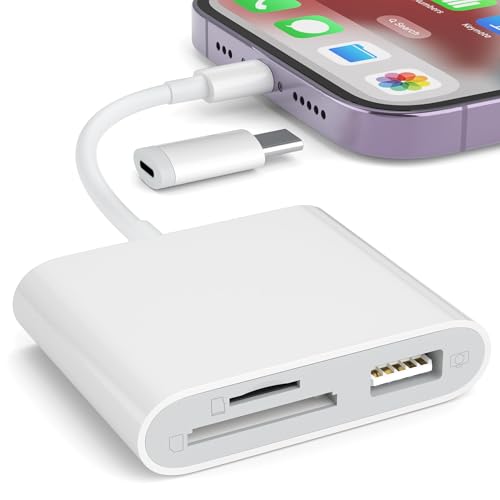
This reader supports SD and TF cards with a Micro SD adapter, designed as a plug-and-play solution for iPhone and iPad. It features a Lightning to USB OTG interface, enabling direct import of photos and videos to the iOS Photos app without any app installation. It allows connection to several devices and peripherals, as long as the current draw remains within 500 mA. It does not support Wi-Fi SD cards or printers.
Apple MFi DESOFICON Lightning to Micro SD Card Reader

This Apple MFi-certified reader supports SD and Micro SD cards and works with iPhone and iPad. It enables two-way transfer between the SD card and the iOS device, and supports exFAT and FAT32 formats. It is compatible with multiple iPhone models and iPad devices; it also notes compatibility with RAW photos and 4K video formats. No driver is required, and the device emphasizes reliable data transfers for media and files.
DESOFICON Micro SD Card Reader for iPhone

This Micro SD card reader attaches directly to iPhone or iPad, enabling access to Micro SD, SD, and TF cards. It supports iOS 13 and later and formats exFAT and FAT32. It emphasizes a simple plug-and-play experience with high-speed data transfer and broad device compatibility, making it suitable for photographers and casual users who want extra storage on the go.
Fubiaofei SD Card Reader for iPhone iPad

This 2-in-1 reader offers both Lightning and USB-C connectors, supporting SD and Micro SD cards. It targets devices across iPhone and iPad lines, including iOS 13+. The design aims for quick data transfers without needing apps, suitable for travelers and professionals who need fast, direct access to media on iOS devices.
SUNTRSI USB C SD Card Reader

Offering both USB-C and Lightning interfaces, this reader supports SD and Micro SD cards with USB 3.0 data transfer speeds. It emphasizes plug-and-play use without apps and can read from multiple card types while connecting to a range of iPhone and iPad models. The dual-port design aims to simplify workflows for photographers and content creators who use Apple devices.
Luonanava SD Card Reader for iPhone

This reader provides USB-C and Lightning dual connectors to support a broad range of devices, including iPhone, iPad, and Macs. It promises a simple plug-and-play experience, with no apps or drivers required. It targets users who want two-way transfer between SD/microSD cards and iOS devices, with a focus on photographers and content creators who need immediate access to files for editing or sharing.
Buying Guide
Key purchase considerations when selecting a lightning-to-micro-SD reader for Apple devices:
- Compatibility: Verify iPhone/iPad compatibility and iOS version support (many require iOS 13+ for full functionality).
- Card support: Check whether the device supports SD, SDHC/SDXC, Micro SD/TF, and the total cards supported simultaneously.
- Connectivity: Decide between Lightning-only, USB-C, or dual-port options to match your devices (iPhone, iPad, MacBook, etc.).
- Power and performance: Look for devices that deliver consistent data transfer speeds and do not exceed device power limits.
- App dependency: Most top options are plug-and-play with no app required; ensure this matches your workflow.
- File formats: Confirm support for RAW, JPEG, and 4K video formats if you work with professional media.
- Build and durability: Aluminum or robust plastic housings improve durability for on-the-go use.
- Two-way transfer: Some readers offer two-way transfer between device and card, which is valuable for backup and sharing.
Buyer considerations also include how you plan to use the device—whether for field photography, travel, or everyday file backup. Compare the number of devices supported, the presence of USB-A or USB-C ports for additional peripherals, and whether the adapter remains compatible after firmware or iOS updates. For professional workflows, prioritize high data-transfer speeds and reliable FAT32/exFAT support to ensure raw files and videos remain intact during transfers.