Explore top light up charging pads that merge wireless charging with RGB illumination for a stylish, organized workspace. Each pick below offers built‑in charging, bright LEDs, and a spacious surface for keyboards, mice, and accessories. The following five models were selected for compatibility, size, and lighting versatility to suit gaming setups and productivity desks alike.
| Product | Brand | Key Feature |
|---|---|---|
| Schkner RGB Gaming Mouse Pad with Wireless Charging | Schkner | 15W wireless charging, 800x300x4mm, 10 light modes |
| Omio Glowing Magic Array Wireless Charger Ultra Slim | Omio | 10W wireless charging, ultra-thin, Qi compatible |
| XXL Mouse Pad with Phone Holder | Miroddi | 15W charging, 31.49×15.75 inches, 11 lighting modes |
| LifeTrim Wireless Charger LED Mousepad | LifeTrim | 35.5×12 inches, 10 lighting modes, 4mm thick |
| GIM Wireless Charging RGB Gaming Mouse Pad | GIM | 15W charging, 800x300x4MM, 10 lighting modes |
These options emphasize wireless charging efficiency, LED customization, and large surfaces for keyboards, mice, and accessories. They are suitable for PC and Mac setups, with varying surface sizes to fit different desk environments.
Schkner RGB Gaming Mouse Pad With Wireless Charging

The Schkner pad combines a large desk mat with built-in 15W wireless charging. It supports compatible devices including latest iPhone and Samsung models, as well as AirPods. Ten RGB lighting modes—three dynamic and seven static—offer customizable ambience. A memory function recalls the last light setting, and the oversized 800x300x4 mm surface accommodates keyboards, mice, and small accessories for clutter-free workspaces.
Omio Glowing Magic Array Wireless Charger
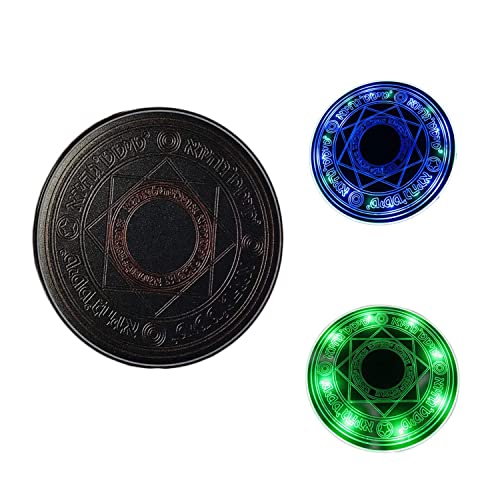
Omio’s ultra-slim wireless charging pad emphasizes a sleek, durable build. It offers universal Qi compatibility and a modern ABS finish. While charging speed exceeds traditional wired charging, it protects devices from overheating and overvoltage. The design is minimal, focusing on rapid top-panel charging with a slim, unobtrusive profile that suits desks with limited space.
XXL Mouse Pad With Phone Holder (Miroddi)

This oversized desk mat pairs a 31.49×15.75 inch surface with built-in 15W wireless charging and a dedicated phone holder. It offers 11 lighting modes (memory function included) to tailor lighting for gaming or productivity. The large footprint covers a full keyboard, mouse, and other desk items, keeping surfaces protected and organized while delivering convenient charging.
LifeTrim Wireless Charger LED Mousepad

LifeTrim offers a 35.5 x 12 inch RGB desk mat with 10 lighting modes and 4mm thickness. Its wireless charging capability supports Qi-enabled devices so you can charge while you work or game. The large surface is suitable for full-size keyboards and mice, and the LED modes provide dynamic or static color options to suit mood or game type without adding clutter.
GIM Wireless Charging RGB Gaming Mouse Pad

GIM combines 15W wireless charging with a large 800x300x4mm surface and 10 lighting modes (7 static, 3 dynamic). It’s designed for gaming and productivity on MacBooks and PCs alike, featuring a non-slip base for stable use. The memory function preserves the last lighting setting, making it easy to resume a preferred ambience during long sessions.
Buying Guide
- Size and desk fit: Measure your desk space to ensure the mat can accommodate a full keyboard, mouse, and any other peripherals without crowding.
- Charging compatibility: Confirm the pad supports the devices you own (iPhone, Samsung, AirPods) and check for required charging standards and adapters.
- Power requirements: Some pads require a higher-wattage wall adapter for full 15W charging; verify what is included or what you’ll need to supply.
- Lighting modes: Decide how many color options you want and whether you prefer static, dynamic, or memory-enabled modes to match your setup.
- Surface material: Look for a smooth, reinforced surface with a non-slip base to keep the mat in place during intense gaming or typing.
- Durability and water resistance: A waterproof or spill-resistant surface helps protect the desk and pad from liquids and wear over time.
- Multi-function use: If you value cable clutter reduction, ensure the pad’s charging area aligns with your device’s charging spot and won’t obstruct mouse movement.
- Aesthetics and integration: Choose lighting colors and pad finishes that complement your monitor, keyboard, and overall room design.
The reviewed options emphasize a common goal: combine wireless charging with vibrant illumination on a spacious desk mat. When selecting, balance surface area, charging speed, brightness levels, and compatibility with your devices to optimize both ergonomics and look. For mixed work and gaming environments, a pad offering a stable surface with multiple lighting modes provides the most flexibility for daily use and extended sessions.