For pilots who left-hand the throttle and want precise control with the joystick in the opposite hand, a well‑designed HOTAS setup can improve immersion and accuracy. This guide reviews five top left‑hand friendly or ambidextrous flight control kits that suit a variety of simulators, from Microsoft Flight Simulator to combat flight sims. Each product includes key features, compatibility notes, and practical considerations to help you choose the best fit for your desk and play style.
Summary of chosen products:
| Product | Brand | Key Features | Platform |
|---|---|---|---|
| Logitech G X56 HOTAS | Logitech | 4 spring options, 189 programmable controls, RGB lighting | PC |
| Thrustmaster T-Flight HOTAS One | Thrustmaster | Detachable throttle, ergonomic stick, adjustable resistance | PC, Xbox |
| Turtle Beach VelocityOne Flightdeck | Turtle Beach | Touch display, OLED HUD, 139 programmable controls | PC |
| PXN 2113 Flight Joystick | PXN | Vibration function, 12 programmable buttons, solid grip | PC |
| Thrustmaster Sol-R4 HOTAS | Thrustmaster | 58 action buttons, hall-effect axes | PC |
Logitech G X56 HOTAS Flight Controller
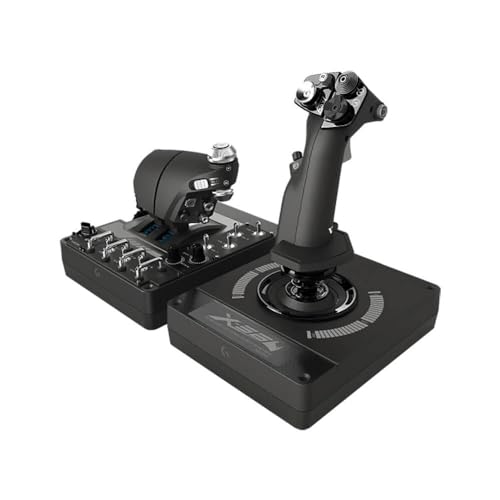
The Logitech G X56 HOTAS combines a dual‑control layout with multiple spring options to tailor force feedback and stick resistance. It supports a broad range of space and flight simulators and offers extensive programmable surfaces to map precise control for roll, pitch, yaw, and weapon control. With RGB backlighting, the device also integrates into RGB‑driven gaming rigs for visual cohesion in low light setups. System requirements span Windows 7 through Windows 11 with USB 2.0 connectivity, ensuring broad compatibility for most PC configurations.
Thrustmaster T-Flight Hotas One

Thrustmaster’s T‑Flight Hotas One offers a realistic flight control experience with a detachable throttle and an ergonomic stick. The adjustable resistance and responsive trigger enable precise takeoffs, landings, and combat maneuvers. The modular design supports flexible setups, letting you place the throttle and stick in nearly any arrangement. It is compatible with PC and Xbox Series X|S, providing a versatile option for gamers who want a single HOTAS that adapts to multiple platforms and environments.
Turtle Beach VelocityOne Flightdeck
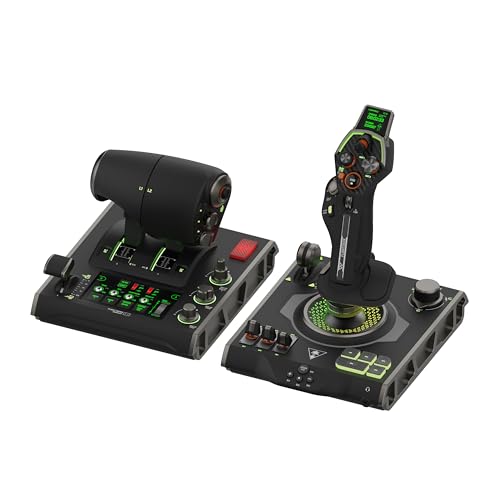
The VelocityOne Flightdeck is a high‑end HOTAS system featuring a flight touch display and an OLED head‑up display for real‑time information. Its contactless hall‑effect controls are designed for precision and durability, making it suitable for long sessions. This platform supports Windows 10 and 11, with a comprehensive set of programmable controls (139) that can be mapped to suit complex flight profiles, from dogfights to long‑range navigations. It emphasizes tactile feedback and sophisticated on‑device display to reduce the need to glance away from the cockpit view.
PXN 2113 Flight Joystick
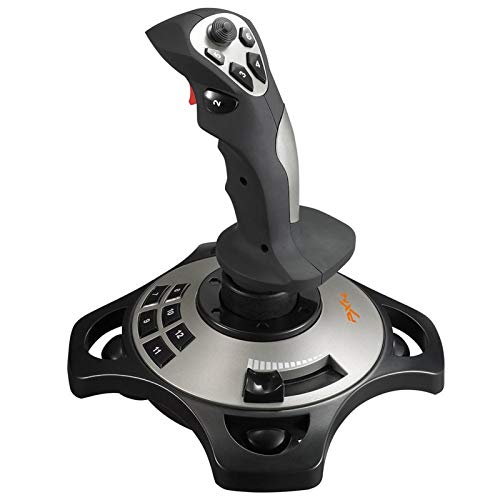
PXN’s 2113 model combines a solid grip with a robust vibration function and a set of 12 programmable buttons. The joystick is aimed at PC users, offering enhanced feedback and a range of compatibility with popular flight simulators. It emphasizes an ergonomic single‑hand control experience with stable suction feet for firm placement, making it a good option for desks with smooth surfaces where you want reliable control without a full cockpit setup.
Thrustmaster Sol-R4 HOTAS

The Sol‑R4 HOTAS delivers a compact yet feature‑rich setup with a joystick and removable throttle, plus a 58‑button action suite. Its Hall Effect axis technology provides high precision across X, Y, and Z axes, supporting longer life and smoother input for extended simulations. It targets PC use and emphasizes a smooth blend of performance and durability for serious sim enthusiasts who want a stable, high‑fidelity control system that won’t overwhelm a smaller desk space.
Buying Guide: Key Considerations For Left Handed Or Ambidextrous Flight Controls
- Grip and hand orientation: Look for sticks designed for comfortable one‑hand operation and consider ambidextrous grips or detachable throttles that can be rearranged to suit a left‑handed setup.
- Resistance and feedback: Adjustable stick resistance helps tailor input for precise maneuvers. Hal‑effect sensors (Hall Effect) offer durability and consistent feedback over time.
- Programmable controls: A wide array of programmable buttons and switches allows mapping of complex flight profiles, weapon systems, and afterburners in heavy sims.
- Platform compatibility: Ensure the device supports your PC’s operating system and, if needed, whether it also works with consoles (some models are cross‑platform).
- Layout flexibility: Detachable throttles, additional axis control, and swap‑in/ swap‑out configurations can help adapt to different cockpit setups or desk spaces.
- Software ecosystem: Manufacturer software for key binding, lighting, and profile management can significantly impact usability and customization.
- Desk space and stability: Some setups include suction feet or weight to reduce movement on smooth desktops; measure your space before purchase.
- Expansion potential: If you anticipate upgrading, choose a modular HOTAS with a crowd‑tested ecosystem and readily available replacement parts or add‑ons.
- Durability and warranty: Side‑by‑side comparisons of build quality and warranty terms help forecast long‑term reliability in intense sim sessions.
- Price/value balance: Higher‑end models offer advanced sensors and more programmable surfaces, but consider whether the added features align with your flight style and budget.
When evaluating left‑handed or ambidextrous flight controls, prioritize input precision, comfort, and an adaptable layout that keeps critical controls within easy reach. A well‑matched HOTAS can reduce fatigue during long campaigns and improve response times in both combat and civilian flight sims. Reading user reviews and watching setup videos can reveal how a particular model performs in real‑world desk configurations similar to yours.