Finding a monitor that combines crisp video conferencing, sharp display quality, and intuitive touch or webcam features can streamline work from home, classroom setups, or small offices. This guide highlights top LED monitors with built-in webcams, balancing image clarity, connectivity, and eye comfort. Each option below serves different priorities—from touch-enabled screens to ultra-wide productivity expanses—so you can pick the right fit for video calls, collaboration, and daily tasks.
| Product | Brand | Key Feature |
|---|---|---|
| Akntzcs 22″ Touchscreen Monitor with Webcam | Akntzcs | Built-in webcam, capacitive touch, Full HD |
| ASUS BE24EQK 24″ Business Monitor | ASUS | Integrated 2MP webcam, mic array, frameless IPS |
| SKitphrati 27″ Webcam Monitor | SKitphrati | 3MP webcam, 1080p, 120Hz, USB-C/HDMI/DP |
| Philips 34E1C5600HE UltraWide | Philips | UltraWide 3440×1440, built-in webcam, USB-C dock |
| Lenovo ThinkVision T27hv-30 | Lenovo | Webcam with privacy shutter, WQHD option |
Note: The following sections provide concise overviews of each model, focusing on how their webcam and display features support video calls, collaboration, and everyday tasks. Images and direct product links are included for quick reference.
Akntzcs 22″ Touchscreen With Webcam

The Akntzcs model combines a 22-inch touch-enabled display with a built-in webcam, delivering a Full HD 1920×1080 resolution for clear video calls and sharp on-screen content. The capacitive touchscreen supports intuitive interaction, which can boost productivity during meetings, brainstorming, and interactive tutorials. With HDMI and VGA ports, it offers flexible connectivity to laptops, desktops, and peripheral devices. This option prioritizes a compact footprint without sacrificing video communication capabilities.
ASUS BE24EQK 24″ Business Monitor
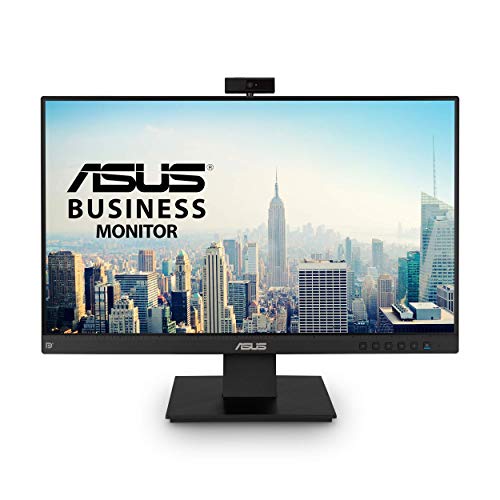
The ASUS BE24EQK pairs a frameless 24-inch Full HD IPS panel with a built-in 2MP webcam, mic array, and stereo speakers. It is designed for telecommuting and online learning, offering wide viewing angles (178°) and a bright 300 cd/m² display for comfortable long sessions. The integrated webcam and audio setup support video conferences and small-team collaborations directly from the monitor surface, reducing desk clutter and cable noise.
SKitphrati 27″ Webcam Monitor

The SKitphrati 27-inch monitor emphasizes professional video conferencing with an integrated 3MP adjustable webcam and built-in microphone array. The 1080p IPS display supports a smooth 120Hz refresh rate, ensuring fluid visuals during meetings and presentations. It provides multiple input options (HDMI, DisplayPort, VGA) plus USB 2.0, enabling flexible connections to laptops, desktops, and docking stations for a seamless hybrid workflow.
Philips 34E1C5600HE UltraWide

The Philips 34E1C5600HE delivers an expansive 34-inch UltraWide QHD display with a 21:9 aspect ratio, enabling immersive multitasking and broad workspaces. It includes a built-in Windows Hello webcam and a noise-canceling microphone, plus USB-C docking and stereo speakers. The curved VA panel with a 1500R radius optimizes color accuracy and comfort, which can reduce eye strain during extended video conferences and content review sessions. This model suits users seeking-large-screen productivity with integrated collaboration features.
Lenovo ThinkVision T27hv-30

The Lenovo ThinkVision T27hv-30 focuses on clear communication with a 27-inch display and built-in webcam. It emphasizes productivity and privacy, with a physical webcam shutter option to block the camera when not in use. The monitor’s blend of color accuracy and practical features supports professional video calls and comfortable long-term usage, making it a strong all-around option for hybrid work environments.
Buying Guide: Key Considerations For Monitors With Webcams
When selecting a monitor with a built-in webcam, consider how the webcam quality, display size, panel technology, and connectivity impact daily use. Below are several perspectives to guide a balanced decision.
- Video Quality and Camera Features: Look for webcams with at least 1080p resolution, privacy shutters, and adjustable angles. Built-in mics and echo cancellation can improve call quality, while privacy shutters help protect against accidental capturing.
- Display Size And Panel Type: Touchscreen models are convenient for interactive tasks, but may have higher costs and reflective surfaces. IPS panels provide wide viewing angles and accurate colors, while VA panels offer strong contrast for media consumption.
- Connectivity And Ports: HDMI and DisplayPort are common, with USB hubs that simplify peripheral connections. For docking setups, USB-C compatibility can streamline connections to laptops and mobile devices.
- Ergonomics and Comfort: Consider height, tilt, swivel adjustments, and VESA compatibility. Larger screens and higher refresh rates benefit video editors and collaborative sessions, while anti-glare coatings can reduce eye strain.
- Privacy And Security: Some models include physical webcam shutters or software options to disable the camera. Privacy-first features are increasingly important for hybrid work.
- Brand And Support: Choose brands with reliable build quality and long-term warranty options. Support for firmware updates can extend the life of the monitor and camera features.
- Use Case Focus: For frequent video conferencing, prioritize integrated webcam quality and microphone performance. For design work, prioritize color accuracy, screen real estate, and color gamut coverage.