Choosing the right laser printer with a scanner can streamline everyday tasks, from printing reports to digitizing documents. This guide highlights five reliable options that balance speed, connectivity, and multifunction features. Each product below includes practical strengths for small teams and home offices, helping you compare performance and capabilities at a glance.
| Product | Brand | Functionality | Key Benefit |
|---|---|---|---|
| Brother DCP-L2640DW | Brother | Printer / Scanner / Copier | Fast monochrome printing with duplex scanning and dual-band Wi‑Fi |
| HP Laserjet MFP M140w | HP | Printer / Scanner / Copy | Compact, entry-level black-and-white all-in-one with easy setup |
| Brother MFC-L3720CDW | Brother | Color Printer / Scanner / Copier | Higher-speed color output with robust connectivity |
| HP LaserJet Pro MFP 3101sdw | HP | Printer / Scanner / Copier / Duplex | Fast all-in-one with strong multitasking features |
| Canon imageCLASS MF465dw II | Canon | Printer / Scanner / Copier / Fax | High-speed monochrome with reliable wireless setup |
Brother DCP-L2640DW: Compact 3-in-1 Laser Printer

The Brother DCP-L2640DW combines printing, scanning, and copying in a compact monochrome model. It supports high-speed printing up to 36 pages per minute and scanning up to 23.6 ipm, with a 50-page auto document feeder for efficient multi-page tasks. Dual-band wireless and Ethernet offer flexible connectivity, while USB provides a direct connection to a single computer. This model is well-suited for small offices needing reliable black-and-white output with efficient scanning workflows.
HP Laserjet MFP M140w: Small-Build All-in-One

The HP LaserJet MFP M140w centers on compact size with reliable black-and-white printing, scanning, and copying for small teams. It delivers solid performance with up to 21 pages per minute and straightforward setup. Ideal for users who prioritize a compact footprint without sacrificing essential all-in-one capabilities, especially in shared spaces.
Brother MFC-L3720CDW: Color All-in-One

Bringing color to the office, the Brother MFC-L3720CDW supports printing, scanning, copying, and fax with auto duplex printing and a sizable 250-sheet tray. Dual-band wireless, Wi-Fi Direct, and USB connectivity accommodate multiple users and devices. A 50-sheet ADF enhances multi-page tasks, making it a productive choice for teams needing frequent color documents alongside robust multi-function features.
HP LaserJet Pro MFP 3101sdw: Fast Office All-in-One

The HP LaserJet Pro MFP 3101sdw delivers strong performance for small teams, combining printing, scanning, and copying with duplex capability. It supports high-speed output—up to 35 pages per minute in black and white—along with reliable wireless connectivity and an auto document feeder for efficient multi-page workflows. It is a well-rounded option for busy office environments.
Canon imageCLASS MF465dw II: Fast Monochrome 4-in-1
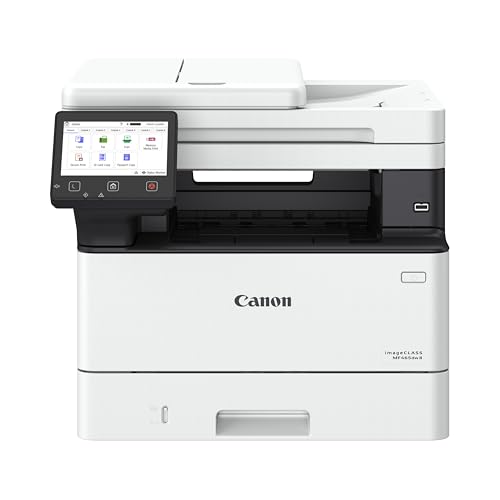
The Canon imageCLASS MF465dw II offers a robust 4-in-1 feature set—print, scan, copy, and fax—along with duplex printing and wireless setup. It’s designed for speed, delivering up to 42 pages per minute, with a quick first print time. A strong choice for offices needing reliable monochrome performance and flexible wireless operation.
Buying Guide: Key Considerations For Your Laser Printer And Scanner
- Print speed and volume: Match the model to your typical daily workload. Look for pages-per-minute (ppm) rates that align with your expected output to avoid bottlenecks.
- Scanner capabilities: Consider scanner speed, optical resolution, and the number of pages the auto document feeder (ADF) can handle. A larger ADF is beneficial for frequent multi-page scans or copies.
- Duplex and paper handling: Auto duplex printing and a flexible paper tray system reduce reloading and save time on long print jobs.
- Connectivity: Ensure multi-device support via built-in Wi-Fi (prefer dual-band for stability), Ethernet, and USB. Wi-Fi Direct is useful for peer-to-peer printing without a network.
- Color vs. monochrome: For document-heavy offices, monochrome models deliver fast output and lower cost per page. Color models are better when visuals or charts are frequently printed.
- Ease of setup and maintenance: Look for user-friendly software, lightweight drivers, and accessible replacement supplies. Refresh subscriptions, if offered, can simplify toner management.
- Security and compatibility: Check wireless security options and compatibility with your devices and operating systems. Consider features like secure print and password protection for sensitive documents.
- Warranty and support: A solid warranty and accessible customer service help minimize downtime in busy environments.