Choosing a laser printer that pairs well with a laptop can boost productivity with fast, clear black-and-white prints. This guide highlights five reliable monochrome laser printers that work smoothly with laptops via USB, Wi‑Fi, or mobile printing apps. Each model is evaluated for home offices or small teams, focusing on speed, connectivity, and ease of use. The included buying guide helps you compare features like duplex printing, paper handling, and energy efficiency to fit varied workflows.
| Product | Key Strength | Connectivity | Best For |
|---|---|---|---|
| Brother HL-L2405W | Compact, reliable black-and-white output | Dual-band Wi‑Fi, USB | Home offices, solo users |
| Brother DCP-L2640DW | 3-in-1 with duplex and fast scans | Wi‑Fi, Ethernet, USB | Small businesses, teams |
| HP Laserjet M110w | Smallest footprint with solid speed | Wireless, mobile printing | Compact desks, solo or small teams |
| HP Laserjet MFP M140w | All-in-one: print, copy, scan | Wireless, USB | Home offices needing versatility |
| Brother HL-L2460DW | Duplex on a budget, strong performance | Wi‑Fi, Ethernet, USB | Home offices and small teams |
These selections emphasize monochrome output for crisp text, reliable network capabilities, and straightforward setup with laptops running Windows, macOS, or Linux. They suit users who print documents, reports, worksheets, and forms frequently. Each entry also supports mobile printing options, so you can print from a phone or tablet when you’re away from the desk.
Brother HL-L2405W: Compact Performance

The Brother HL-L2405W is designed for homes and home offices, delivering sharp, black-and-white output at up to 30 pages per minute. Its compact design makes it easy to fit on a small desk, while dual-band wireless connectivity and a USB option provide flexible laptop connectivity. The Brother Mobile Connect app enables remote printer management, toner tracking, and on-the-go printing, which can streamline daily document tasks for laptop users.
Key advantages include fast single-sided prints, simple setup, and reliable performance for everyday documents. This model targets users who want affordable ownership with dependable text clarity and straightforward wireless support for laptops and mobile devices.
Brother DCP-L2640DW: All-in-One For Small Teams

The Brother DCP-L2640DW combines a laser printer, scanner, and copier in one compact device, tailored for small businesses. It supports duplex printing, fast outputs, and efficient scanning with a 50-page auto document feeder. Connectivity includes dual-band Wi‑Fi, Ethernet, and USB, making it easy to link a laptop or multiple devices. The built-in security and remote management features help keep workflow steady for teams that rely on quick, high-volume document handling.
This model suits laptops that require routine scanning or copying in addition to printing, creating a versatile hub for a compact office setup with multiple users.
HP Laserjet M110w: The Space-Saving Workhorse
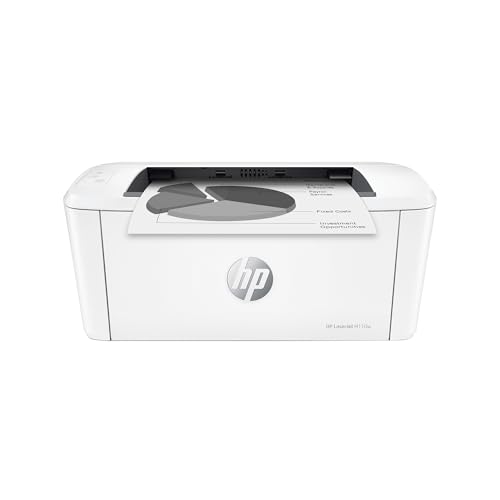
HP’s LaserJet M110w is marketed as America’s most trusted printer brand in its class for small setups. It offers a minimal footprint with reliable monochrome output and wireless/mobile printing options that pair well with laptops. With speeds up to 21 pages per minute, it balances compact size with everyday performance, making it a practical choice for laptop users who need to conserve desk space without sacrificing speed.
Ideal for individuals or small teams that prioritize portability and simple wireless printing, this model emphasizes ease of use and straightforward device integration with laptops and mobile devices.
HP LaserJet M209d: Duplex, USB-Clean Setup

The HP LaserJet M209d focuses on speed and duplexing through a robust design for home offices. It features automatic duplex printing and a simple USB connection, complemented by easy-to-use guided buttons. With its fast two-sided printing capabilities, it handles multipage documents efficiently, appealing to laptop users who routinely print lengthy reports or client proposals with minimal fuss.
While compact, this model supports essential office workflows, offering a balance of compact size, dependable speed, and reliable black-and-white output for everyday business tasks.
HP Color LaserJet Pro MFP 3301sdw

While primarily a color printer, the HP Color LaserJet Pro MFP 3301sdw brings professional-grade capabilities to mixed workflows, including scanning and copying in a single device for families or shared offices. It supports wireless and Ethernet connections, and prints up to 26 pages per minute in monochrome or color. This model suits laptop users who occasionally require color documents and multi-function features in addition to strong standard printing performance.
Buying Guide: Key Purchase Considerations
- Connectivity and compatibility: Look for built-in Wi‑Fi, Ethernet, USB, and mobile printing apps. Ensure your laptop’s OS is supported and that the printer can pair with smartphones or tablets when needed.
- Print speed and duplexing: If you print long documents, prioritize higher pages-per-minute (ppm) and automatic duplex (two-sided) printing to save time and paper costs.
- Copies, scans, and faxes: For all-in-one needs, choose models with reliable scanning quality, a practical ADF (auto document feeder), and easy scanning-to-email or cloud options.
- Printer size and footprint: Space constraints matter. Compact printers save desk space but may offer smaller input trays; confirm paper capacity fits your typical workload.
- Operating costs: Consider toner yield, cost per page, and compatibility with third-party consumables if you want long-term savings. Some brands offer subscription options for toners and supplies.
- Security and manageability: For small offices, features like secure printing, user authentication, and remote management can protect sensitive documents.
- Color vs. monochrome: Monochrome lasers are usually faster and cheaper for text-heavy tasks. Color lasers cater to marketing or charts but cost more per page and may print slower.
- Energy efficiency: Energy Star-rated models reduce electricity use, which matters for printers left on or running during long workdays.