For anyone seeking a larger, easier-to-read keyboard for PC work or gaming, large print backlit keyboards offer clear typefaces, high-contrast colors, and comfortable layouts. This guide highlights five top options designed to aid visibility without sacrificing functionality. Each model features oversized letters, backlighting, and ergonomic touches to reduce eye strain and fatigue during long sessions. Whether you’re upgrading for accessibility, working in low light, or simply preferring a bigger key surface, these keyboards provide reliable performance across home and office setups.
| Product | Brand | Key Benefit | Backlight |
|---|---|---|---|
| KOPJIPPOM Large Print Backlit Keyboard | KOPJIPPOM | Large print keys; full-size with numeric keypad | White LED |
| BOOGIIO Large Print Keyboard | BOOGIIO | High contrast yellow keys; spill resistant | Backlit (unspecified color) |
| X9 Large Print Backlit Keyboard | X9 Performance | Large print; full-size with 107 keys | 7-color backlight |
| SABLUTE Large Print Backlit Keyboard | SABLUTE | Oversized letters; multiple backlight modes | 7-color backlight |
| Acebaff Gaming Keyboard | Acebaff | Large print keys; rainbow backlit; anti-ghosting | Rainbow backlight |
The following selections emphasize readability, durability, and comfort for extended use. Each product is evaluated for print size, backlighting options, ergonomic design, and overall usability on Windows PC setups. The list prioritizes keyboards that balance visibility with a familiar typing experience, helping you type confidently whether you’re working, studying, or playing.
KOPJIPPOM Large Print Backlit Keyboard
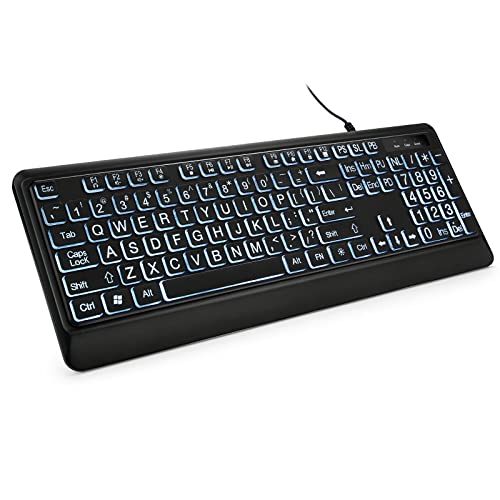
The KOPJIPPOM keyboard is designed for visibility with fonts four times larger than standard keyboards. It features a 104-key full-size layout with a numeric keypad and adjustable white LED backlighting for low-light environments. The large print keys reduce search time during typing, aiding elderly users, visually impaired individuals, and institutions such as libraries. An ergonomic fold-out foot design helps reduce hand fatigue during long sessions, supporting comfortable, extended use while maintaining familiar keyboard dynamics for Windows-based desktops and laptops.
Key benefits include easy-to-find characters and a backlight that can be turned on or off and brightness-adjusted. The combination of large print keys and backlit guidance aims to minimize errors and improve typing accuracy in dim rooms or studios. The build prioritizes reliability, with a straightforward USB wired connection that works across standard PCs and laptops without latency.
BOOGIIO Large Print Computer Keyboard
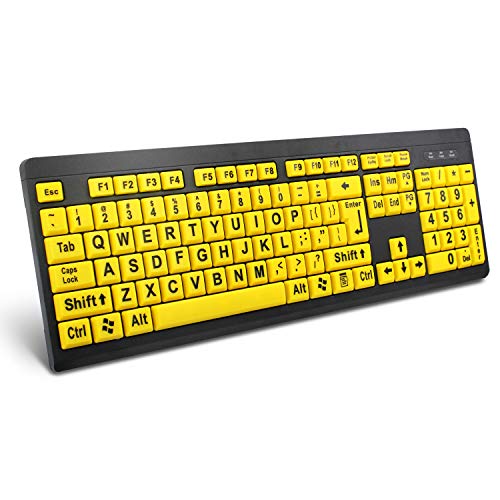
The BOOGIIO keyboard emphasizes high-contrast readability with oversized print and bold yellow key caps, making characters stand out even in low light. It’s designed for visually impaired users, seniors, and educational or corporate environments where quick recognition matters. A spill-resistant construction adds durability for busy desks and shared workspaces, helping protect electronics and extend keyboard life after accidental spills. The device uses a wired USB connection for stable performance and broad compatibility with Windows PCs.
Despite its focus on visibility, it maintains a practical typing experience and a responsive keystroke profile. The keyboard balances legibility with everyday usability, offering a straightforward solution for users who need clear, large-print keys without additional software or complex setup. It’s suitable for classrooms, libraries, and home offices that prioritize accessibility in daily tasks and basic productivity.
X9 Large Print Backlit Computer Keyboard
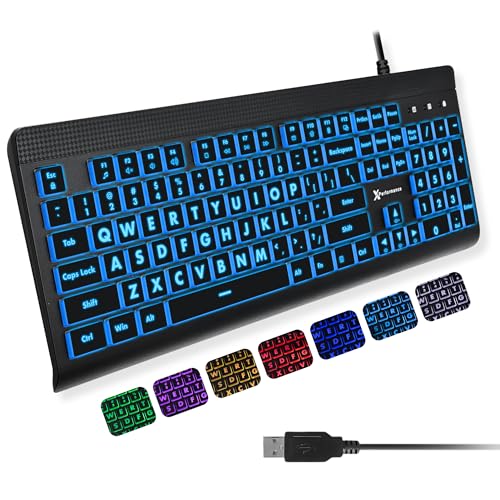
The X9 Performance keyboard pairs large print letters with a 7-color backlight system, enabling easy visibility in bright or dark surroundings. Its full-size 107-key layout includes a numeric keypad and 12 shortcut keys, supporting efficient navigation for both work and study tasks. The backlit feature ensures readability in dim rooms, while color options help differentiate function zones—an aid for users who prefer visual cues to locate keys quickly. This model is well-suited for seniors, students, and visually impaired users who require dependable illumination and straightforward operation.
Compatibility spans Windows environments and typical PC setups, and its wired USB connection provides reliable, low-latency typing performance. The design focuses on practical usability, with a balance between readability and traditional keyboard familiarity, making it a strong choice for everyday computing and light gaming tasks on personal computers.
SABLUTE Large Print Backlit Keyboard

This SABLUTE model focuses on large characters and multiple backlight options for versatile visibility. It offers seven color choices and four backlight modes, enabling users to tailor lighting to their environment. The large print keys are designed to reduce typing errors and provide faster identification of each letter. A fold-out stand on the back of the keyboard helps maintain ergonomic wrist positioning, enhancing comfort during extended typing sessions. The keyboard is suitable for PC and laptop use, with wired USB connectivity for straightforward setup.
Durability features include a robust layout and a design that prioritizes readability without sacrificing basic functionality or keyboard feel. It’s a practical choice for workplaces, libraries, and homes, particularly for users who spend long hours typing and require reliable, easy-to-read keys in various lighting conditions.
SABLUTE Large Print Backlit Keyboard With Wrist Rest

The SABLUTE model with wrist rest emphasizes ergonomic comfort along with oversized print keys. It features seven-color backlighting and a palm-friendly design to reduce wrist fatigue during long typing sessions. The keyboard’s large print layout helps users locate keys quickly, minimizing search time and typing errors. It’s designed for PC and laptop use with a wired USB connection, ensuring stability and compatibility across major Windows systems. The wrist rest provides additional support, making it suitable for office work, school assignments, and home computing.
While focusing on readability, this keyboard also emphasizes durability through a sturdy construction and a thoughtful keyboard angle. It is a practical option for users who need sustained accuracy and comfort, particularly in low-light environments or long study periods where typing proficiency matters most.
Buying Guide: Key Considerations For Large Print Backlit Keyboards
- Print size and legibility: Look for fonts explicitly described as oversized or magnified. Consider the contrast between key legends and key color, as well as key spacing for tactile accuracy.
- Backlighting features: Assess color options, brightness levels, and modes (static, breathing, auto-cycle). Verify whether memory function exists to retain last settings after power loss.
- Ergonomics and comfort: Check for fold-out stands, wrist rests, and key spacing that reduce fatigue during extended typing sessions. A comfortable tilt and ergonomic footprint improve long-term usability.
- Durability and spill resistance: For shared or busy environments, spill-resistant designs and durable key switches help protect investment and reduce maintenance.
- Connectivity and compatibility: Most options use USB wired connections for reliability. Ensure compatibility with Windows versions and common PC configurations.
- Layout and features: Confirm a full-size layout with a numeric keypad if you rely on numeric input. Some models include multimedia keys and shortcut functions for efficiency.
- Maintenance and memory: Some keyboards offer backlight memory or easy cleaning access. Note any cautions about cleaning liquids and warranty considerations.
Overall, the best large print backlit keyboard choice depends on your priorities: maximum print size, color backlighting variety, ergonomic support, or spill resistance. If you work in low-light conditions or require high-contrast keys, prioritize models with adjustable brightness and color options. For long typing sessions, consider keyboards with wrist rests and fold-out stands to minimize strain. Finally, ensure the keyboard fits your PC setup and provides stable, responsive keystrokes for a seamless computing experience.