For artists, designers, and archival enthusiasts, a large format flatbed scanner can transform oversized artwork, detailed sketches, and expansive documents into high-quality digital files. This guide highlights five capable options, covering A3 to A2 formats, high optical resolutions, fast scan speeds, and user-friendly features. Whether you’re digitizing paintings, CAD drawings, or archival magazines, these scanners balance performance with value and are suitable for both homes and offices. The following sections present concise product profiles and practical buying considerations to help you compare capabilities.
Product Overview
| Product | Brand | Format | Resolution | Notable Feature |
|---|---|---|---|---|
| VIISAN VF3240 Large Format Flatbed Scanner | VIISAN | A3 | 2400 x 2400 dpi | Fast 4-second scans, frameless design |
| VIISAN 3120 A3 Flatbed Scanner | VIISAN | A3 | 1200 x 1200 dpi | Auto-Scan, frameless, auto-detect |
| Plustek OS1180 Flat Scanner | Plustek | A3 | Unknown (HD LED) | LED light source, quick setup |
| Plustek OpticSlim 1680 | Plustek | Tabloid/A3 | Unknown (high speed) | High-speed, dual-view for quick checks |
| Plustek OpticPro A320E | Plustek | A3 | Unknown | Professional large-format with batch scanning |
VIISAN VF3240 Large Format Flatbed Scanner

VIISAN’s VF3240 is an A3 large-format flatbed designed to scan photos, painting albums, books, magazines, and CAD drawings up to 12” x 17”. It supports Windows and Mac, with a universal power adapter for global use. The scanner reads up to 2400 x 2400 dpi with a 48-bit color depth, delivering rich, accurate color. A frameless, narrow boundary design and four-panel control buttons enable quick scans, emails, prints, and multipage PDFs. Note that it uses a CIS sensor and is best for flat materials rather than three-dimensional items.
Highlights
- Fast A3 scans: 4 seconds at 200 dpi
- High resolution: 2400 x 2400 dpi
- Frameless design with multimedia buttons
- Universal power compatibility (AC 100–240V)
Ideal use cases include digital archiving of artwork, large-format photos, and flat prints. It’s a practical choice for classrooms or small studios needing reliable large-format capture without specialized equipment.
VIISAN 3120 A3 Flatbed Scanner
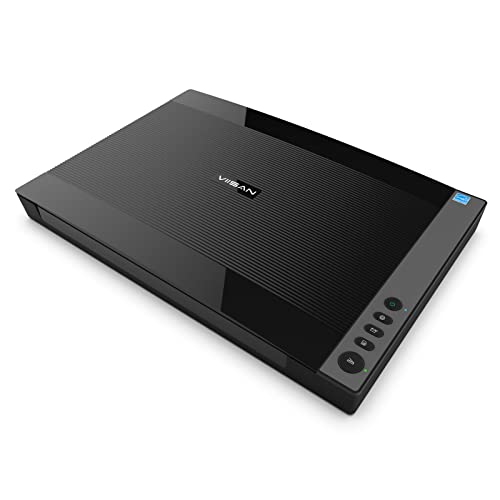
VIISAN’s 3120 is designed for large artworks, photos, books, and CAD drawings up to 11.7″ x 16.7″ (approx. A3). It includes a universal power adapter and emphasizes efficient workflow with Auto-Scan and LED lighting for quick, high-quality results. While it provides robust 1200 x 1200 dpi resolution, its value proposition centers on speed, ease of use, and reliable performance in educational or design environments.
Highlights
- Large-format capacity: 11.7″ x 16.7″
- Auto-Scan feature and frameless design
- Fast LED-based scanning with energy efficiency
This model suits institutions or freelancers who need dependable large-format capture with minimal setup and straightforward operation.
Plustek OS1180 Flat Scanner

The Plustek OS1180 targets graphics, libraries, and schools with an A3-capable scan area (up to 11.7″ x 17″). It features a streamlined LED light source and a quick startup, enabling faster ready-to-scan times. This model emphasizes large-format document handling in an environment where quick, repeatable scans are essential. While it does not advertise a specific DPI in the snippet, it’s positioned for accurate color and dependable performance for large digital archives.
Highlights
- A3-sized scanning area
- LED light source for immediate use
- Easy operation and energy efficiency
Best for libraries and studios needing a simple, effective large-format solution without a complicated feature set.
Plustek OpticSlim 1680

The Plustek OpticSlim 1680 is designed for fast large-format scanning of tabloid to A3 sizes, with a focus on speed and workflow efficiency. It offers a dual-view capability to preview adjustments quickly, and four pre-configured buttons to streamline destinations and file types. This model is well-suited for busy studios needing rapid checks and easy export options for graphics, prints, and documentation.
Highlights
- High-speed tabloid to A3 scanning
- One-key operation with pre-configured buttons
- Intuitive dual-view interface for quick checks
Strong choice for freelancers or small shops prioritizing speed and simple file management for large-format work.
Plustek OpticPro A320E
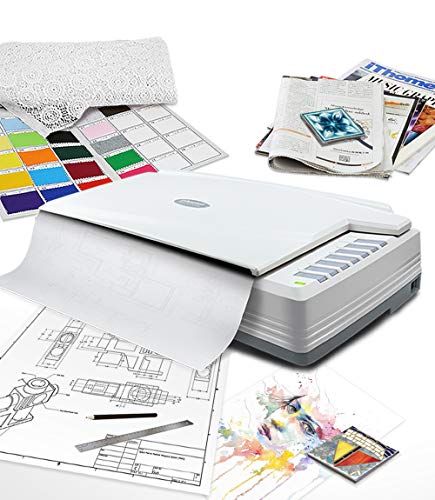
The Plustek OpticPro A320E is a professional large-format scanner with a 12″ x 17″ scan area, designed for maps, drawings, and wide-format documents. It supports batch scanning and offers versatile file management, including scan-to-print, email, and network destinations. The A320E is ideal for professional studios needing reliable batch processing and post-scan workflow automation for large-format projects.
Highlights
- Professional A3-wide scan area
- Batch scanning and versatile post-scan destinations
- OCR and document management features for productivity
Best for architectural firms, design studios, and educational institutions requiring efficient, repeatable large-format workflows.
Buying Guide: Key Purchase Considerations
- Scan size and format: Match the scanner’s maximum area (A3, A2/A3) to your artwork or documents. For larger pieces, consider models that handle 12″ x 17″ or larger with minimal borders.
- Resolution and color accuracy: Higher optical resolution (e.g., 2400 x 2400 dpi) yields more detail for art and archiving. Color depth and soft proofing capabilities also matter for faithful reproductions.
- Speed vs. workflow: Fast single-pass scans save time for multi-page projects, but quality should not be compromised. LED lighting typically offers instant-on operation and lower power use.
- Sensor type: CIS sensors are common in affordable large-format scanners but may have higher noise or limitations with 3D textures. Consider dedicated devices for fragile artwork or reflective surfaces.
- Software and compatibility: Ensure drivers work with your OS (Windows or macOS) and that bundled software supports OCR, PDF creation, and easy file export.
- Ease of use: Auto-Scan, one-touch buttons, and built-in PDF creation enhance efficiency for busy studios or classrooms.
- Build quality and design: Frameless or slim boundary designs reduce crop and maximize scan area. Physical controls can speed up routine tasks.
- Power and connectivity: Global power adapters simplify international use; USB connectivity is common for desktop setups and compatibility with modern workstations.
- Reliability and service: Consider brands with established support networks and available replacement parts or warranties for ongoing projects.
When choosing, weigh the importance of maximum image detail against the need for fast workflows and ease of integration with existing design pipelines. For institutions handling large-format assets, a model with batch scanning and robust software is beneficial. For individual artists and small studios, a compact, user-friendly option that delivers consistent results may be preferable.