Connecting a laptop to a TV or monitor is easier than ever with the right converter. This guide highlights five dependable options that cover USB-C to HDMI, multiport hubs, and RCA/HDMI conversions. Whether you’re streaming, presenting, or extending your workspace, these adapters help you mirror or extend your display with clarity and reliability. Below you’ll find quick product snapshots, feature highlights, and practical buying tips to help you choose the best solution for your setup.
| Product | Brand | Key Benefit |
|---|---|---|
| Acer USB C to HDMI Adapter | Acer | 4K output, 100W PD charging, USB-A 3.0 |
| Battony USB C to HDTV Adapter | Battony | 4K UHD HDMI output, multiport, high-speed data |
| DigitConvert AV to HDMI Converter | DigitConvert | RCA to HDMI, plug‑and‑play |
| BD&M AV to HDMI Converter | BD&M | RCA to HDMI, 720P/1080P, easy setup |
| Wonlyus HDMI to RCA Converter | Wonlyus | HDMI to AV, versatile legacy compatibility |
Acer USB C to HDMI Adapter: 4K Output And 100W PD

The Acer USB C to HDMI Adapter combines a 4K HDMI output with a 100W PD charging port and a USB-A 3.0 port in a compact 3-in-1 hub. It’s designed to mirror or extend a laptop display to a TV, monitor, or projector that supports HDMI. The adapter supports 4K video at 30Hz and relies on a DisplayPort Alternate Mode capable USB-C port. It’s particularly suitable for MacBook Pro/Air, iPad, and other USB-C devices, delivering a clean, simple way to upgrade home entertainment or on-the-go presentations. Note: PD charging speed varies with the charger and cable used.
Battony USB C to HDTV Adapter: 4K And Multiport Convenience

The Battony adapter offers USB-C to HDTV that can mirror a laptop or phone display to a TV, monitor, or projector with up to 4K UHD output at 30Hz. It also functions as a multiport hub, supporting USB 3.0 devices to expand your connectivity. This makes it a practical choice for travel, classroom setups, or home theaters where a reliable, compact hub is essential. Ensure you’re using a compatible HDMI cable (HDMI 2.0 or better) for the best results.
DigitConvert AV to HDMI Converter: Analog To Digital Upgrade

The DigitConvert RCA to HDMI converter converts analog RCA composite input into a digital HDMI signal (720P/1080P). It’s a straightforward plug-and-play solution requiring a USB power source for operation. This adapter is well-suited for reclaiming older devices like VHS players, older laptops, or legacy gaming consoles to modern displays. It’s important to note that this device only converts RCA to HDMI, not the reverse, so use cases should align with older source equipment that needs HDMI input on a TV or monitor.
BD&M AV to HDMI Converter: Easy RCA to HDMI

This BD&M device converts RCA composite input to HDMI with 720P or 1080P output, suitable for TV/Monitor setups. It emphasizes a simple plug-and-play approach and requires a USB power connection for stable operation. The converter uses advanced signal processing to deliver clear colors and detail across standard HD formats. It’s compatible with common devices like DVD players, legacy set-top boxes, and older game consoles that rely on RCA outputs.
Wonlyus HDMI to RCA Converter: HDMI To AV
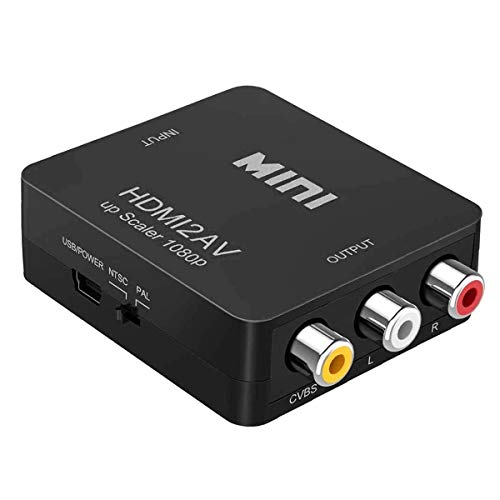
The Wonlyus HDMI to RCA converter provides HDMI input and converts to AV (RCA) outputs, enabling older TVs and projectors to display content from modern laptops or media devices. This device is particularly useful for those who need to connect devices lacking HDMI input to legacy displays. It requires a USB power source and is designed for straightforward plug-and-play use. It’s not a bi-directional converter, so verify your signal direction before use.
Buying Guide: Key Considerations For Laptop To TV Converters
- Output format and resolution: Ensure the converter supports the resolution you need (1080p, 4K) and that your display accepts that format at the desired refresh rate.
- Source compatibility: USB-C with DisplayPort Alternate Mode is required for many USB-C to HDMI adapters. Check your laptop’s specifications to confirm compatibility.
- Power delivery: If you plan to charge while you mirror, pick a model with PD charging (preferably 60W or higher) and use a compatible charger and cable.
- Port versatility: 3-in-1 or multiport hubs can reduce cable clutter, offering HDMI, USB-A, and power in a single dongle for travel or desktop use.
- Signal direction: Some RCA/HDMI adapters are unidirectional. Confirm whether you need HDMI to RCA or RCA to HDMI to match your devices (TVs, projectors, older players).
- Cable quality and length: A short, high-quality HDMI cable often yields better performance and fewer dropouts. If you need longer runs, verify compatibility with your setup.
- Audio support: For devices using USB audio, verify whether the converter passes audio along with video or requires a separate audio setup.
- Device reliability: Look for adapters with robust ICs and good user reviews to avoid compatibility issues with macOS, Windows, or Android devices.
- Port density and footprint: If you travel with a laptop, a compact, lightweight adapter can save space and reduce desk clutter.
- Warranty and support: Check warranty terms and vendor support in case you encounter driver or compatibility issues.
When choosing, consider your primary use case: streaming media from a laptop to a TV, presenting from a portable device, or reviving an older display. For frequent travelers or students, a compact USB-C to HDMI hub with PD charging offers convenience. For owners of older TVs or projectors, RCA/HDMI converters provide practical compatibility. By aligning features with your devices and display specs, you can ensure smooth, reliable screen mirroring without technical headaches.