Discover top external GPU docking stations that turn a thin laptop into a capable workstation or gaming rig. This guide highlights five practical options, focusing on power delivery, PCIe bandwidth, cooling, and compatibility with popular graphics cards. Whether you’re a creator, gamer, or remote worker, these docks expand graphics performance beyond what a built-in GPU can offer.
Summary of selected products
| Product | Brand | Key Feature | Power / Compatibility |
|---|---|---|---|
| MINISFORUM DEG1 eGPU Dock | MINISFORUM | Oculink PCIe 4.0 x4, supports RTX 4090/ RX 7900 XT | ATX/SFX power; Oculink only |
| AOOSTAR AG01 External GPU Docking Station | AOOSTAR | 800W built-in power supply, wide card compatibility | Oculink port required |
| TobenONE 18 in 1 Dock | Tobenone | Triple 4K displays, 18 ports | USB-C/PD, needs compatible host |
| BOSGAME eGPU Dock | BOSGAME | RX 7600M XT, 4K outputs | Oculink/Thunderbolt options |
| OwlTree PCIe 4.0 eGPU Dock | OwlTree | High-speed PCIe 4.0 x4, flexible cabling | OCuLink or similar interface |
MINISFORUM DEG1 eGPU Dock Review

The MINISFORUM DEG1 eGPU Dock is designed to extend high-end graphics capability via an Oculink connection. It supports PCIe 4.0 x4 both directions, enabling external GPUs with modern PCIe bandwidth. A notable feature is its flexible power support, accepting ATX and SFX power supplies to fit compact mini chassis and varied use cases. A documented caveat is the OCulink interface limitations, including no hot plugging, which means the system should be powered down before connecting or removing the device. This enclosure aims to balance portability with performance for enthusiasts who want a compact, capable eGPU solution.
Pros: Solid PCIe 4.0 x4 bandwidth, flexible PSU compatibility, compact form factor. Cons: Requires power-down for OCulink connection, Z-height may limit larger GPUs in some mini cases. If your laptop supports Oculink, this dock can be a practical upgrade for gaming or acceleration tasks.
AOOSTAR AG01 External GPU Docking Station

The AOOSTAR AG01 brings a built-in 800W power supply, targeting a broad set of graphics cards with a practical power headroom. The enclosure uses an open metal design with a center aluminum frame, keeping weight around 1.5 kg and accommodating long PCIe GPUs. It emphasizes OCuLink PCIe 4.0 x4 bandwidth and notes hot-swappability is not supported on the OCuLink interface. Compatibility focuses on laptops or desktops with an OCuLink port, making it a strong match for users who already rely on that standard for external GPUs.
Pros: Strong internal power, roomy enclosure, supports many modern GPUs. Cons: OCuLink dependency and non-hot-swappable interface can affect some hot-plug workflows. For users who already own OCuLink-enabled devices, this dock offers robust performance and expansion.
TobenONE 18 In 1 Docking Station
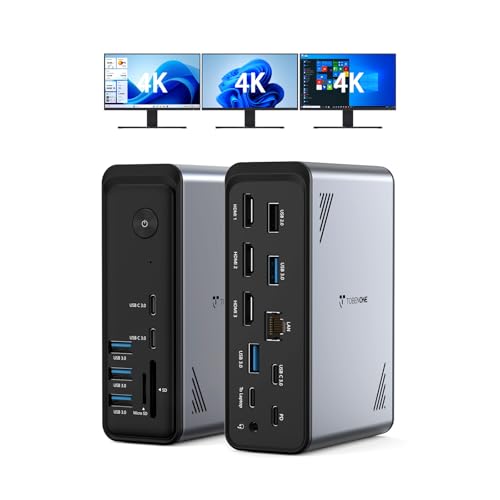
The TobenONE dock is a multifunction workstation hub that integrates 18 ports, including multiple USB, HDMI, and networking options. It supports triple 4K displays and 9 USB ports to connect peripherals, ideal for home offices or design workflows where screen real estate and device connectivity matter. While it provides robust port variety and display support, it does not include a power adapter, making it essential to supply a compatible external power source for demanding GPUs. It’s a strong choice for users seeking an all-in-one docking solution with high expandability, especially for Windows laptops that demand versatile external displays.
Pros: Extensive I/O and multi-monitor support, centralized cable management potential, strong USB ecosystem. Cons: Requires separate power adapter; not optimized for the most demanding gaming GPUs when used without external power.
BOSGAME eGPU Dock With RX 7600M XT

Powered by an external RX 7600M XT in the dock, this solution highlights RDNA 3 architecture and a gaming-focused feature set. It offers two HDMI 2.1 outputs and two DisplayPort 2.0 outputs to support multi-monitor configurations at 4K resolutions. The inclusion of Oculink and USB4 ports provides fast data transfer and flexible connectivity for a range of GPUs and hosts. This dock targets users seeking noticeable graphical upgrades for laptop gaming or graphics workflows, with a clear emphasis on multiple 4K display outputs and high bandwidth data paths.
Pros: Modern RDNA 3 GPU integration, strong multi-monitor support, fast data interfaces. Cons: Specific GPU compatibility varies by momentary availability; ensure your host supports the dock’s interface (OCuLink/USB4) for best results.
OwlTree PCIe 4.0 External GPU Dock

The OwlTree docking solution emphasizes PCIe 4.0 x4 bandwidth with a detachable enclosure on both ends, enhancing portability and storage convenience. The kit includes a PCIe x16 enclosure and a flexible 50 cm cable, designed to minimize EMI and resist performance degradation. It’s a practical option for users who want a modular, portable eGPU enclosure that can be adapted to different laptop brands and setups. It supports a range of GPUs that have compatible drivers and uses a JHL6340-based architecture for reliable performance in Windows environments.
Pros: High-speed PCIe 4.0, portable detachable design, emphasis on low interference. Cons: Requires careful cable management and driver compatibility checks for certain GPUs.
Buying Guide: Key Considerations For Selecting A Laptop Docking Station With A Graphics Card
When choosing an external GPU dock, consider the following factors to align with your use case and laptop specifications.
- Interface and bandwidth: Look for PCIe 4.0 x4 support (OCuLink or USB4) to maximize GPU performance. Higher bandwidth supports more demanding GPUs and multi-monitor setups.
- Power delivery: Confirm whether the dock includes a robust built-in PSU or requires an external power supply. For gaming GPUs, sufficient wattage is essential to reach peak performance and stability.
- Display support: If you plan to run multiple 4K displays, ensure the dock provides enough video outputs (HDMI 2.1, DisplayPort 2.0) and adequate bandwidth for smooth playback.
- Thermal design: External GPUs generate heat; docks with open frames or active cooling can help maintain performance during long sessions.
- Host compatibility: Verify that your laptop has a compatible port (OCuLink, TB3/TB4, or USB4) and that driver support is available for your GPU model on Windows or macOS where applicable.
- Card length and slot type: Some enclosures limit GPU length or require single/dual-slot designs. Check the physical dimensions if you plan to use aftermarket cards.
- Portability vs. expandability: Detachable enclosures and lighter builds are easier to transport, but some may compromise on cooling or power headroom. Balance portability with performance needs.
- Future-proofing: Consider docks that support newer GPU generations and offer firmware or driver updates to extend compatibility over time.
Bottom line: A high-quality eGPU dock can extend a laptop’s lifespan for demanding tasks, but success depends on matching the dock’s interface, power delivery, and cooling to your chosen graphics card and host computer. Always confirm compatibility with your specific GPU model and laptop before purchasing.