If you need to share USB peripherals between two computers without swapping cables constantly, a USB switch or a USB-based KVM switch can simplify your setup. This guide highlights five reliable options, covering USB 3.0 and USB 2.0 variants, PS/2 to USB adapters for legacy keyboards and mice, and compatibility notes across Windows, macOS, Linux, and Chrome OS. Each choice focuses on ease of use, fast data transfer, and straightforward one-click switching.
| Product | Brand | Key Benefit |
|---|---|---|
| BENFEI USB 3.0 Switch | BENFEI | High-speed USB 3.0 sharing for two computers and four USB devices |
| StarTech.com Portable Laptop Crash Cart Adapter | StarTech.com | BIOS/UEFI access for servers via VGA and USB console |
| UGREEN USB 3.0 Switch Selector 2 Computers | UGREEN | Easy one-button swap with USB 3.0 speeds |
| Perixx PERIPRO-401 PS2 to USB Adapter | Perixx | PS/2 to USB integration for legacy keyboards/mice |
| DKARDU PS2 to USB Adapter Cable | DKARDU | PS/2 to USB A adapter for reuse of old peripherals |
Note: This overview focuses on USB-based switching and compatibility with a range of operating systems. Always check your specific devices and firmware for compatibility notes, especially for legacy PS/2 peripherals or BIOS/UEFI control scenarios.
BENFEI USB 3.0 Switch Overview

The BENFEI USB 3.0 Switch enables two computers to share four USB devices, such as keyboards, mice, printers, scanners, and USB cameras. It supports Windows, Mac, Linux, and Chrome OS with driver-free operation and offers data transfer speeds up to 5 Gbps via USB 3.0. A simple LED indicator shows which computer is active. A single A-to-A cable connection is required for operation.
- Two computers share four USB devices
- USB 3.0 with up to 5 Gbps transfer
- Driver-free; broad OS compatibility
- One-click switching with LED status
StarTech Portable Laptop Crash Cart Adapter

This StarTech solution is designed for servers and legacy systems, allowing a laptop to connect via USB and VGA to a headless server, PC, ATM, or kiosk. It enables BIOS/UEFI level control and supports file transfer, screen capture, and activity logging through compatible software. It is particularly useful for on-site troubleshooting and maintenance in enterprise environments.
- USB/VGA analogue KVM-style console for servers
- BIOS/UEFI control from a laptop
- File transfer, screenshots, and activity logging
- Supports Windows, Linux, and MacOS with driver software
UGREEN USB 3.0 Switch Selector

The UGREEN 2×4 USB 3.0 switch lets two computers share four USB devices, enhancing workflow by letting you switch with a single button. It supports high-speed transfers up to 5 Gbps and is compatible with Windows, macOS, Linux, and Chrome OS. It is recommended to provide adequate power when using multiple devices to avoid disconnections. This device is not a video KVM switch; it does not transmit video signals.
- One-button switching between two PCs
- Supports up to four USB peripherals
- USB 3.0 with 5 Gbps transfer
- Plug-and-play; driver-free
UGREEN USB Switch Selector (USB 2.0)

This UGREEN USB 2.0 switch is designed for sharing printers, scanners, mice, keyboards, and other USB peripherals between two PCs. It emphasizes a simple, one-button swap and compatibility across Windows, macOS, Linux, and Chrome OS. A note highlights the importance of power supply when multiple devices are used to prevent disconnections. It is not a video KVM switch.
- 2 in, 4 out USB switch box (USB 2.0)
- One-button computer switching
- Driver-free and broad OS compatibility
- Power considerations for multiple devices
Perixx PERIPRO-401 PS/2 to USB Adapter
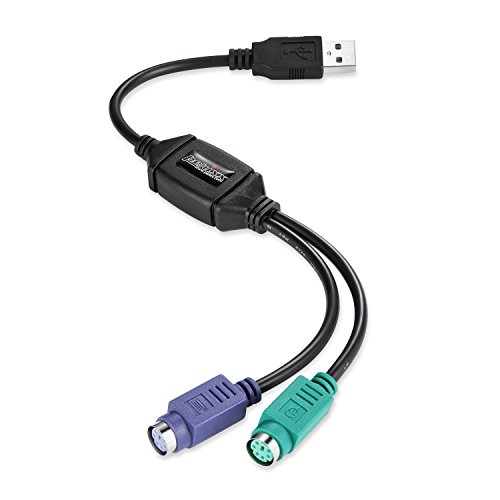
The PERIPRO-401 allows continued use of PS/2 keyboards and mice by connecting them to USB 2.0 ports. It includes two PS/2 ports (keyboard and mouse) and one USB port, with a built-in USB controller for plug-and-play recognition. It can also support PS/2 ports on some KVM switches, offering a bridge between legacy and modern systems.
- PS/2 input to USB output
- Built-in USB controller for immediate recognition
- PS/2 keyboard and mouse compatibility
DKARDU PS2 to USB A Adapter Cable

The DKARDU adapter converts PS/2 keyboards and mice to USB A connections. It uses a built-in USB chip for driver-free operation, enabling quick reuse of older peripherals with newer USB-enabled devices. It supports both Linux and Windows platforms and works with many legacy KVM setups that rely on PS/2 inputs.
- PS/2 to USB A male adapter
- Plug-and-play without extra drivers
- Compatibility with older keyboards and mice
Buying Guide: Key Purchase Considerations
When selecting a USB switch or KVM-style adapter, consider these factors to match your setup and future needs:
- USB version and speed: USB 3.0/3.1 devices benefit from higher transfer rates; USB 2.0 devices will work on compatible switches but with slower speeds.
- Number of devices and ports: Ensure the switch supports the exact mix of devices you use (keyboard, mouse, printers, scanners, USB drives, webcams, etc.).
- Number of computers: If you only work with two machines, a 2×4 or 2×2 layout is common; larger fleets require more complex switches.
- Video support: For KVM functionality, verify whether the product supports video passing (HDMI, VGA, or DisplayPort). Many USB switches do not transmit video and are not KVM switches.
- Power requirements: Some devices benefit from an external power supply when multiple peripherals are connected; power helps prevent disconnections.
- Operating system compatibility: Confirm driver-free operation for Windows, macOS, Linux, or Chrome OS as needed.
- Legacy peripherals: If you use PS/2 devices, consider PS/2 to USB adapters or dedicated KVM switches with PS/2 support.
- BIOS/UEFI access: For server or maintenance scenarios, a crash cart adapter can provide BIOS access and remote troubleshooting capabilities.
- Ease of use and indicators: LED indicators and one-click switching improve workflow clarity during multitasking.
The right USB switch or KVM adapter can simplify multi-device workflows, reduce cable clutter, and improve productivity across workstations and servers. Review compatibility notes for your specific devices and ensure the chosen option aligns with your intended use, whether it’s periphery sharing, legacy device integration, or on-site server management.