Finding a versatile wireless keyboard with a touchpad can streamline everyday tasks—from typing and browsing to controlling a TV-connected PC or HTPC. The following five keyboards are chosen for broad compatibility, built-in trackpads, and convenient layouts. Each product supports multiple devices and offers easy switching, making them ideal for work, travel, and media centers.
Summary of selected products:
| Product | Brand | Key Benefit |
|---|---|---|
| Bnnwa Multi-Device Wireless Keyboard with Touchpad | Bnnwa | Three-device wireless pairing with a large multi-touch trackpad |
| Arteck Universal Backlit Bluetooth Touch TV Keyboard | Arteck | Seven backlight colors and media controls for TV and HTPC |
| Miritz Mini Keyboard with Touchpad | Miritz | Ultra-portable dual-mode (Bluetooth and 2.4G) |
| Logitech Wireless Touch Keyboard K400 | Logitech | Built-in multi-touch trackpad and couch-friendly range |
| Rii X8 Mini Keyboard with Touchpad | Rii | Compact design with RGB backlight and multi-touch |
Bnnwa Multi-Device Keyboard With Touchpad

The Bnnwa keyboard is designed for multi-device use, supporting three connection options: Bluetooth and 2.4 GHz wireless with an extensive 33-foot (10-meter) range. Users can switch between devices with a single key press, making it suitable for pairing with a PC, tablet, or Android device without missing a beat. Its two-in-one design combines a keyboard with a responsive multi-touch trackpad, enabling effortless navigation, zooming, and scrolling. The keyboard features an ultra-slim, durable ABS body and a compact layout that retains essential navigation keys—even in a reduced footprint—great for travel and shared workspaces.
Arteck Universal Backlit Bluetooth Touch TV Keyboard

The Arteck Bluetooth touch keyboard emphasizes entertainment control with seven backlight colors and two brightness levels, plus auto-sleep to conserve power. It offers broad compatibility across Windows, macOS, Android, Chrome OS, and tablet ecosystems, including iOS. The built-in touchpad provides straightforward navigation for TV-connected PCs or HTPC setups. This keyboard is a balanced choice for living rooms and home offices where media control and typing are both needed.
Miritz Mini Keyboard With Touchpad

The Miritz mini keyboard emphasizes portability and dual-mode flexibility. Designed for travel and compact setups, its small footprint makes it ideal for media centers or on-the-go use. It supports both Bluetooth and 2.4G USB receivers, delivering a stable range of up to 33 feet. The device is plug-and-play, eliminating complex pairing steps, and its slim form factor pairs well with tablets, small laptops, and smart TVs where space is at a premium.
Vilros 15 Inch USB Keyboard With Touchpad
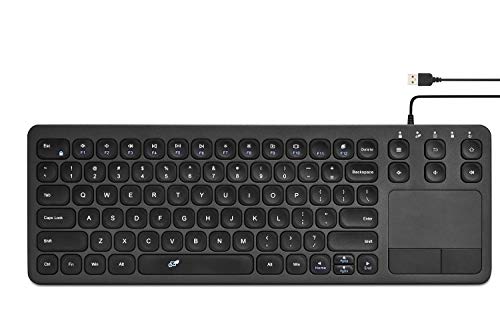
The Vilros 15-inch USB keyboard with touchpad is a straightforward option for Raspberry Pi users and other USB-equipped devices. Its large form factor provides a comfortable typing experience and a built-in trackpad for navigation, making it a practical choice for desktop setups, media centers, and educational projects that require a larger keyboard area alongside a touch surface.
Arteck 2.4G Wireless Touch TV Keyboard

This Arteck model focuses on a compact design for TV-connected computers and HTPC use, delivering a built-in touchpad with responsive media controls. The 2.4 GHz wireless connection provides reliable performance within a typical living room radius, and the keyboard’s layout favors couch-based navigation without sacrificing typing efficiency. It’s a solid alternative for setups where a slim profile and ergonomic distance from the couch matter.
Logitech Wireless Touch Keyboard K400

The Logitech K400 is a couch-friendly favorite that pairs a full set of keys with a large multi-touch trackpad. The 33-foot wireless range offers plenty of flexibility for living room use. Its plug-and-play setup via a tiny Unifying receiver minimizes wiring, making it a practical choice for TV-connected laptops and HTPCs. The integrated trackpad supports smooth web navigation and media control from a comfortable distance.
Rii X8 Mini Keyboard With Touchpad
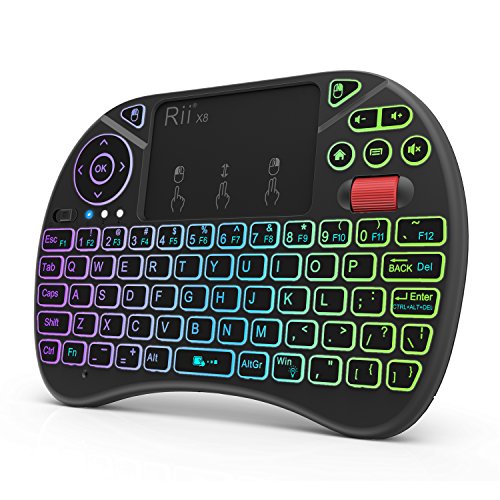
The Rii X8 Mini Keyboard is a compact, travel-friendly option with a built-in touchpad, RGB backlighting, and rechargeable battery. It uses 2.4 GHz wireless connectivity and includes a USB dongle for plug-and-play use. The mini form factor supports quick typing, media control, and navigation across PCs, Android boxes, and gaming devices, while the RGB backlight adds usability in dim environments.
Buying Guide: Key Purchase Considerations
- Device compatibility: Check whether the keyboard supports Bluetooth and/or 2.4 GHz USB receivers, and confirm compatibility with your primary devices (Windows, macOS, Android, Chrome OS, iOS, Raspberry Pi, smart TVs, etc.).
- Connectivity options: Dual-mode keyboards (Bluetooth plus 2.4G) offer flexibility for multiple devices at once, but may require switching between profiles. Consider how you will switch devices and the latency you can tolerate.
- Trackpad size and gestures: A larger trackpad enables easier navigation, with gestures like two-finger scrolling and pinch-to-zoom. If you primarily type, a smaller trackpad or none might suffice; prioritize comfort for extended sessions.
- Layout and ergonomics: Look for keyboards with a compact footprint for tight desks or travel. Some models retain classic navigation keys, while others optimize space by consolidating function rows.
- Battery life and charging: Bluetooth keyboards and those with built-in rechargeable batteries vary in endurance. Consider charge time, standby efficiency, and whether a USB-C or micro-USB port is used for charging.
- Backlighting and media controls: For media centers or living room use, backlighting improves visibility in dark rooms, while dedicated media keys can simplify playback control.
- Durability and materials: ABS plastic housings are common and light; look for reinforced keys or a robust chassis if you travel often or plan to handle the device frequently.
- Size versus usability: Ultra-compact keyboards are highly portable but may compromise key travel and typing comfort. Evaluate your typical usage scenario—work at a desk or lounge while watching TV?
When evaluating options, balance device compatibility with your primary use case. If you frequently switch between a laptop, tablet, and smart TV, a dual-mode Bluetooth/2.4G keyboard with a comfortable trackpad is often the most efficient setup. For media-centric living rooms, backlit keys and dedicated media controls can enhance the user experience, while a larger trackpad supports smoother navigation on a connected PC or HTPC.