For iOS users who need precise navigation and efficient workflow on mobile or tablet devices, a compact keyboard with arrow keys can boost productivity. This guide highlights five versatile options that work well with iOS, offer arrow-key functionality, and suit different use cases—from gaming and design to data entry and everyday typing. Each pick emphasizes plug‑and‑play setup, multi-device compatibility, and practical shortcuts that pair with iPhone or iPad. Explore models that balance portability, customization, and ease of use so you can choose the right keyboard for your iOS setup.
| Product | Brand | iOS Compatibility | Key Features |
|---|---|---|---|
| BTXETUEL Mini 4-Key Keypad Arrow Keypad (Black, Arrow Keycaps 1) | BTXETUEL | iOS compatible via USB-C | Ultra-small, plug-and-play, arrow keys, programmable functions |
| Vaydeer One-Handed Mechanical Keyboard | Vaydeer | iOS compatible via USB-C | 6 functional layers, 9 programmable keys, floating window |
| LOONASA Bluetooth & 2.4G Number Pad | LOONASA | iOS via Bluetooth | Wireless, 35-key keypad, multi-device switching |
| Arteck HB192 Universal Bluetooth Keyboard | Arteck | iOS and Android, Windows, Mac | Multi-device switch, stainless steel, full-size with arrow keys |
| Arteck 7-Colors Backlit Keyboard | Arteck | iOS and Android, Windows | Backlit, full-size with arrow keys, long battery |
Whether you need compact navigation for writing on a tablet, professional data entry with number and arrow keys, or a full keyboard that travels, the following selections provide solid iOS compatibility, practical arrow-key access, and dependable build quality. Each section below links to the vendor page for quick access.
BTXETUEL Mini Arrow Keypad

The BTXETUEL Mini 4-Key Keypad provides a compact solution for arrow navigation and quick shortcuts. Its ultra-small design attaches a detachable USB-C cable and ensures plug-and-play use without software installation. The default layout assigns Up, Left, Down, Right for fast directional control, making it suitable for scrolling through documents or moving a cursor in design apps. It can coexist with a normal keyboard on the same computer without interference. Additional functions include shortcuts, multi-step operations, undo/redo, playback controls, and volume adjustments. Users can adjust lighting and gradient effects via software or a web portal to match their setup.
Vaydeer One-Handed Mechanical Keyboard
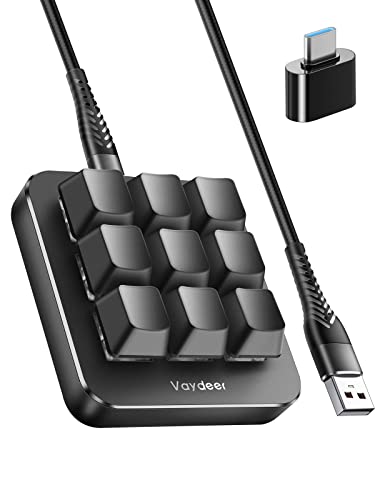
The Vaydeer one-handed macro keypad targets high-speed workflows with 6 functional layers and 9 programmable keys. Layers can be switched via a floating window or automatically based on the active application, enabling tailored mappings for gaming, design, or productivity. The compact device supports non-conflict key macros for simultaneous input, improving timing and accuracy. Its real-time floating window helps you remember the current function, and OTA firmware updates keep features fresh. The one-handed design is ideal for iOS users who prefer a compact, ergonomic layout for long work sessions or gaming on the go.
LOONASA Bluetooth & 2.4G Number Pad

The LOONASA 35-key numeric keypad blends wireless convenience with essential navigation controls. Its dual connectivity options—2.4 GHz and Bluetooth 3.0/5.0—enable quick pairing with PCs, Macs, and iPads. The keypad supports multi-device switching via a simple one-click control, saving time when moving between devices. It includes arrow keys and NumLock to enhance data entry efficiency. The compact, rechargeable design prioritizes portability, making it a practical companion for iOS workspaces where a separate numeric keypad accelerates data tasks and spreadsheet work.
Arteck HB192 Universal Bluetooth Keyboard

The Arteck HB192 is a universal, multi-device Bluetooth keyboard designed for iOS, Android, Windows, and Mac. It supports switching among three devices with a single key press, making it suitable for users who frequently switch between an iPhone, iPad, and a computer. Built with a stainless steel frame and low-profile keys, it offers comfortable typing with dedicated arrow keys and a full keyboard layout. Its compatibility and robust construction appeal to those needing a portable, reliable option for iOS workflows, whether for note-taking, coding, or navigation across apps.
Arteck 7-Colors Backlit Keyboard

The Arteck 7-Colors Backlit Keyboard adds ambient illumination and a full-size layout with arrow keys, suitable for iOS devices in low-light environments. It supports Bluetooth across iOS, Android, Windows, and Mac, with a rechargeable battery designed for extended use. The multi-color backlighting helps visibility and can match user preferences or workflow lighting. This model balances portability with a traditional keyboard feel, making it a solid option for iPad workspaces, writing tasks, and navigation-heavy tasks that benefit from arrow keys and a complete set of function keys.
Buying Guide
Key purchase considerations for iOS users choosing a keyboard with arrow keys include: device compatibility and connectivity, whether you need a compact keypad or a full-size layout, and how you plan to switch between devices. Plug-and-play devices typically require less setup when used with iOS, while Bluetooth models offer wireless convenience across iPad, iPhone, and a computer. Evaluate whether you want a one-handed keypad for gaming or productivity, or a full keyboard with dedicated arrow keys for data entry. Consider software customization for macros or shortcut keys and whether firmware updates enable additional features. Portability, battery life, and build quality should align with how you plan to carry and use the keyboard on the go. Finally, verify that the selected model supports iOS-specific use cases, such as navigation shortcuts in iPadOS apps or compatibility with iPadOS paste and text navigation shortcuts.
For a balanced setup, consider a compact keypad for arrow navigation on the go (BTXETUEL or LOONASA), complemented by a full-feature Bluetooth keyboard for longer work sessions (Arteck HB192 or Arteck 7-Colors). If you frequently switch between devices, prioritize models with easy device switching and robust battery life. Always check the latest firmware updates and user reviews for real-world performance with iOS devices, including iPad and iPhone compatibility and any known pairing quirks.