To extend your internet reach or keep critical devices online with minimal downtime, products that use your home’s electrical wiring or remote power control can be a practical solution. This guide highlights five reliable options that emphasize stability, ease of use, and remote management. Whether you’re boosting a smart TV setup, stabilizing a home office, or keeping networking gear online, these picks leverage power outlets or smart power switching to keep you connected.
| Product | Brand | Type | Key Benefit |
|---|---|---|---|
| NETGEAR Powerline Adapter Kit PLP2000 | NETGEAR | Powerline Adapter | Gigabit speeds via existing wiring with passthrough outlet |
| MSNSwitch2 UIS-722b | Proxicast | IP Remote Power Switch | 2 independent outlets with auto-reboot |
| ezOutlet5-2R | Proxicast | IP & WiFi Remote Power Switch | Dual outlets with auto-reboot via LAN or WiFi |
| MSNSwitch2 UIS-722T | Proxicast | IP Remote Power Switch | 2 outlets with auto-reboot, TI/TA compliant |
| MSNswitch MAX UIS-801bc | Proxicast | Smart Power Switch | Power metering, surge protection, auto reboot |
NETGEAR Powerline Adapter Kit PLP2000
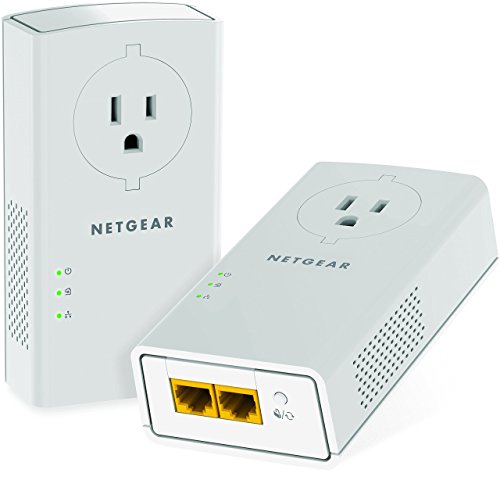
Use your existing household electrical wiring to extend your internet service to another room. The PLP2000 supports Gigabit speeds through HomePlug AV2 technology and includes a passthrough outlet for an additional device. It’s IEEE 1901 and IEEE 802.3 compliant, noting that this is not a Wi-Fi device. Ideal for streaming 4K video, gaming, and connecting smart TVs or game consoles with minimal lag.
MSNSwitch2 UIS-722b Internet Enabled IP Remote Power Switch

This two-outlet IP remote power switch monitors connectivity and can automatically cycle one or both outlets if the connection is lost. It supports user-defined scheduled power cycling and provides an auto reset function with a single-button setup. It’s suitable for remotely rebooting essential equipment like modems, routers, DVRs, servers, and other networked devices to maintain uptime.
ezOutlet5-2R – Dual Outlet IP & WiFi Remote Power Switch

Designed to monitor connectivity and automatically restart equipment when the broadband connection drops, this dual-outlet switch can connect to your LAN via 2.4 GHz WiFi or Ethernet. It’s a practical solution for restarting modems, routers, or security cameras without on-site visits, reducing downtime and manual troubleshooting.
MSNSwitch2 UIS-722T Internet Enabled IP Remote Power Switch
Like its UIS-722b sibling, this model provides two independent outlets with automatic reboot capabilities. It is built to monitor connectivity, perform scheduled power cycling, and reboot remote equipment—ideal for networking devices, home offices, and small business setups requiring reliable remote management.
MSNswitch MAX UIS-801bc

MSNswitch MAX adds power metering, surge protection, and noise filtration to an internet-enabled power switch. It supports control via smartphone, cloud, or API and is designed to minimize downtime by remotely rebooting unresponsive devices while monitoring energy use for efficiency insights.
Buying Guide: How to Choose the Right Internet Via Power Outlet Solution
- Use case and scope: If you primarily need to extend network reach to a different room, a Powerline adapter like the NETGEAR PLP2000 is a strong option. If you require remote reboot and monitoring for multiple devices, a smart IP power switch (Proxicast or ezOutlet) is more appropriate.
- Connectivity method: Powerline adapters rely on electrical wiring, which can be influenced by circuit layout and interference. Remote power switches rely on Ethernet or Wi-Fi for control; verify your home network’s coverage.
- Number of outlets: Dual-outlet designs provide convenience for powering multiple devices without using extra power strips. Consider how many devices need rebooting or metering.
- Auto reboot and self-healing: If uptime is critical, choose devices with automatic connectivity monitoring and auto-reboot to minimize downtime.
- Security and management: Cloud or API access enables centralized control. Ensure the device supports secure access and has firmware updates from the manufacturer.
- Power metering: For energy awareness, models offering power measurement help track consumption and detect power anomalies in connected equipment.
- Installation complexity: Powerline adapters are generally plug-and-play; IP power switches may require initial setup via app or web interface. Read the setup instructions for compatibility with your devices.
- Reliability and warranty: Look for devices with proven reliability, good customer reviews, and a reasonable warranty period to cover potential issues.
In practice, the right choice depends on whether you need network expansion through existing wiring or robust remote power management for uptime-critical devices. The options above provide a spectrum from pure connectivity to comprehensive remote reboot capabilities, supporting a range of home and small business scenarios.