Finding the right internet connection devices for laptops helps ensure fast, stable online access whether you’re streaming, gaming, or working remotely. This guide covers five top USB-to-Ethernet and wireless adapters that expand connectivity, boost speeds, and improve reliability for Windows, Mac, and Linux laptops. Each option is evaluated on ease of use, speed potential, compatibility, and value.
| Product | Brand | Key Benefit |
|---|---|---|
| uni USB to Ethernet Adapter | uni | Plug-and-play, 1Gbps wired speeds |
| UGREEN 2.5Gb Ethernet Adapter | UGREEN | Upgrades to 2.5Gbps for faster networks |
| USB WiFi Adapter AX900 | LIVINGTHING | Wi-Fi 6 for wireless speed and reliability |
| Denlane Ethernet Splitter 1 to 4 | Denlane | Expands one port to four devices |
| USB-C to Ethernet Adapter | i-zclive | Gigabit Ethernet over USB-C |
Note: The following sections reference product features directly to help you compare capabilities and use cases. All links direct to each product’s Amazon listing for convenience and are opened in a new tab.
uni USB to Ethernet Adapter
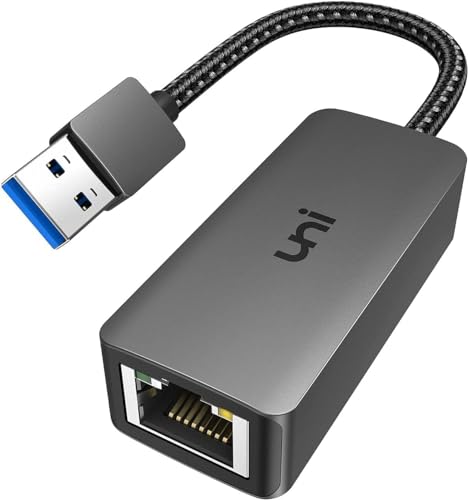
The uni USB to Ethernet Adapter provides 10/100/1000 Mbps wired connectivity via USB 3.0, while remaining backward compatible with USB 2.0 and USB 1.1. For 1 Gbps performance, using CAT6 or higher Ethernet cables is recommended. This plug-and-play device bridges an RJ45 Ethernet cable and a laptop with USB 3.0, minimizing setup. Note: Windows 11 may require a driver, available in the product documents.
Ideal scenarios include online classes, video conferences, large file downloads, and gaming where a stable wired connection reduces latency and interference from wireless networks. It’s described as secure and stable for everyday tasks, though not recommended for television streaming in some setups.
UGREEN 2.5Gb Ethernet Adapter

The UGREEN USB to Ethernet Adapter supports up to 2.5 Gbps, enabling faster downloads, smoother streaming, and better performance with NAS and high-speed networks. It uses an RTL8156BG chip to maintain peak performance with low power consumption and cooler operation. The device offers an easy upgrade path from 1 Gbps to 2.5 Gbps by pairing with 2.5 Gbps-capable routers or switches. It’s designed for users upgrading legacy devices to higher-speed networks while preserving portability and simplicity.
Consider this option when upgrading an older laptop’s wired connectivity or when you anticipate future network upgrades at home or in a small office. It’s particularly beneficial for content creators or heavy downloaders who want sustained throughput without upgrading multiple devices.
USB WiFi Adapter AX900

The AX900 USB WiFi 6 adapter brings 5 GHz and 2.4 GHz dual-band performance with up to 900 Mbps theoretical speed. It’s designed to improve signal strength, penetration, and overall wireless reliability, especially for HD streaming, video meetings, and gaming. The installation is driver-free for Windows 7/8/10/11, with occasional driver needs on some systems. It’s not compatible with macOS or Linux in its listed form, making it best for Windows-based laptops seeking a quick WiFi upgrade without internal card changes.
When choosing a wireless upgrade, consider home WiFi coverage quality, distance from the router, and whether your use case benefits more from WiFi 6’s efficiency or simply stronger signals in challenging spaces. This adapter offers straightforward setup and a meaningful boost for compatible Windows machines.
Denlane Ethernet Splitter 1 To 4

The Denlane Ethernet Splitter converts a single Gigabit Ethernet port into four ports, enabling simultaneous connections for multiple devices such as PCs, laptops, TVs, and other networked devices. It supports up to 1000 Mbps and highlights that actual speeds depend on network conditions and cabling. The splitter is powered via a USB cable and does not require extra software or drivers, simplifying deployment in a home office or entertainment setup.
Use cases include expanding ports on a router’s edge or distributing network access across several devices without swapping hardware. Remember that actual throughput is shared and subject to the capabilities of connected equipment and network plan.
USB Ethernet Network Adapter (Eiszuso)

The Eiszuso USB Ethernet Network Adapter emphasizes universal USB compatibility, linking to USB 2.0 and ensuring broad device support across Windows, macOS, and other OS variants. It targets quick, reliable wired connections for streaming, conferencing, and gaming, with a focus on travel-friendly design and compact form. The device is presented as a practical solution when wired performance is needed on devices lacking built-in ethernet or when a stable wired connection is preferred over upgrading internal network hardware.
Consider its strength in compatibility and portability. If your laptop or tablet primarily relies on USB-A ports and you frequently travel, this adapter can offer dependable wired access without complex setup.
ELUTENG Ethernet Splitter 1 To 2

The ELUTENG 1-to-2 Ethernet Splitter expands a single Gigabit port into two outputs, allowing two devices to be networked simultaneously. It supports up to 1000 Mbps with attention to potential crosstalk and the overall network speed, noting that actual performance depends on connected devices and cabling. The device is housed in an aluminum alloy case for better heat dissipation and durability, with a stated reach of up to 100 meters for stable transmission in longer runs.
When evaluating splitters, consider how many devices need wired access, your router’s capacity, and cable quality. This option is well suited for desks where both a laptop and a gaming console or smart TV require wired connections without adding extra hubs or power adapters.
Buying Guide: Key Purchase Considerations
- Connection type: Choose between wired USB-to-Ethernet adapters for stability and speed, or wireless USB adapters for flexibility when a wired port is not available or practical.
- Speed and compatibility: Look for devices that match your network plan—1 Gbps is common, while 2.5 Gbps or WiFi 6 may be worthwhile for future-proofing. Ensure compatibility with your operating system and hardware ports (USB-A vs USB-C).
- Ease of use: Plug-and-play options reduce setup time; note any driver requirements listed by the manufacturer for your OS version.
- Hardware quality: Aluminum housings and heat management support reliability during long sessions. Durable connectors help maintain steady connections over time.
- Port expansion: If you need multiple devices on a single network line, splitter/ hub solutions can help, but be mindful that throughput is shared across devices and may be limited by your overall network and cable quality.
- Cable and router considerations: For wired adapters, ensure you have quality Ethernet cables (Cat 6 or better) and a router capable of the adapter’s speed to realize full performance.
- Portability: For travel, compact, driver-free adapters reduce hassles and ensure quick setup on the go.
These devices collectively address common laptop networking needs: upgrading slow wireless performance, adding reliable wired connectivity, and expanding port options without major hardware changes. When selecting, consider your primary use case (gaming, streaming, conferencing), the environment (home, office, travel), and future-proofing goals for your home network.