Finding the right internet access card for a laptop can boost speed, stability, and range. This article highlights top USB and PCIe options, compares key features, and explains what to consider for different setups—whether you’re upgrading an old laptop or building a compact travel rig. Each product below is selected for reliable performance, broad compatibility, and clear benefits for American users seeking faster wireless connectivity.
| Product | Brand | Type | Key Benefit |
|---|---|---|---|
| 300Mbps USB WiFi Adapter | LOTEKOO | USB Wireless Adapter | Plug-and-play on Windows 10/11, broad Windows/Mac compatibility |
| AX900 Wi-Fi 6 USB Adapter | LIVINGTHING | USB Wireless Adapter | WiFi 6 speeds, dual-band for fast, reliable connections |
| AX210HMW WiFi 6E Card | EDUP | Mini PCIe/NGW Card | Tri-band 6E with Bluetooth 5.3, MU-MIMO, high-throughput |
| 4G LTE USB Dongle | EIOTCLUB | USB WiFi 6 Dongle with SIM | Portable hotspot with pre-installed SIM and data |
| Nineplus USB WiFi 6 Adapter | Nineplus | USB Wireless Adapter | AX1800 speeds, easy driver-free setup on Windows |
The products below are organized to help you compare form factors, speed class, platform support, and setup complexity. Each entry includes a direct link to purchase for convenient access.
LOTEKOO 300Mbps USB WiFi Adapter

The LOTEKOO wireless adapter uses IEEE 802.11n/g/b standards with a RTL8192EU chipset for up to 300Mbps in the 2.4GHz band. It offers broad compatibility with PC, laptop, and desktop systems and supports Windows 11/10/8.1/8/7/XP and Mac OS versions 10.4–10.8 (not compatible with newer MacOS 10.9–10.15) as well as Linux. Notably, installation is plug-and-play for Windows 10/11, with a flashing indicator showing active connectivity. This option suits older laptops needing a simple upgrade without driver hassles.
LIVINGTHING AX900 Wi-Fi 6 USB Adapter

The AX900 delivers WiFi 6 (802.11ax) speeds up to 900Mbps with dual-band support (5GHz and 2.4GHz) and a 7dBi external antenna for improved range. It claims driver-free installation on Windows 7/11/10, with automatic driver setup when connected to a USB 3.0 port. The adapter emphasizes faster speeds, better signal penetration, and reduced latency for streaming, gaming, and large downloads. It notes compatibility is best on Windows platforms and may not support macOS or Linux.
EDUP AX210HMW WiFi 6E Card

Powered by the Intel AX210 NGW module, this wireless card supports MU-MIMO, 160MHz bandwidth, OFDMA, and 1024-QAM for fast, stable connections. It offers tri-band capability (2.4GHz, 5GHz, 6GHz) with speeds up to 5400Mbps and Bluetooth 5.3 for peripheral devices. While designed for laptops and compatible mini PCIe slots, some systems may require BIOS or firmware adjustments. It’s a strong upgrade option for users seeking cutting-edge WiFi 6E performance with Bluetooth integration.
EIOTCLUB 4G LTE USB WiFi 6 Dongle
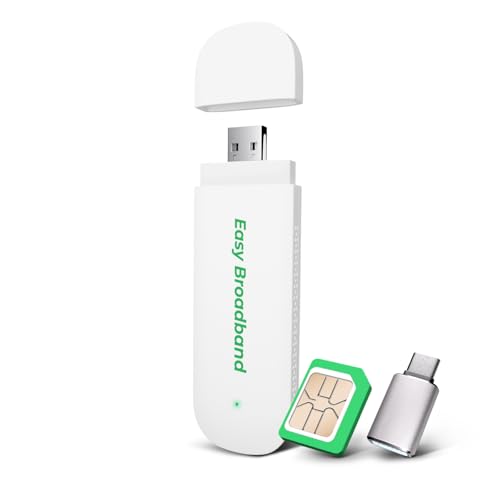
The EIOTCLUB dongle doubles as a portable hotspot with a pre-installed SIM card and a 1GB trial plan, supporting up to 10 devices. It uses a USB interface for power and quick setup, making it ideal for travel, car use, or temporary work sites. It’s designed for US users with flexible, pay-as-you-go plans, and emphasizes portability and ease of use over traditional PC-based WiFi upgrades. This is best for scenarios where cellular access is preferred or required.
AX210HMW WiFi Card (Mini PCIe)

EDUP’s AX210HMW is a mini PCIe WiFi 6E card with tri-band support and Bluetooth 5.3. It’s designed for compatible laptops and mini PCs with a mini PCIe interface and aims to deliver high throughput, MU-MIMO, and improved wireless management. While installation versatility is a key feature, compatibility varies by device model, BIOS, and slot availability. Potential buyers should verify laptop compatibility and BIOS settings before upgrading.
EM7345 4G LTE Module (ThinkPad Friendly)

The EM7345 4G LTE module provides LTE/HSPA+ support with an open SIM approach, designed for ThinkPad models and similar systems. It supports EMEA regions, Australia, and New Zealand. This module is intended for users who need cellular data as a primary or backup internet source and are comfortable with hardware-level installation and configuration. It’s less about WiFi and more about cellular WAN integration for laptops that require long-range or mobile data access.
Buying Guide: How To Choose The Right Internet Access Card For A Laptop
- Internet standard and speed: Consider whether you need WiFi 6/6E for high-throughput tasks like gaming or 4K streaming, or if a basic 802.11n/g/b adapter suffices for light browsing.
- Interface compatibility: USB adapters are universal for laptops, while PCIe or Mini PCIe cards suit desktops or compatible laptops. Check your device’s slots and BIOS compatibility for internal modules.
- Operating system support: Ensure the adapter’s drivers are available for your OS version. Some devices advertise driver-free installation on specific Windows versions but may require manual drivers on others.
- Coverage and antenna design: External antennas and dual-band or tri-band support can extend range and reduce dead zones, especially in larger homes or offices.
- VPN and security considerations: Look for adapters with up-to-date encryption support and compatibility with VPN software used in your environment.
- Cellular alternatives: If constant WiFi is unavailable, portable cellular hotpots or SIM-enabled dongles offer on-the-go connectivity, but consider data plans, coverage, and roaming needs.
- Ease of setup: Driver-free or plug-and-play options save time, but ensure you can still customize settings like network bands, channel width, and security if needed.
- Device compatibility notes: Some models list limited macOS or Linux support. Verify compatibility with your specific laptop model and year, especially for internal PCIe cards.