If you’re expanding storage or refreshing an aging PC, a reliable internal hard drive mounting kit can simplify the upgrade. These kits help you convert and adapt 2.5″ drives (HDD or SSD) to fit into 3.5″ drive bays, with included cables and screws for a quick, tidy install. The following picks are popular, compatible with typical desktop cases, and designed to maximize space and airflow without sacrificing performance.
Summary of selected products:
| Product | Brand | Key Benefit | Typical Use |
|---|---|---|---|
| SABRENT 3.5 Inch to x2 SSD / 2.5 Inch Mounting Kit | SABRENT | Includes power and data cables; quick install | Convert two 2.5″ drives to 3.5″ bays; ideal for dual-SSD setups |
| SABRENT 2.5 Inch to 3.5 Inch Mounting Bracket Kit | SABRENT | Easy conversion for single 2.5″ drive | Turn a 2.5″ HDD/SSD into a 3.5″ bay for standard desktops |
| Corsair Dual SSD Mounting Bracket | Corsair | Supports up to two 2.5″ drives in a 3.5″ bay | Flexible, broad compatibility for desktop cases |
| Kingwin Internal Mounting Kit | Kingwin | Quick install for 2.5″ to 3.5″ | Converts two 2.5″ drives for use in 3.5″ bays |
| Cable Matters 2-Pack 2.5 to 3.5 Hard Drive Adapter | Cable Matters | All-in-one kit with cables and screwdriver | Install two SSDs or HDDs in a 3.5″ bay |
SABRENT 3.5 Inch to x2 SSD / 2.5 Inch Mounting Kit

This SABRENT kit is designed to accept up to two 2.5″ drives and convert them into a single 3.5″ drive bay. It ships with a Molex to dual SATA power splitter and two SATA data cables, plus a screw pack for securing drives. Quick and simple installation minimizes the time needed to upgrade storage in a desktop. The included power and data cables help maintain cable management and reduce clutter inside the case.
Features to note: The kit provides a Molex 4-pin to two 15-pin SATA power split, two SATA data cables, and mounting screws. It is especially handy for users upgrading laptops drives or adding a pair of SSDs in a compact desktop with limited bays. The assembly is straightforward, making it accessible for beginners and advanced builders alike.
SABRENT 2.5 Inch to 3.5 Inch Internal Mounting Bracket Kit

This mounting bracket converts a single 2.5″ hard drive into a 3.5″ drive bay, compatible with all 2.5″ HDDs and SSDs. Installation is quick, and the kit is suitable for expanding an older desktop to accommodate additional small-form-factor drives. It’s a cost-effective solution for adding a robust storage option without repositioning other components inside the case.
Corsair Dual SSD Mounting Bracket
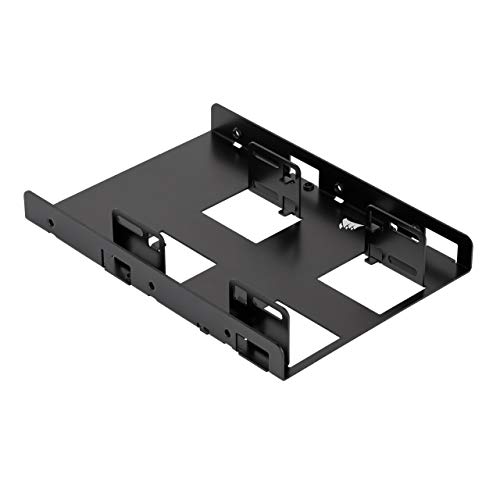
The Corsair mounting bracket enables the use of up to two 2.5″ SSDs in a single 3.5″ drive bay. It’s compatible with cases that offer at least one 3.5″ bay and supports 7mm and 9.5mm height SSDs. This solution emphasizes simple, tool-free installation and broad case compatibility, making it a practical upgrade path for modern desktops seeking faster SSD performance without chassis changes.
Kingwin SSD Hard Drive Mounting Kit

Kingwin’s internal mounting kit converts two 2.5″ drives into a single 3.5″ drive bay. It is designed for quick and easy installation, compatible with all 2.5″ drives (HDD/SSD). The kit is particularly useful for multi-drive builds where maximizing space inside the case is a priority, helping to standardize drive alignment and improve airflow within the chassis.
Cable Matters 2-Pack 2.5 to 3.5 Hard Drive Adapter

Cable Matters offers a two-pack 2.5″ to 3.5″ adapter set, including screws, data and power cables, and a screwdriver. It supports mounting two drives and is designed for easy integration into most desktop cases. The included SATA cables support up to 6Gbps, ensuring compatibility with modern SSDs and HDDs. This kit is well-suited for users who want a complete, ready-to-install solution with minimal extra tools.
Dual 2.5 to 3.5 Drive Bracket Kit
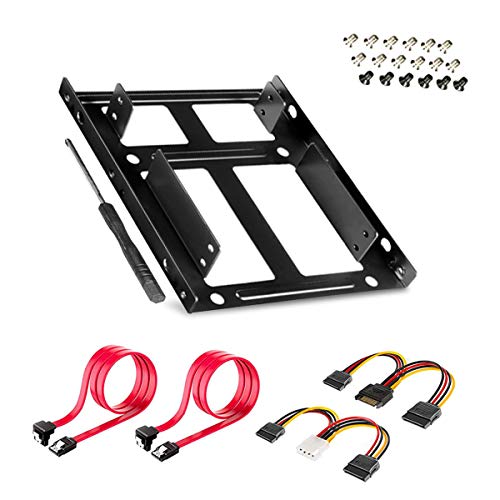
W WDX Dynapoint’s dual bracket converts two 2.5″ drives into one 3.5″ drive bay. It includes a screwdriver and screws to facilitate quick mounting, along with two SATA power cables and two SATA data cables. The design emphasizes straightforward installation, enabling a clean upgrade path for both SSD and HDD pairs in desktop builds.
DecorStat 2.5” SSD to 3.5” Adapter

DecorStat offers a 2.5″ to 3.5″ mounting adapter designed for desktops. It supports a range of 2.5″ drives and SSDs with heights up to 15mm, and includes simple plug-and-play installation. The kit’s compatibility with Windows, macOS, and Linux makes it a versatile choice for mixed operating environments or multi-OS setups in a single machine.
Buying Guide: Key Considerations for Choosing an Internal Drive Mounting Kit
- Drive compatibility: Ensure the adapter supports your drive type (HDD vs SSD) and height (7mm, 9.5mm, 12.5mm, 15mm). Some kits explicitly state compatibility with SSDs.
- Number of drives: Decide if you need a single-drive bracket or a dual-drive solution. Dual-drive kits are useful for RAID setups or maximizing storage density in limited bays.
- Ease of installation: Look for screwless or tool-free designs if you want quick upgrades. Included screws and cables simplify the process.
- Cables and power: Confirm the kit includes SATA data cables and a reliable power solution (often power splitters from Molex or SATA power). Ensure cable length fits your case dimensions.
- Cable management: Consider kits with organized routing options to minimize clutter and improve airflow inside the case.
- Case compatibility: Check that the bracket fits the case’s form factor and the available 3.5″ drive bay. Some kits are more suited to mid-tower or full-tower cases.
- Build quality: Metal brackets tend to be sturdier than plastic alternatives. Pay attention to the presence of mounting screws and the overall robustness of the brackets.
- Future-proofing: If you plan to upgrade further, choose a kit that supports multiple drives or higher-speed connections (SATA III compatibility is common and advisable).
- Avoiding vibrations: Some brackets include damping features or tighter tolerances to reduce drive vibration, which can improve acoustics and longevity.
- Warranty and support: Look for brands with solid customer support and a reasonable warranty period in case parts are missing or damaged during installation.
When selecting a kit, weigh the number of drives you intend to mount, the physical space within your case, and your preference for screwless installation versus a more traditional approach. The right kit should simplify upgrades, maintain clean cable management, and support stable, reliable operation for your system’s workload.