If you’re expanding or recovering data from older drives, a reliable IDE docking station with USB 3.0 offers quick access to both IDE and SATA drives. This guide highlights five compatible options, focusing on ease of use, fast transfer speeds, and broad drive support. Each product supports 2.5″ and 3.5″ drives, with USB 3.0 interfaces that deliver high-speed data transfer for backups, cloning, and file retrieval.
| Product | Brand | Key Features | Drive Types |
|---|---|---|---|
| SABRENT USB 3.0 to SATA External Hard Drive Docking Station | SABRENT | 2.5/3.5″ SATA; USB 3.0; UASP; hot-swappable | SATA I/II/III |
| StarTech.com Dual-Bay USB 3.0 to SATA and IDE Docking Station | StarTech.com | 2 bays; hot-swap; independent power and eject; supports IDE and SATA | SATA I/II/III; IDE |
| ORICO External USB 3.0 to SATA HDD Docking Station | ORICO | Lay-flat design; UASP; up to 24TB; 5Gbps | SATA I/II/III |
| Zopsc USB 3.0 SATA/IDE Docking Station (Three-Bay) | Zopsc | Three bays; offline clone; fast USB 3.0; card slots | SATA I/II/III; IDE |
| Tccmebius TCC-S865 USB 3.0 to SATA IDE Dual Slots Dock | Tccmebius | 2 bays; USB 3.0; one-touch backup; integrated card reader | SATA I/II/III; IDE |
Below, five selected IDE docking stations are reviewed with objective, feature-focused details to help you compare options quickly. Each section includes a direct link to the product page for easy access.
SABRENT USB 3.0 to SATA Dock

The SABRENT dock supports all common 2.5″ and 3.5″ SATA drives, with USB 3.0 connectivity for speeds up to 5 Gbps using USB Attached SCSI Protocol (UASP). It emphasizes easy setup with tool-free design and hot-swapping capability, making it suitable for quick data transfer, imaging, or backups. The dock is OS independent and designed for reliable, straightforward use with a focus on compatibility across drive types.
StarTech.com Dual-Bay USB 3.0 Dock
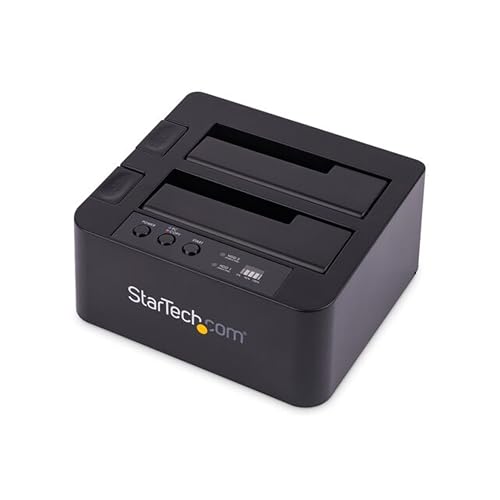
This StarTech model offers two bays for simultaneous access to SATA and IDE drives, with a dedicated slot for each protocol. The toolless design supports hot-swapping while the independent bays let users back up or clone without a computer. It ships with essential cables and a universal power adapter, and it’s built to endure frequent drive insertions with high cycle-rated bays.
ORICO USB 3.0 External Dock
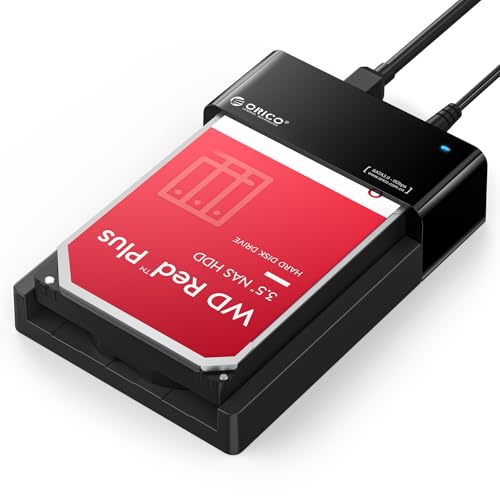
ORICO’s lay-flat dock combines USB 3.0 performance with UASP support, accommodating up to 24TB across 2.5″ and 3.5″ drives. The lay-flat form factor improves cooling and access in tight spaces, and the dock is designed for quick data transfers, backups, and cloning tasks. It’s a practical, all-in-one solution when you need high capacity and straightforward operation.
Zopsc Three-Bay USB 3.0 Dock
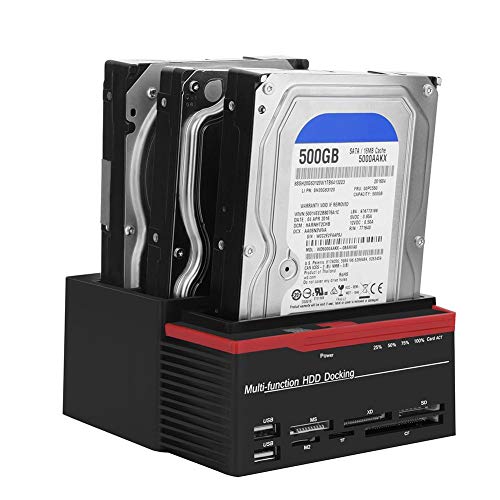
Designed for multi-drive setups, the Zopsc three-bay unit supports 2.5″ and 3.5″ SATA and IDE drives and includes an offline clone feature. Its USB 3.0 interface offers fast data transfer, with an additional set of USB 2.0 ports and integrated card readers for expanding media access. The standalone clone capability helps migrate drives without a computer, which can save time during large-scale upgrades.
Tccmebius Dual-Slot USB 3.0 Dock

The Tccmebius dual-slot dock provides 2 bays for 2.5″ and 3.5″ IDE/SATA drives with USB 3.0 connectivity. It features an integrated card reader and a one-touch backup function, enabling quick data copying from computer to external drives. The design emphasizes straightforward operation, making it appropriate for archiving, backups, or rapid file retrieval when working with mixed drive types.
Buying Guide
When choosing an IDE docking station with USB 3.0, consider drive compatibility, transfer speeds, and convenience features. Key factors include:
- Drive support: Ensure the dock handles 2.5″ and 3.5″ drives, and supports IDE and SATA I/II/III formats as needed. Some models support additional memory card readers, which can help with quick media access.
- Data transfer performance: USB 3.0 (up to 5 Gbps) provides fast transfers. Some docks also offer USB 3.1/3.2 or UASP for better throughput.
- Power and cooling: Look for a reliable power supply and lay-flat or open-frame designs that promote heat dissipation during long transfers or cloning sessions.
- One-touch features: One-Touch Backup or clone functions can simplify repeated tasks, especially for backups or archiving workflows.
- Cloning capability: Some docks support offline cloning, which copies data between drives without a PC. This is helpful for large migrations or duplication tasks.
- Ease of use: Tool-free installation, hot-swapping, and clear status indicators (LEDs) reduce setup time and improve user experience.
- Software compatibility: Some features require software (e.g., One-Touch Backup). Check OS compatibility and whether software supports your computer’s OS.
- Durability and warranty: Since these devices handle frequent drive changes, choose models with robust construction and a favorable warranty.
For most users, the best all-around choice combines USB 3.0 speed with reliable drive support, straightforward setup, and optional cloning or card-reader features. If you need three bays or offline cloning, heavier-duty units like Zopsc can be advantageous. If you require maximum compatibility with older IDE drives alongside SATA, a dual-slot dock from StarTech or SABRENT provides clear, dedicated pathways for each drive type while preserving hot-swap convenience.