Tech users seeking instant drive access and easy upgrades will find hot swappable hard drive docks indispensable. This guide highlights top docks that support 2.5″ and 3.5″ SATA drives, offer USB connections, and provide convenient plug-and-play operation. Each option below emphasizes speed, reliability, and tool-free usability for backups, data recovery, and rapid cloning tasks. Read on to compare features, compatible interfaces, and performance notes that matter most for American households and small offices.
| Product | Drive Support | Max Capacity | Interface | Key Benefit |
|---|---|---|---|---|
| ICY BOX Dock | 2.5″ & 3.5″ SATA | Up to 30TB | USB 3.0 (UASP) | Fast, universal compatibility |
| cenmate 4 Bay Enclosure | 2.5″ / 3.5″ SATA HDD/SSD | 80TB total | USB 3.0 | High capacity with cooling |
| ICY DOCK MB839SP-B | 1x 2.5″ SATA | 1 drive | PciExpress slot mounted adapter | Strong rugged design |
| StarTech SDock2U33 | 2 bays | Any capacity | USB 3.0 / eSATA | Independent bay control |
| MAIWO 5 Bay Dock | 5x 2.5″/3.5″ SATA | Up to 110TB | USB 3.0 | Offline clone capability |
ICY BOX 2.5/3.5-Inch Docking Station With USB 3.0

The ICY BOX docking station supports both 2.5-inch and 3.5-inch SATA drives, enabling quick access to SSDs and HDDs with a single device. Its tool-free design makes drive insertion simple, while USB 3.0 with UASP support delivers data speeds up to 5 Gbps. This dock is suitable for backups, data recovery, and rapid transfers, making it a versatile choice for mixed-drive setups. The plug-and-play operation minimizes setup time, as no screws or tools are required to start using a newly inserted drive.
CenMate 4 Bay Enclosure With Cooling Fan

This four-bay enclosure accepts both 2.5″ and 3.5″ SATA HDDs and SSDs, with a total potential capacity up to 80TB. Aluminum alloy construction plus an integrated cooling fan helps manage heat during extended data transfers, though fan noise can reach around 40-50 decibels for sensitive environments. USB 3.0 with UASP support enables fast file transfers, and the design emphasizes a compact desktop footprint suitable for business or personal use. It’s ideal for large-scale backups, multimedia libraries, and archival storage where space efficiency matters.
ICY DOCK 2.5-Inch Removable Bay Adapter For PCIe
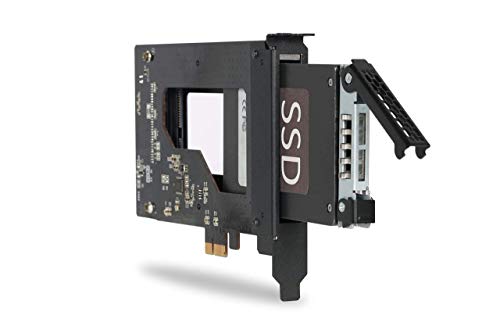
This compact accessory provides a rugged, removable 2.5-inch bay adapter designed for PCIe expansion cards and mission-critical systems. It supports a single 2.5-inch SATA drive (SSD or HDD) with heights ranging from 7mm to 9.5mm. While primarily aimed at enterprise and embedded applications, the unit’s sturdy metal construction and compatibility with PCIe slots make it a durable choice for specialized builds where hot-swapping is required in a controlled environment.
StarTech Dual-Bay USB 3.0 To SATA Dock

The StarTech SDock2U33 provides two bays for 2.5/3.5″ SATA drives and supports USB 3.2 Gen 1 transfer rates up to 5 Gbps, with top-loading, tool-less drive swapping. Independent power controls for each bay enable hot-swapping while one drive remains active. It’s OS independent and compatible with a broad range of SATA drives, including older SATA I/II devices. The dock is suitable for quick backups, disk imaging, and rapid data transfers across mixed drive ecosystems in creative studios and IT environments.
ICY DOCK 4 Bay Tool Free Mobile Rack

The ICY DOCK multi-bay mobile rack supports four 2.5″ SAS/SATA drives, with heights up to 9.5mm. It’s designed for 5.25″ external bays and supports SATA 6Gbps and SAS up to 12Gbps (SAS host required). This configuration is well-suited for high-throughput environments that demand flexible drive swapping within a larger external enclosure framework, such as media production workflows or backup stations with modular expansion.
MAIWO 5-Bay External Docking Station

MAIWO’s five-slot dock supports both 2.5″ and 3.5″ SATA drives and offers offline cloning between drives without a computer. Its claimed capacity expansion up to 110TB makes it a strong option for large backups and multimedia libraries. Data transfer speeds reach up to 5 Gbps with USB 3.0 and UASP optimization for improved efficiency. The offline cloning feature supports rapid duplication workflows, which can streamline IT tasks and disaster recovery preparations.
StarTech Dual-Bay Dock With eSATA

This StarTech model offers a dual-bay dock supporting 2.5/3.5″ SATA drives with USB 3.0 and eSATA interfaces. Its hot-swap capability and independent drive controls enable flexible workflows for backups, imaging, and transfers. The kit includes USB-A and eSATA cables plus a universal power adapter, making it a versatile plug-and-play solution for mixed environments where both USB and eSATA are desired for different devices and data transfer needs.
Terramaster D4-320 External Enclosure

The Terramaster D4-320 is a 4-bay USB 3.2 Gen2 external enclosure designed for hot-swappable operation. It supports up to 10Gbps with USB 3.2 Gen 2, and real-world read/write speeds can exceed 1,000 MB/s when using four drives, with individual disks functioning without a RAID setup. The unit supports up to 30TB per single drive and up to a total of 120TB when populated with four drives, covering a wide range of storage and backup scenarios. Mac, Windows, and Linux compatibility are emphasized for cross-platform use.
Buying Guide: Key Purchase Considerations
- Drive compatibility and capacity: Verify that the dock supports your drive sizes (2.5″ vs 3.5″), and check the maximum per-drive and total capacity to meet backup or archival needs.
- Interface and speed: USB 3.0/3.1/3.2 Gen 1 or Gen 2 each offer different throughput. UASP support improves performance with SSDs; consider eSATA for legacy setups if applicable.
- Number of bays and expansion needs: For small backups, a 2-bay dock may suffice; larger workflows benefit from 4 or 5 bays or a modular enclosure with hot-swap capabilities.
- Cooling and heat management: Enclosures with internal fans or aluminum housings help maintain drive health during long transfers, especially for busy servers.
- Hot-swapping and tool-free design: If rapid drive swapping is essential, prioritize docks with independent bay controls and tool-free operation to minimize downtime.
- Cloning and data protection features: Some multi-bay docks offer offline cloning, making it easier to duplicate drives without a computer—useful for backups and disaster recovery.
- Noise and form factor: Consider noise levels for quiet environments; enclosure materials and fans influence acoustic performance.
- Compatibility with operating systems: Most docks are OS-agnostic, but verify macOS, Windows, or Linux support if you have mixed systems.