Preserving old home videos often means digitizing them from VHS, Hi8, or DV tapes. The following selection highlights five reliable video capture and conversion devices designed to simplify the transfer to DVD or digital formats. Each product supports classic analog sources, offers easy plug-and-play operation, and stores memories to USB drives or SD cards. Read on to compare capabilities, inputs, outputs, and key features to choose the right tool for archiving your family footage.
| Product | ||
|---|---|---|
| Portta VHS to Digital Converter | Portta | Direct USB/SD storage with 1080P capture |
| VHS to Digital Converter 2.0 | DigitPro | 3.5″ preview screen and smart recording |
| Oassuose VHS to Digital Converter | Oassuose | PC/Mac capture via USB-A/USB-C |
| Roxio Easy VHS to DVD 3 Plus | Corel | Comprehensive editing and DVD burning |
| Techigher VHS to Digital Converter | Techigher | 2-in-1 VHS to digital and RCA to HDMI |
Portta VHS to Digital Converter (1080P, No PC Needed)

The Portta device is a stand-alone converter and recorder that digitizes analog video and audio to digital formats. It supports AV/RCA (CVBS+R/L), S-Video, and AUX inputs, with a recording resolution up to 1080P at 30Hz. It does not function as a standalone tape player; instead, it captures from connected sources and saves to USB drives or SD cards. A built-in 3.0-inch preview LCD allows on-device playback, and the unit outputs MP4 video and MP3 audio. This setup is ideal for quick archiving without a computer.
VHS to Digital Converter 2.0 (HD Capture, 1080P)

DigitPro’s model emphasizes one-touch digital conversion from VHS, VCR, and related devices to MP4, MP3, or WAV formats. It features a 3.5-inch HD preview screen with built-in speakers for real-time playback. The device records directly to USB or TF cards up to 512GB and supports NTSC/PAL formats. It also offers smart features like auto pause/resume on signal loss and scheduled recording, with HDMI output to view on a larger display. This option suits users seeking on-device review and scheduling alongside simple storage needs.
Oassuose VHS to Digital Converter (USB-C / USB-A)
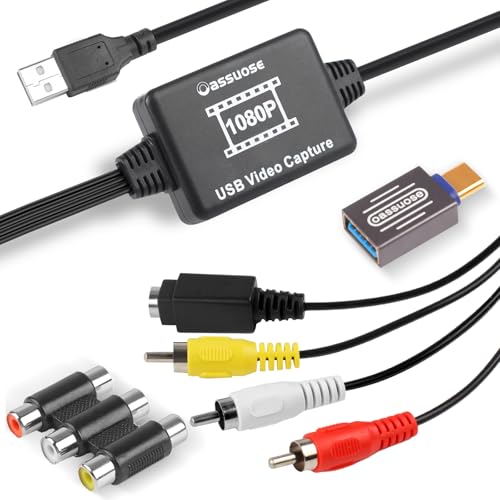
Oassuose focuses on PC and Mac compatibility, capturing VHS, VCR, DVD, Hi8, DV tapes, or camcorders via RCA or S-Video into USB-A or USB-C connections. The device digitizes to 1080P at 30fps and requires acquisition software on the computer for operation. It is a practical choice for users who want to edit or archive video on a computer after capture, offering straightforward plug-and-play setup and broad software compatibility.
Roxio Easy VHS to DVD 3 Plus

Roxio Easy VHS to DVD 3 Plus provides a comprehensive workflow for converting analog video to DVD or digital formats. It supports direct capture from camcorders or VCRs and includes editing tools to trim, enhance color, add transitions, reduce noise, and stabilize footage. This option is well-suited for users who want a polished final product ready for burning to DVD or sharing digitally across devices.
Techigher VHS to Digital Converter (VHS to HDMI, USB-C/USB-A)

Techigher offers a 2-in-1 solution that handles both VHS to digital conversion and RCA to HDMI display output. It supports USB-A and USB-C for universal compatibility, capturing via USB and allowing real-time viewing on HDMI displays. This device is ideal for households looking to preserve memories while also displaying them on modern screens without a separate capture setup.
avedio links VHS to Digital Converter (RCA/USB)
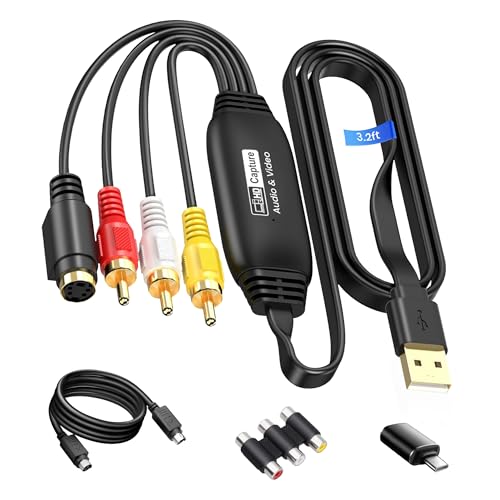
avedio links provides an RCA-to-USB capture pathway, supporting up to 1920×1080 at 30Hz. The device works with RCA and S-Video inputs and supports USB 2.0 or Type-C capture, making it versatile for older equipment and newer laptops. It emphasizes broad OS compatibility and straightforward plug-and-play operation, suitable for users who want a reliable PC-based digitization workflow.
Portta VHS To Digital Converter With 128GB USB Drive

This Portta bundle adds a 128GB USB 3.0 flash drive for immediate storage. Like other Portta models, it supports AV/RCA, S-Video, and AUX inputs with a 1080P 30Hz recording limit. It uses a built-in preview LCD and plays back saved content directly from the device. The included memory card helps reduce extra shopping trips and speeds up the digitization workflow.
Buying Guide: Key Considerations For Picking The Right VHS To Digital Device
- Input Compatibility: Check whether the device supports your source formats (RCA, S-Video, AV, and HDMI out, where available). Some units accept only analog inputs, while others offer HDMI passthrough for live viewing on modern displays.
- Storage Options: Decide between USB flash drives, SD/TF cards, or internal memory. Larger capacities are useful for long video sessions, but ensure the device can handle the drive size and file formats you prefer.
- Output Formats: Look for MP4 or MOV for digital archiving, and MP4/MP3/WAV for audio. Some models offer direct DVD burning, while others require a computer for editing and burning.
- On-Device Preview: A built-in screen (e.g., 3.5-inch LCD) helps preview recordings and verify quality without connecting to a TV or computer.
- PC/Mac Compatibility: If you plan to edit or archive on a computer, confirm support for Windows, macOS, and any required software or drivers. Some devices are fully plug-and-play, while others rely on compatible capture software.
- Smart Features: Features such as auto pause/resume, scheduled recording, time watermark, and batch conversion can save time when digitizing large collections.
- Ease Of Use: Plug-and-play operation, guided setups, and clear audio/video settings reduce the learning curve for first-time users.
- Durability And Support: Look for reliable customer support, warranty coverage, and clear instructions or tutorials to troubleshoot common issues.
Choosing the right home video transfer device depends on whether you prioritize standalone recording without a PC, or a PC-based workflow with editing tools. For quick archiving, standalone converters with USB/SD storage and on-device playback are convenient. For enhanced editing and custom DVDs, consider options with robust software, trimming tools, and more precise color adjustments. Across these five picks, you can build a practical, scalable solution for preserving cherished footage for future generations.