Whether you’re backing up family devices, streaming media across rooms, or creating a private multimedia library, a home network attached storage (NAS) device can simplify everything. This guide reviews five reliable NAS options focused on easy setup, cross‑device compatibility, and scalable storage. Each pick supports multi‑user access over your home network, with features like remote access, personal cloud, and robust data protection. Use this overview to compare capacities, performance, and user friendliness for a true private cloud experience at home.
Summary Table of Selected Products
- BUFFALO LinkStation 210 — 4TB, 1-Bay NAS, RAID capable
- BUFFALO LinkStation 210 — 6TB, 1-Bay NAS, RAID capable
- BUFFALO LinkStation 710 — 8TB, 1-Bay NAS, enhanced features
- UGREEN NAS DH2300 — 2-Bay, Diskless starter, beginner friendly
- YGren (Yxk) Zero1 — 2-Bay, Diskless, private security & remote access
Buffalo LinkStation 210: 4TB One‑Bay NAS With Private Cloud
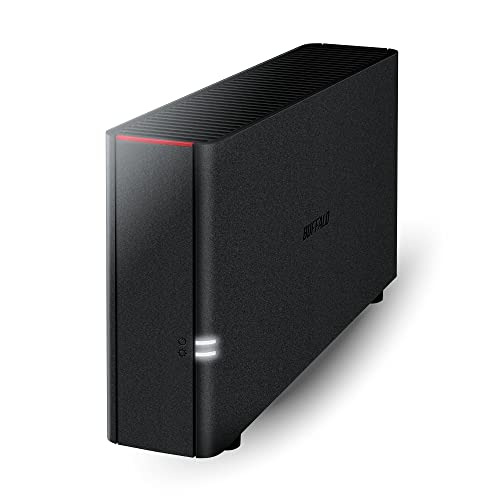
Buffalo’s LinkStation 210 is a value‑oriented NAS that emphasizes centralized storage and backup for multiple devices. It includes a hard drive and supports RAID configurations to protect data across a single bay. The device is designed to plug into your router, creating a shared storage space accessible from Windows and macOS ecosystems. Buffalo provides US‑based support for installation guidance, making it a practical option for households seeking a straightforward private cloud setup. The model is positioned as an affordable entry point for households needing reliable on‑premises storage without ongoing subscriptions.
Buffalo LinkStation 210: Expanded 6TB One‑Bay NAS
This 6TB variant delivers the same core value proposition as the 4TB model but with added storage capacity for larger media libraries or backups. Like other LinkStations, it connects to your router to enable shared network storage across devices and supports Windows and macOS. The “subscription‑free” private cloud angle remains a highlight, allowing users to store, back up, and access media and documents from anywhere on your home network without monthly fees. The device targets households needing a simple, scalable NAS with RAID protection for essential data.
Buffalo LinkStation 710: High‑Capacity 8TB Private Cloud NAS

The LinkStation 710 expands capacity and performance with an 8TB single‑bay design that aligns with Buffalo’s emphasis on cloud‑like features without ongoing costs. It provides enhanced features and cloud capabilities while maintaining compatibility with Windows and macOS. The model supports MacOS 26 and earlier ecosystems and remains backed by Buffalo’s 24/7 US support for setup assistance. For households growing their digital libraries, this option offers robust storage with straightforward network sharing and personal cloud capabilities.
UGREEN NAS DH2300: Beginner‑Friendly 2‑Bay Desk NAS

UGREEN’s DH2300 is positioned as an entry‑level NAS designed for users new to private cloud storage. It is a 2‑bay enclosure that supports up to 60TB with disk drives added, and it emphasizes easy use with automatic backups and cross‑device data syncing across Windows, macOS, iOS, and Android. While it’s diskless by default, its feature set targets households seeking a private storage hub that can grow over time, with a straightforward app and remote access capabilities. It does not support Docker or virtual machines, keeping complexity low for beginners.
Yxk Zero1: 2‑Bay NAS With Private Security And Remote Access

The Yxk Zero1 2‑Bay NAS emphasizes data integrity and remote access with enterprise‑grade features like RAID redundancy and snapshot recovery. It is designed for scalable capacity without ongoing cloud fees, offering one‑time hardware investment for true ownership. Setup is streamlined via a QR code and supported by a comprehensive mobile/desktop app for consistent control. This model targets households that want stronger resilience and easier remote management while maintaining a straightforward user experience for private cloud storage at home.
UGREEN NAS DH4300 Plus: 4‑Bay Private Cloud Starter

The DH4300 Plus from UGREEN is a 4‑bay NAS designed for home storage with higher capacity and remote access. It supports Docker but not virtual machines, making it suitable for users who want to run lightweight apps and media servers locally. The device advertises 120TB capacity possibilities with disks installed and offers a beginner‑friendly app experience for Windows, macOS, Android, iOS, web browsers, and smart TVs. Remote access across devices is a core selling point, enabling a flexible private cloud for households with growing media and backup needs.
Asustor Drivestor 2 Lite: Compact 2‑Bay Private Cloud

Asustor Drivestor 2 Lite provides a compact 2‑bay NAS with a quad‑core processor and 1GbE networking, suitable for basic home backups, media streaming, and private cloud tasks. It ships with 1 GB RAM and supports Wake on LAN for convenient remote wake‑ups. The device targets households needing reliable local storage with simple remote access and media handling, while offering the option to expand storage with compatible drives. It is positioned as a cost‑effective, private cloud solution for small homes or offices with modest performance demands.
Buying Guide: Key Purchase Considerations
When selecting a home NAS, consider capacity needs, drive configuration, and network performance. A single‑bay NAS is budget‑friendly and compact but lacks redundancy unless paired with RAID on compatible models. A multi‑bay NAS improves data protection and expansion flexibility, but may come with a higher upfront cost. Look for:
- Capacity and scalability: Estimate current needs and future growth; check whether the NAS supports expansion bays or higher‑capacity drives.
- RAID levels and data protection: RAID 1/5/6/10 options protect data against drive failure; ensure your chosen model supports the RAID configuration you want.
- Remote access and private cloud: Confirm whether the device provides secure remote access without ongoing subscription fees and supports cross‑platform access (Windows, macOS, iOS, Android).
- App ecosystem and media features: A robust app suite and media server capabilities (DVR, transcoding, DLNA, Plex compatibility) improve daily use.
- Performance and hardware: Processor speed, RAM amount, and network interfaces (1GbE vs 2.5GbE) influence streaming quality and backup speeds.
- Ease of setup and support: Beginner‑friendly interfaces and vendor support help minimize setup time and troubleshooting.
- Disk compatibility: If selecting diskless options, plan for compatible HDDs/SSDs and expected total drive bays.
For households prioritizing simple plug‑and‑play storage, entry‑level 2‑bay systems can cover backups and streaming. If you want to store large media libraries or run apps locally, a 4‑bay or higher system with robust RAM and remote access options provides more headroom. Consider your Wi‑Fi network reliability as well; NAS devices benefit from a wired connection to the router for most stable access.
In a multi‑device home, the choice often comes down to balance between price, capacity, and ease of use. The models reviewed here offer a range of capacities and feature sets, from beginner friendly options to more scalable, advanced private cloud solutions. Each supports centralized storage and cross‑device access, making them solid candidates for building a private home storage network without ongoing cloud fees.