Choosing a high speed cable modem with built‑in WiFi can simplify your setup and boost home network performance. The models below pair DOCSIS 3.1 technology with reliable WiFi to support streaming, gaming, and smart devices. Each option is vetted for compatibility with major U.S. providers and capable of handling fast plans without renting equipment.
The selected products cover a range from compact, all‑in‑one units to more scalable setups. Consider coverage area, maximum wireless speed, ports, and whether you prefer a combo device or a modem plus a separate router. Use the Buying Guide after reviewing the product highlights for key decisions.
| Product | Brand | WiFi | Max Speeds | Notes |
|---|---|---|---|---|
| NETGEAR Nighthawk CAX30 | NETGEAR | WiFi 6 AX2700 | 2.7 Gbps | Up to 2,000 sq ft, 25 devices |
| Motorola MG8702 | Motorola | AC3200 | 3200 Mbps | Power Boost, AnyBeam |
| ARRIS G18 | ARRIS | WiFi 6 AX1800 | AX1800 | Dual‑band, fast DOCSIS 3.1 |
| ARRIS SB8200 | ARRIS | Modem only | up to 2 Gbps | Requires router |
| NETGEAR Nighthawk CM3000‑1AZNAS | NETGEAR | DOCSIS 3.1 modem | Up to 2.5 Gbps | Works with existing router |
NETGEAR Nighthawk Modem Router Combo (CAX30)

The NETGEAR Nighthawk CAX30 combines a DOCSIS 3.1 modem with a WiFi 6 router. It supports major providers such as Xfinity, Spectrum, and Cox, while excluding Verizon, AT&T, CenturyLink, and DSL services. It covers up to 2,000 sq ft and handles up to 25 devices. It includes four 1 Gig Ethernet ports (with port aggregation) and a USB 3.0 port for wired peripherals.
Motorola MG8702 Cable Modem + Wi‑Fi Router
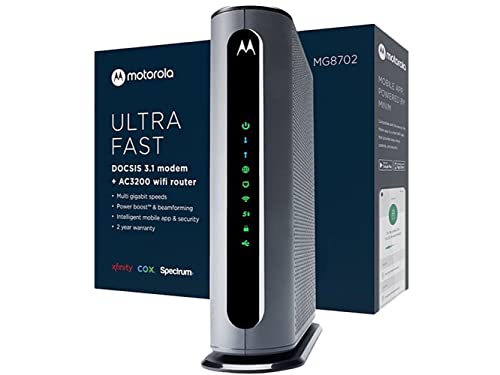
Motorola MG8702 combines a DOCSIS 3.1 cable modem with an AC3200 Wi‑Fi router. It supports high‑speed cable plans and includes Power Boost, Range Boost, and AnyBeam for improved coverage. This unit is designed to deliver faster wireless performance while potentially lowering rental costs compared to renting from a provider.
ARRIS G18 Cable Modem Router Combo

The Arris G18 is a DOCSIS 3.1 multi‑gigabit modem/router combo featuring WiFi 6 AX1800. It is approved for major providers like Comcast Xfinity, Cox, and Spectrum. The dual‑band WiFi 6 ensures faster wireless performance across many devices, with a streamlined design for a tidy home network.
ARRIS SB8200 DOCSIS 3.1 Modem
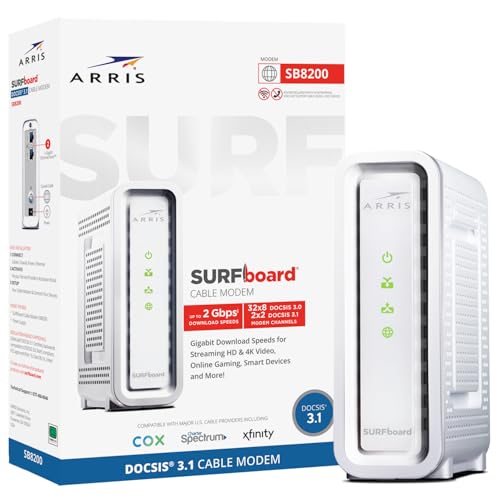
ARRIS SB8200 is a DOCSIS 3.1 modem with two 1‑Gig Ethernet ports. It supports cable internet plans up to 2 Gbps and works with Xfinity, Cox, and Spectrum. It is a modem‑only device, so a separate router is required for WiFi. It features a compact, modern design with LED indicators for status monitoring.
NETGEAR Nighthawk CM3000‑1AZNAS

The Nighthawk CM3000‑1AZNAS is a DOCSIS 3.1 modem designed for use with a separate router. It delivers up to 2.5 Gbps download capability and is compatible with most major providers. It is intended for users who already own or plan to pair with a high‑performance router for maximum wireless throughput.
Buying Guide
- Compatibility: Verify your internet provider and plan maximums. Some devices are approved for major providers, while others exclude certain carriers.
- Modem vs. router: Decide between an all‑in‑one modem/router and a separate modem plus router. A combo unit simplifies setup; a modem plus router can offer more flexible upgrades.
- WiFi standard and coverage: WiFi 6/6E offers better speeds and capacity for busy homes. Consider range and device density when selecting a model.
- Ports and features: Look for enough Ethernet ports (and optional port aggregation), USB options, and any built‑in smart features like beamforming.
- Future‑proofing: DOCSIS 3.1 supports current and near‑future plans. If your plan is capped at lower speeds, a newer modem may still provide longevity.
- Rent vs. own: Owning a modem avoids monthly rental fees. Confirm any rental credits or compatibility with your cable service provider’s policies.
- Security and updates: Choose devices with regular firmware updates and robust security features to protect home networks.
- Physical setup: Ensure your home’s size and layout align with the device’s WiFi coverage capabilities or plan for additional access points or a mesh system.