Upgrade your PC’s wireless performance with compact, high-power Mini PCIe wireless cards. This guide highlights top options that combine speed, band support, and reliability for Windows 10/11 systems. Each entry includes key features and practical notes to help you compare capabilities like tri-band coverage, Bluetooth integration, and compatibility with various Mini PCIe slots. Use this overview to choose a card that fits your motherboard and networking needs, from Wi‑Fi 6/6E to newer Wi‑Fi 7 era devices.
Summary of chosen products:
- REKONG WiFi 6E MPE-AXE3000H – Ultra-fast tri-band with 6GHz, mini PCIe, Windows 10/11.
- Intel Dual-Band Wireless-AC 7260 – Reliable legacy option for 802.11a/b/g/n/ac support in Mini PCIe.
- AX210HMW – Wi‑Fi 6E, tri-band, Bluetooth 5.3, mini PCIe interface for laptops and mini PCs.
- LICAEVEY WiFi 7 Half Mini PCIe – High throughput with multi-band support and BT 5.4.
- Ableconn PEX-MP117 – Adapter to convert Mini PCIe to PCIe, enabling use of mPCIe cards in PCIe slots.
Buying decisions for high power Mini PCIe cards center on throughput, band support, hardware compatibility, and driver availability. The following sections explore each option with practical considerations, performance notes, and installation tips to help you optimize network performance in a compact form factor.
REKONG WiFi 6E Mini PCIe Card – MPE-AXE3000H

The REKONG MPE-AXE3000H is a WiFi 6E card designed to extend wireless capabilities into the 6GHz band, offering up to 5400 Mbps combined across 2.4 GHz, 5 GHz, and 6 GHz. It features OFDMA and MU‑MIMO support, 160 MHz channel width, and broad compatibility with Windows 10/11. The 6GHz band provides additional channels to reduce interference in networks with many devices. This card targets desktop PCs and laptops with mini PCIe interfaces that support Windows drivers from Intel or the seller’s support resources.
Key considerations:
- Tri-band performance (2.4/5/6 GHz) and 160 MHz channels offer high throughput for local networks and streaming.
- Driver availability is essential; check the Intel/REKONG driver center if needed.
- Compatibility depends on laptop or motherboard BIOS and mini PCIe slot type (half vs full height). Some ThinkPad/HP models may have compatibility caveats.
Intel 7260.HMW Dual Band Wireless-AC Card

The Intel 7260.HMW offers solid support for dual-band Wireless-AC with Bluetooth integration. As a legacy Mini PCIe card, it remains a viable option for older systems that require stable 802.11ac performance and broad driver maturity. It supports Bluetooth together with Wi‑Fi, providing a practical upgrade path for desktops and notebooks with older hardware.
Key considerations:
- Great for older systems needing reliable 802.11ac performance with Bluetooth.
- Driver updates are generally well-supported on Windows 10/11, though maximum performance may be limited compared to Wi‑Fi 6/6E adapters.
- Check slot compatibility (half-height vs full-height) and antenna connector arrangements on your motherboard.
AX210HMW WiFi 6E Card – Mini PCIe

The EDUP AX210HMW is a compact WiFi 6E module offering tri-band support (2.4/5/6 GHz) and Bluetooth 5.3. It targets laptops and small-form-factor PCs that use a Mini PCIe interface. With a theoretical maximum around 5400 Mbps across bands, this card is designed for high-throughput use cases such as 8K streaming or large file transfers, while also enabling modern Bluetooth peripherals through BT 5.3.
Key considerations:
- Mini PCIe form factor makes installation straightforward in compatible devices.
- Not all laptops support 6GHz; verify BIOS/UEFI and driver availability.
- Bluetooth 5.3 improves peripheral connectivity; ensure antenna setup provides proper BT range.
LICAEVEY WiFi 7 Half Mini PCIe Card
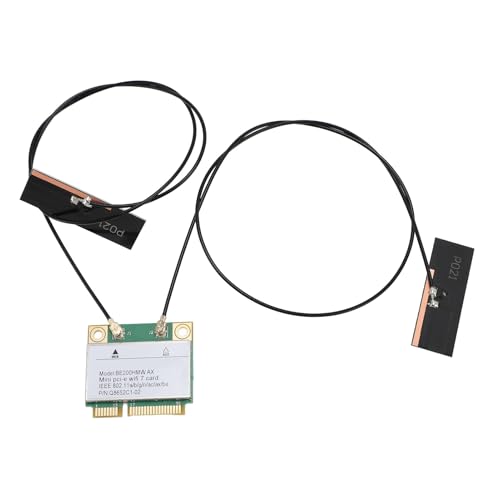
The LICAEVEY WiFi 7 Half Mini PCIe card is positioned for the next generation of wireless speed. It supports tri-band operation (2.4/5/6 GHz) with 6GHz band capabilities and MU‑MIMO, delivering up to 8774 Mbps total throughput in ideal conditions. Bluetooth 5.4 is included, along with improved channel management for dense network environments. This card targets desktop and laptop upgrades seeking top-tier performance and forward compatibility.
Key considerations:
- WiFi 7 aspiration with high throughput; real-world results depend on router capabilities and interference.
- Ensure your system has an appropriate Mini PCIe slot (half-height) and adequate antenna routing for optimal gains.
- Driver support and firmware updates are critical for stability in Windows 10/11 and Linux environments.
SUPERPLUS Mini PCI-E Express mSATA Extension Cable

The SUPERPLUS mPCI-E extension serves as a flexible accessory for wireless card installations. It supports Full-Size and Half-Size MiniCard adapters, and is designed to minimize signal degradation with a robust design. While not a wireless card itself, this extension can help position antennas for better reception in certain desktop builds or compact cases, making it a practical accessory for high-power Mini PCIe cards that require additional clearance.
Key considerations:
- Useful for adjusting card positioning to minimize EMI and optimize antenna placement.
- Check compatibility with your motherboard’s Mini PCIe slot and chassis clearance.
- Quality of extension affects signal integrity; ensure connectors are secure.
Buying Guide: What To Look For In A High Power Mini PCIe Card
- Band support: Tri-band (2.4/5/6 GHz) is common for WiFi 6E/7, while dual-band is adequate for older routers. Consider 6 GHz availability in your environment to reduce interference.
- Throughput vs. real-world performance: Theoretical speeds are high, but router capabilities, channel width, and network congestion affect actual performance.
- Interface and form factor: Mini PCIe is common in laptops and some desktops. Half-height vs full-height and antenna connector type compatibility matter for installation.
- Bluetooth integration: If you use Bluetooth peripherals, ensure the card includes Bluetooth 5.x for better range and efficiency.
- Driver support and OS compatibility: Confirm Windows 10/11 compatibility and availability of drivers from the vendor or Intel/EDUP/others. Linux support may vary.
- Antenna setup: Proper antenna placement and the possibility of upgrading antennas can significantly impact reception and speed, especially for high-power cards.
- Upgrade path: If you plan to migrate to WiFi 7, ensure your router and network environment can support the newer standards to realize full benefits.
In summary, the listed options provide a range of high-power Mini PCIe cards and related accessories suitable for upgrading desktop and laptop wireless capabilities. When selecting, balance band coverage, real-world speed expectations, slot compatibility, and driver support to match your specific use case—gaming, streaming, or large file transfers—while ensuring seamless integration with your router and network setup.