For power users who demand speed, reliability, and broad compatibility, high-end network cards offer a clear upgrade over standard onboard Ethernet. This guide reviews premium PCIe NICs designed for Windows, Linux, and enterprise-style workloads. Read on for performance-focused options, key specs, and practical considerations to help you choose a card that fits your build and usage pattern.
Summary of selected products:
| Product | Brand | Interface/Speed | Key Benefit |
|---|---|---|---|
| TP-Link TX401 | TP-Link | PCIe 10GBASE-T, 10 Gbps | Extreme throughput, broad compatibility |
| YuanLey 10G PCIe | YuanLey | PCIe, 10GBASE-T, Marvell AQC113 | Flexible PCIe slot support, strong performance |
| 10Gtek X540 Card | 10Gtek | PCIe, Dual RJ45, X540 | Intel X540-based resilience and iSCSI/NFS options |
| BrosTrend 5Gb PCIe | BrosTrend | PCIe, 5 Gbps | Future-proof 5GBASE-T, low-profile support |
| TP-Link TX201 2.5G | TP-Link | PCIe, 2.5 Gbps | Cost-effective 2.5G upgrade, QoS for gaming |
TP-Link TX401 – 10G PCIe Network Card
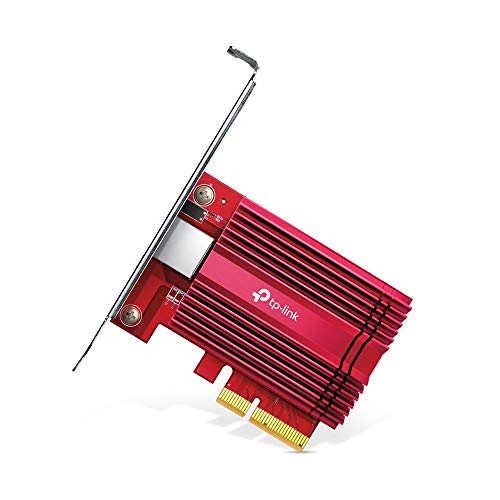
The TX401 is a PCIe 10GBASE-T NIC built for high-end desktops and servers. It supports Windows and Linux operating systems and is designed to deliver sustained 10 Gbps performance for bandwidth-intensive tasks. The card’s PCIe interface ensures wide compatibility with modern motherboards and PCIe slots, including PCIe x4 and higher. It is ideal for data-intensive workloads, large file transfers, and high-definition streaming in data centers or advanced home labs.
Key features include 10 Gbps base-T connectivity, broad OS support, and backward compatibility with lower speeds. This enables seamless negotiation between 10 Gbps, 5 Gbps, 2.5 Gbps, 1 Gbps, and 100 Mbps links depending on network infrastructure. QoS prioritization helps maintain gaming and application performance during heavy network use. The TX401’s rugged build and driver support make it a strong choice for users seeking top-tier network throughput without sacrificing compatibility.
YuanLey 10G Base-T PCIe Network Card
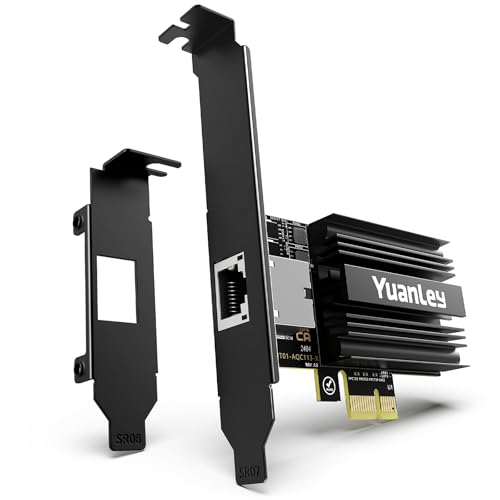
The YuanLey 10G PCIe NIC leverages a Marvell AQC113 controller to deliver robust 10GBASE-T performance. It supports a wide range of PCIe slots (X1, X4, X8, X16) and is designed for Windows, Linux, and ESXi environments. The card also supports multiple speeds (10G, 5G, 2.5G, 1G) and can function as a high-speed network adapter for servers and workstations that demand scalable bandwidth. Dual mounting brackets enhance installation flexibility in compact and standard builds alike.
With broad OS compatibility and flexible installation, this card is well-suited for users seeking a strong 10G upgrade that remains practical for varied system configurations. It’s particularly attractive for small-to-mid-sized data centers, media servers, and gaming rigs that require stable high-speed connectivity and efficient data handling over Ethernet networks.
10Gtek Dual RJ45 PCIe Card with X540 Controller

The 10Gtek card uses the Intel X540 controller, a proven standard for reliable enterprise-grade performance. It provides dual RJ45 ports capable of up to 10 Gbps each, offering aggressive throughput for servers, virtualization hosts, and demanding workstations. It’s designed for Windows Server, Windows, and Linux environments, with support for iSCSI and NFS storage protocols. This card emphasizes stability, driver availability, and compatibility across a variety of server-class workloads, making it suitable for data-heavy tasks and multi-VM setups.
Originating from a long line of X540-based solutions, this NIC can be deployed in data centers, media servers, or future-proofed home labs. The card’s dual-port design supports link aggregation and high-bandwidth tasks, supporting efficient data transfer across multiple streams and clients.
BrosTrend 2.5G PCIe Network Card

The BrosTrend 2.5G NIC offers a practical 2.5 Gbps upgrade with a low-profile form factor, broad OS compatibility, and Windows 11/10/8.1/8/7/XP support in various configurations. It emphasizes improved local network transfers and smoother online activities, especially for users who want a noticeable speed boost without the complexity of higher-end 10G setups. The 2.5GBASE-T technology helps reduce latency and improve gaming and streaming performance on supported networks, while the card’s flexibility accommodates compact PC builds and space-constrained cases.
In practice, this card is a good balance between cost and performance for enthusiasts who want faster wired speeds for gaming, content creation, or heavy file transfers, without needing the full 10G infrastructure. It’s commonly deployed in home labs, media centers, and small offices where a robust wired connection matters.
TP-Link TX201 2.5G PCIe Network Card

The TX201 2.5G NIC provides a straightforward 2.5 Gbps upgrade path for desktops and servers. Its compatibility with Windows and Linux, combined with backward speed negotiation, allows smooth operation across varied network infrastructures. The TX201 emphasizes practical performance improvements, including Quality of Service features to ensure gaming and latency-sensitive applications receive prioritized bandwidth. This makes it a sensible choice for users upgrading from Gigabit Ethernet to a faster, more responsive network connection without committing to a full 10G deployment.
Buying Guide: Key Considerations For Choosing A High-End Network Card
- Speed and bandwidth targets: Decide between 2.5 Gbps, 5 Gbps, or 10 Gbps based on your network backbone, switch capabilities, and internet plan. Higher speeds demand matching switches and cabling (for 10GBASE-T, CAT6A or better is recommended).
- Chipset and performance features: Intel X540-based cards are known for reliability, while Marvell AQC113-based NICs offer solid performance with broad OS support. Consider offload features, QoS, and interrupt coalescing to optimize throughput and latency.
- Operating system compatibility: Ensure drivers are readily available for Windows (Server editions included) and Linux distributions, as well as virtualization environments like VMware or ESXi if needed.
- Slot compatibility and form factor: Check PCIe slot availability (x1, x4, x8, x16) and case space. Some models include low-profile brackets suitable for compact builds.
- Networking features: Look for Jumbo Frames support, Wake-on-LAN, NIC teaming or link aggregation, and Quality of Service for prioritizing game or VOIP traffic.
- Future-proofing: If you plan to upgrade your network backbone (switch, router, or NAS) in the near term, a 10 Gbps NIC may offer longer-term value despite a higher upfront cost.
- Installation and maintenance: Review available installation guides, driver updates, and community or vendor support to minimize troubleshooting time after installation.
- Physical build considerations: Dual-port cards offer link aggregation options, while single-port variants can be more compact and cost-efficient for straightforward upgrades.
When evaluating options, balance price against throughput needs, OS compatibility, and future expansion plans. For gaming or single-user high-performance workstations, a 2.5 Gbps or 5 Gbps card with QoS can deliver noticeable improvements without the complexity of full 10G deployments. For workloads involving large data transfers, virtualization, or media servers, a 10 Gbps NIC paired with a capable switch is often the most effective upgrade path.