Discover top all-in-one heat transfer printer cutter bundles designed for DIY t-shirt projects, home studios, and small businesses. These sets combine direct-to-film (DTF) or heat transfer printing capabilities with integrated cutting to streamline design-to-garment workflows. The following picks emphasize reliability, maintenance features, and ease of use for both beginners and seasoned crafters.
Summary of chosen products
| Product | Brand | Key Advantage |
|---|---|---|
| M1630 Pro Automatic Maintenance & Cutter A3 DTF Printer Bundle | B btransfer | Integrated heating, vacuum system, auto maintenance, built-in cutter |
| B btransfer A3 DTF Printer Bundle with Cutter Automatic Self-Maintenance | B btransfer | All-in-one DTF bundle with cutter, shaker/dryer, self-maintenance |
| Likcut Vinyl Cutter Machine – Heat Transfer Creator Bundle | LIKCUT | Portable HTV bundle with multiple accessories for versatile projects |
| M1630 Pro 13in DTF Printer Automatic Maintenance A3 Heat Transfer | B btransfer | White ink circulation, film cutter, auto/self-maintenance |
| VINYL Cutter Machine, 34 inch Max Feed Width | VEVOR | Large format cutter with dual blades and SignMaster software |
M1630 Pro Automatic Maintenance & Cutter A3 DTF Printer Bundle

This bundle from B btransfer integrates a direct-to-film (DTF) printer with an automatic cutter and vacuum-assisted feeding. The built-in heating and vacuum system minimizes wrinkles and improves ink adhesion on both dark and light fabrics. A ready-to-print configuration includes pre-installed software, plus a complete DTF consumables set. A standout feature is the exclusive Holiday Mode, which maintains printhead health during downtime and reduces clogs, extending printer life. The auto/manual cutter adds precise cutting with zero film waste, making it well-suited for home studios and small shops aiming for efficient production.
Key features include built-in heating and vacuum systems for smooth film handling, a plug-and-play setup with maintenance tools, and cutter integration that minimizes waste. The bundle supports a range of fabrics and is designed for both casual and semi-professional use, aligning with those seeking an all-in-one printing and cutting workflow.
B btransfer A3 DTF Printer Bundle with Cutter Automatic Self-Maintenance
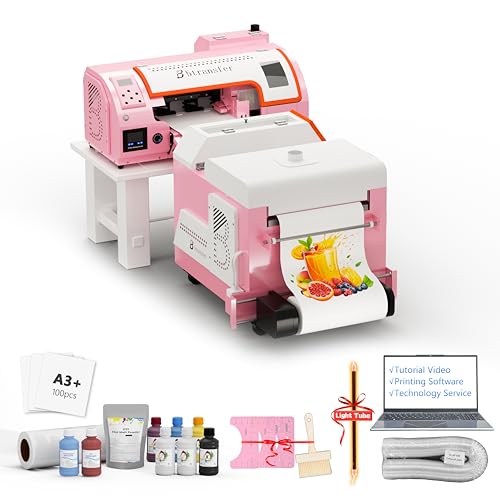
This all-in-one DTF printing bundle expands on the prior design with a self-maintenance approach, including a shaker and dryer for quick post-print processing. Its DTF printer supports automatic and manual cutting, and includes a portable stand for indoor and outdoor use. The Holiday Mode and self-maintenance routine help prevent nozzle clogs during breaks or vacations. The compact footprint makes it a practical choice for hobbyists who want a reliable, self-contained system that can handle regular T-shirt and fabric transfers.
Highlights are the all-in-one kit format, space-saving design, and enhanced maintenance routines that reduce downtime. The cutter-enabled workflow ensures clean, precise designs on a variety of fabrics, while the included consumables help new users start printing quickly.
SHENGJINSH 28″ Vinyl Cutter Machine – Large Format

While primarily a vinyl cutter, this unit complements heat transfer workflows by enabling large-format designs, stickers, and decals used in apparel customization. It features a wide feed width, a sturdy aluminum frame, and a digital control panel for speed and blade pressure. SignMaster software support and bundled design galleries assist beginners, while a large cutting area allows ambitious projects such as customized banners, labels, and multi-piece garment decorations. It’s a strong choice for studios needing to expand into broader vinyl-based transfer work.
Key strengths include a broad cutting area, precise control over cutting pressure, and software compatibility that makes complex designs accessible for home crafters and small businesses alike.
VEVOR Vinyl Cutter Machine – 34 Inch Max Width

The VEVOR 34-inch vinyl cutter blends a generous cutting area with dual blades, adjustable force, and speed settings. This model supports SignMaster software and comes with a complete package that includes transfer film and sticker sheets, making it suitable for a broad range of transfer tasks, from stickers to heat-applied designs on garments. The dual-blade design enables more flexible workflows—drawing and cutting or scoring in one pass—saving time for larger runs or intricate artwork. It is a robust option for users who require higher throughput and extended material compatibility.
Notable aspects include a large-format capacity, compatibility with Windows and macOS, and a flexible connection setup. The bundled software and materials help users quickly start producing heat transfer designs.
Buying Guide
Key considerations for choosing a heat transfer printer cutter
- Workflow integration: Look for bundles that combine a printer, cutter, and software in a single ecosystem to minimize setup complexity and ensure smoother operation.
- Maintenance and reliability: Features like Holiday Mode, auto-cleaning, and self-maintenance routines protect printheads and extend uptime, especially for occasional use.
- Ink system and media handling: Evaluate ink circulation (especially white ink), vacuum-assisted feeding, and film handling to determine compatibility with your fabrics and transfer types.
- Cutting performance: Consider cutting width, speed, blade pressure, and accuracy to match your typical project sizes and details. Large-format cutters expand design possibilities but require more space.
- Software ecosystem: Ensure the included RIP or design software supports efficient layout, clipping, and material-saving features. SignMaster, RIP software, and compatible drivers can materially reduce setup time.
- Footprint and portability: If you have a small studio or move between locations, prioritize compact bundles with portable stands or integrated casings.
- Material versatility: If you plan to work with HTV, vinyl, and decals, a cutter with broad material support and easy material interchange can improve efficiency.
- Customer support and community: A vendor with robust documentation, tutorials, and a user community can help shorten the learning curve for beginners.
Comparative considerations by use case
- Beginner home crafter: A bundle with ready-to-print setup, maintenance features, and clear instructions is ideal for getting started quickly.
- Small business owner: Prioritize reliability, efficient waste management, and strong software support for faster production turnaround.
- Pro or hobbyist expanding into vinyl: Large-format cutters offer expanded capabilities, but ensure the space and budget accommodate larger equipment.
- Frequent downtime: Models with automatic ink circulation and simple maintenance routines minimize downtime and nozzle clog risks.
Across these options, buyers should align the chosen bundle with their workspace size, fabric types, and project scale. The combinations presented here emphasize heat transfer printing plus cutter functionality, balancing usability with advanced features to accommodate a range of creative projects.