Keeping laptops cool is essential for performance and longevity. This guide highlights the best heat sinks designed to improve cooling for memory, SSDs, GPUs, and CPUs in portable devices. Each selection below is chosen for relevance, build quality, and cooling efficiency across common laptop configurations.
| Product | Brand | Type | Key Benefit |
|---|---|---|---|
| Easycargo Laptop Memory Heatsink Kit | Easycargo | Copper Memory Heatsink | Pre-applied adhesive for simple installation |
| Laptop NVMe M.2 Heatsink with Nano Thermal Pads | SGTKJSJS | Copper M.2 SSD Heatsink | 10-20°C cooling range |
| Easycargo 100pcs Heatsink Assortment Kit | Easycargo | Aluminum & Copper Assortment | Wide variety for multiple components |
| Awxlumv Large LED Aluminum Heatsink | Awxlumv | Aluminum Fin Heatsink | Large cooling surface |
| icepc M.2 Heatsink for PS5 NVMe 2280 | icepc | Graphene-Coated Copper Heatsink | High conductivity with graphene coating |
Note: All selections are compatible with common laptop configurations and are focused on practical, installable cooling solutions for memory, SSDs, and system-wide heat management. Each product includes core features and intended use cases to help compare at-glance suitability for your device.
Easycargo Memory Heatsink Kit For Laptops

This low-profile copper heatsink is designed to cool laptop memory RAM. It is compatible with SODIMM RAM in laptops and notebooks, and includes pre-applied 3M 8810 thermal conductive adhesive tape for straightforward installation. The copper’s high thermal conductivity supports efficient heat transfer from memory modules, potentially reducing throttling and maintaining performance during heavy workloads.
NVMe M.2 Heatsink With Nano Thermal Pads

Designed for M.2 2280 SSDs, this copper heatsink provides a compact cooling solution for laptops and desktops. It’s compatible with popular drives like Samsung EVO series and others. The kit emphasizes a 10-20°C cooling range, depending on environment, with 100% copper construction and a polished finish. The result is improved heat dissipation in tight laptop spaces and reduced risk of throttling during extended use.
Easycargo 100-Piece Heatsink Assortment Kit
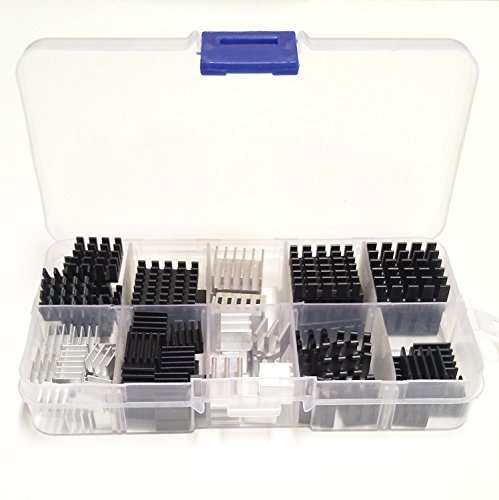
This kit provides a broad assortment of small to medium aluminum heat sinks, plus some copper options, ideal for cooling a range of laptop components including CPU, GPU, RAM, VRAM, VRM, and MOSFETs. The variety enables users to tailor cooling layouts for custom builds, repairs, or upgrades. The included forms cover multiple sizes like 9x9x5mm up to 22x22x10mm, expanding installation flexibility without extra hardware.
Awxlumv Large LED Aluminum Heatsink
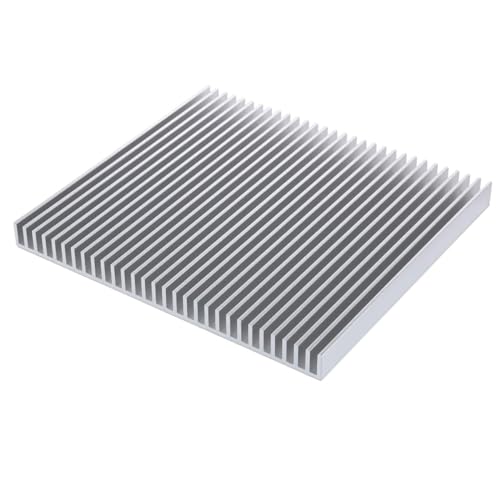
Crafted from anodized aluminum, this sizable heatsink offers a large cooling surface with a weighty profile suitable for higher heat output components. Specifications include a 200 x 220 x 18 mm footprint and a base thickness of 3.1 mm with 2.5 mm fins. Its broad surface area helps dissipate heat efficiently, reducing thermal risk for CPUs, GPUs, and other hot-running modules in larger laptops or external enclosures.
icepc M.2 Heatsink With Graphene Coating
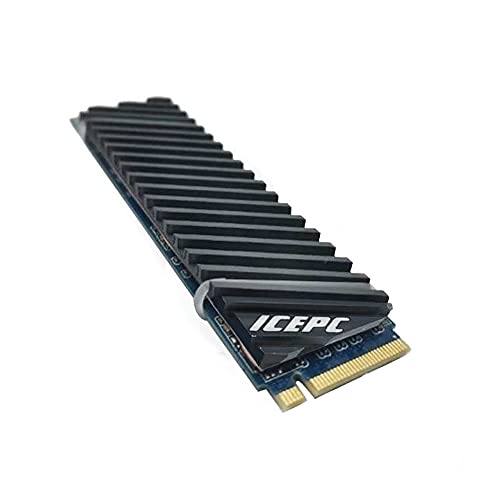
This M.2 heatsink is designed for 2280 SSDs and features graphene coating to maximize thermal transfer. Graphene is noted for very high thermal conductivity, potentially surpassing copper in practice. The copper core remains 100% copper construction, and the design prioritizes efficient air contact through a precise aerospace-like duct for better heat exchange in tight laptop spaces. It is compatible with common 2280 NVMe drives and some notebook configurations.
Buying Guide: Key Considerations For Laptop Heat Sinks
- Compatibility: Check that the heatsink fits your component type and size (RAM, M.2 SSDs, CPUs, GPUs). Some models are universal, others are targeted to 2280 M.2 drives or SODIMM RAM.
- Material: Copper offers high thermal conductivity but is denser and heavier; aluminum is lighter with good conductivity. Graphene-coated options aim to boost transfer rates for SSDs.
- Adhesive Options: Some kits come with pre-applied thermal tape for quick installs, while others require separate tape. Ensure tape compatibility with your device’s components.
- Thickness and Clearance: In tight laptops, installation height is critical. Look for low-profile heatsinks if you have limited space around RAM slots or SSD bays.
- Cooling Range: Vendors often quote a cooling range (e.g., 10-20°C). Real-world results depend on ambient temperature, airflow, and workload.
- Number of Pieces vs. Coverage: Kits with many pieces (like 100-piece assortments) offer flexibility for multiple components, but may require more planning during installation.
- Installation Tools: Some products include adhesive and mounting hardware; others rely on existing laptop screws or brackets. Factor in ease of replacement or future upgrades.
- Aesthetic and Build: Fin profiles and finishes vary. For external use or visible installations, consider the appearance and potential interference with fans or vents.
- Reliability and Warranty: Look for reputable brands and clear warranty terms, especially for copper and graphene-coated products that may have higher price points.
When selecting a heat sink, balance the device’s temperature needs, space constraints, and your comfort with heat management upgrades. For notebooks with frequent gaming or sustained workloads, a combination of memory and NVMe cooling is often most effective, ensuring memory and storage remain within safe operating temperatures while maintaining performance.