Mobile sales often hinge on fast, reliable card processing that works with both headphones jacks and standard audio adapters. This guide highlights five compatible readers and adapters that connect via 3.5mm jacks, Lightning, USB, or other common ports. Each option supports multiple card types and integrates with popular point‑of‑sale apps, helping you accept payments anywhere.
| Product | Brand | Key Benefit |
|---|---|---|
| Square Reader for magstripe (headset jack) | Square | Low per-swipe rate; supports major cards; integrates with Square POS |
| Square Reader for magstripe (with Lightning connector) | Square | Single, transparent rate; Apple devices pair with Square POS and receipts |
| Square Reader for contactless and chip (2nd Generation) | Square | Tap, dip, or scan with offline mode; broad compatibility with wallets and devices |
| FosPower 3.5mm Male to Female AUX Adapter | FosPower | Extends 3.5mm reach for use with card readers in tough cases |
| MSR90 USB Swipe Magnetic Card Reader | Deftun | Plug‑and‑play USB emulation; reads multiple tracks and formats |
Square Reader For Magstripe (Headset Jack)

This headset‑jack version fits devices with a standard 3.5mm audio port and works with the Square Point of Sale app to process major credit and debit cards. It advertises a single low rate on every swipe and supports the major networks—Visa, Mastercard, Discover, and American Express—without hidden fees. It also provides a sales history and earnings overview within the Square POS ecosystem, enabling real‑time tracking of transactions and growth metrics for small businesses on the move.
Square Reader For Magstripe (With Lightning Connector)
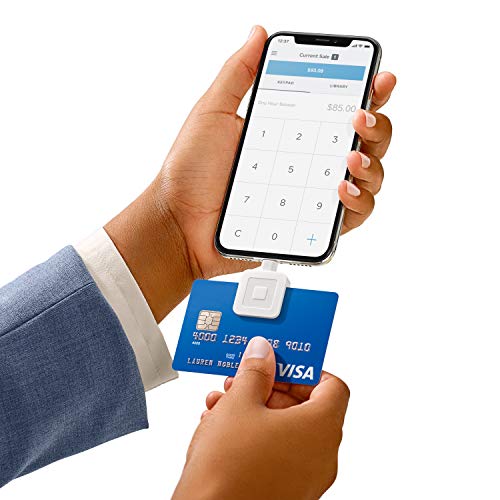
Designed for Apple devices, this magstripe reader connects via Lightning and works with most Square POS apps. It enables customers to pay, tip, and sign directly on the device, and it maintains a clear cash, gift cards, and sales history record. The reader supports a single transparent rate per swipe for major networks and is compatible with discounts, receipts, and e‑mailed or texted confirmations. This option emphasizes a smooth end‑to‑end checkout experience from card swipe to digital receipt.
Square Reader For Contactless And Chip (2nd Generation)
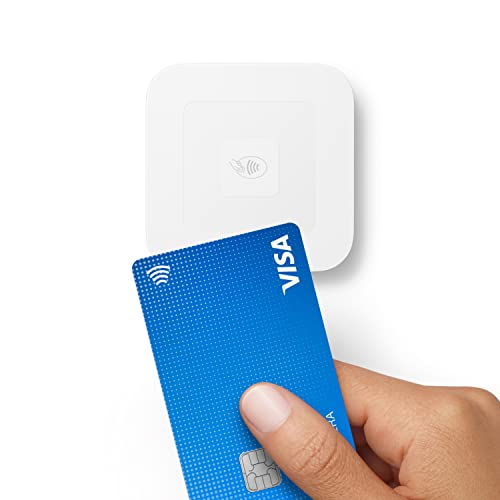
The second‑generation Square reader supports contactless payments, chip cards, Apple Pay, and Google Pay. It’s optimized for improved connectivity and extended battery life, with enhanced security and a low, per‑tap or dip rate. The device works without long‑term commitments or monthly fees and includes offline payment capability for up to 24 hours, ensuring sales can continue in areas with unreliable connectivity. This option suits mobile vendors who need flexibility and modern wallet support.
MSR90 USB Swipe Magnetic Card Reader
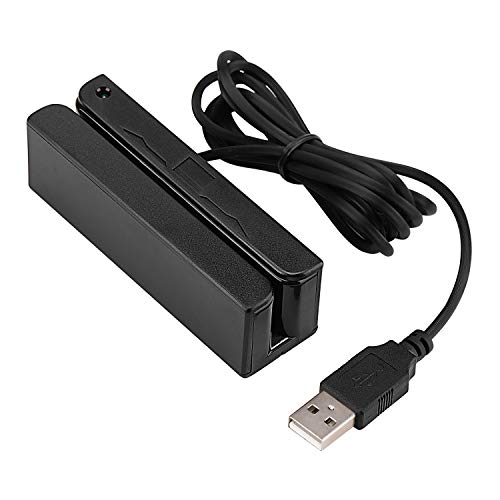
Deftun’s MSR90 is a USB keyboard‑emulation reader that requires no driver installation. It reads up to three tracks of data and supports ISO7811, AAMVA, CA DMV, and other common card formats. The device is designed for quick mounting with threaded inserts and includes an LED indicator. It is a practical choice for desktop setups or portable stations where plug‑and‑play simplicity is essential.
FosPower 3.5mm Male to Female AUX Adapter

Adapter cables extend the reach of 3.5mm card readers, enabling easier access when devices are encased in protective cases or mounted in tight spaces. This slim, four‑foot 3.5mm male‑to‑female cable is compatible with 3.5mm readers and keeps audio lines open for swipes, tips, and signatures. It is suitable for use with many readers and payment setups that rely on standard AUX connections.
Buying Guide: Key Purchase Considerations
- Compatibility and device ecosystem: Check whether the reader supports your smartphone or tablet’s operating system (iOS, Android), and whether it pairs with your preferred POS app or payment workflow. Some readers are optimized for Square; others are more flexible with multiple platforms.
- Payment methods and networks: Consider which networks (Visa, Mastercard, Discover, American Express) you need. Some devices advertise single‑rate pricing per swipe, while others support multiple wallets like Apple Pay or Google Pay for contactless payments.
- Connectivity and offline capability: If you operate in areas with spotty connectivity, offline payment support and reliable Bluetooth or USB connections are important. Look for readers with offline mode or low‑latency data transfer.
- Ease of use and setup: Plug‑and‑play options reduce setup time. USB‑driven readers may require minimal software, while Lightning or 3.5mm solutions should work with existing devices without adapters.
- Durability and form factor: For on‑the‑go sales, compact, robust designs with secure mounting options help prevent accidental damage and loss during busy times.
- Fees and pricing transparency: Compare per‑swipe rates and any hidden costs. Transparent pricing helps avoid surprises in daily cash flow and profitability analyses.
- Security and compliance: Ensure readers support current PCI standards and secure data handling to protect customer information during swipes or dips.
- Accessories and expandability: Cables, stands, and docks can improve workflow, especially in counter or market stall setups. Consider whether you need a dock, extension cable, or multi‑reader configuration.
- Printer and receipt options: Some readers integrate with receipt email or text options; others require a separate printer or digital receipt workflow. Align with your customer experience goals.