For content creators, gamers, educators, and live broadcasters, choosing a reliable HDMI to USB capture solution is essential. The following five products represent a mix of 1080p and 4K-capable capture cards that connect via USB, support popular streaming software, and offer plug-and-play functionality. This guide compares features, compatibility, and common use cases to help you pick a device that fits your setup.
| Product | Brand | Resolution & Frame Rate | Interface | Best Use |
|---|---|---|---|---|
| Guermok Video Capture Card | Guermok | 1080p60, 4K30 input | USB 3.0 Type-C | Streaming, recording, gaming |
| Capture Card Nintendo Switch (Rybozen) | Rybozen | 1080p60 input; 4K30/60 passthrough | USB 3.0 | Multi-device streaming |
| VIXLW 4K HDMI Capture Card | VIXLW | 4K60 input; 1080p60 output | HDMI to USB | Live broadcasts, meetings |
| 1080P HDMI Video Capture Card (MYPIN) | MYPIN | 1080p60 input | USB 3.0 | Gaming with mic-in |
| Audio Express AXHDCAP | Audio Express | 4K30 input; 1080p30 output | USB 2.0 | Streaming, conferencing |
The products above span a range of interfaces, resolutions, and feature sets. All are designed to connect HDMI sources such as game consoles, cameras, and laptops to a computer for recording or live streaming, with varying levels of latency, portability, and compatibility. Use this guide to match your device, software, and performance goals.
Guermok Video Capture Card Review

The Guermok capture card is built around USB 3.0 with an input resolution up to 4K at 30 Hz and an output up to 2K at 30 Hz or 1080p at 60 Hz. It uses Type-C and USB interfaces to accommodate a wide range of devices, from PCs and Macs to tablets and consoles. The unit emphasizes ultra-low latency screen sharing, which helps reduce lag during live streams and gameplay. It’s designed for plug-and-play use—no extra drivers or power supply required—making it highly portable for on-the-go recording and streaming. The aluminum body aids heat dissipation during extended sessions. Suitable for online capture, real-time recording, video conferencing, and teaching scenarios, it pairs well with OBS or similar software after setup.
Rybozen Switch Capture Card—Versatile for Many Setups
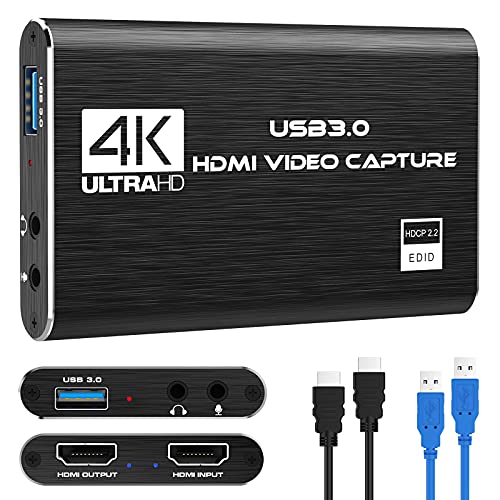
The Rybozen capture card supports 1080p60 input with 4K passthrough options (4K30/60). It’s designed to be a true plug-and-play device: once connected, it’s recognized automatically as a webcam, with no driver installation required. It’s compatible with Windows and Mac OS and leverages USB 3.0 to deliver low-latency streaming to platforms like OBS, Twitch, YouTube, and more. The device is suitable for gaming, console capture, and use with cameras or camcorders for live streaming. The lack of external power needs adds to its portability for field use and education settings.
VIXLW 4K HDMI Capture Card Overview

The VIXLW solution offers 4K@60 Hz input with 1920×1080@30 Hz output, and supports USB recording to a computer or smartphone. It focuses on ultra-low latency HDMI real-time screen sharing and audio capture, making it suitable for live broadcasts, online conferences, and teaching. The compact aluminum shell aids heat dissipation, and the device is designed for plug-and-play use, with no external power supply required. It is broadly compatible with OBS and other common streaming tools, providing a balance of performance and portability for creators who need reliable, high-quality captures on the go.
MYPIN 1080P HDMI Capture Card
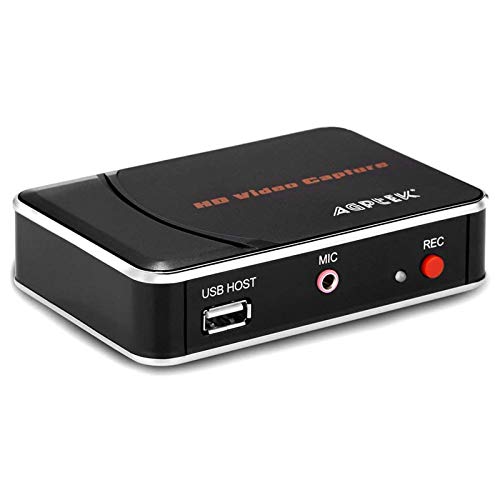
The 1080p HDMI capture card from MYPIN records up to 1080p60 and supports saving to USB drives, enabling quick transfers to devices without relying on a PC. It includes a microphone input for on-the-fly commentary, though it does not facilitate party chat capture. It’s a suitable option for gamers or hobbyists who want simple direct-to-storage recording. The device supports USB 3.0 and USB 2.0 and is compatible with Windows and Mac OS. This makes it a practical choice for offline archiving or portable gaming sessions where a computer isn’t always available.
Audio Express AXHDCAP: High-Quality 4K to 1080p Capture

The AXHDCAP from Audio Express emphasizes a 4K input with 1080p output, and USB 2.0 connectivity. It features enhanced 4K-1080P capture with ultra-low latency, making it well-suited for streaming, live broadcasting, video conferencing, and teaching. The device is designed for cross-platform use, connecting to Windows, MacOS, and Linux, and supports streaming to Twitch, YouTube, OBS, Zoom, Potplayer, and VLC. The aluminum shell aids heat management, and the built-in drivers simplify setup for many users, particularly in more static studio environments or classrooms.
Buying Guide: Key Purchase Considerations
- Resolution and passthrough: If you need 4K input but 1080p output, ensure the device supports the intended end-output resolution and frame rate for your stream or recording. Some capture cards offer high input resolution with lower output, which is common for live streaming setups.
- Latency and real-time performance: For gaming and live interactions, ultra-low latency is important. Look for devices that advertise low-latency HDMI, hardware encoding, or USB 3.0/3.1 interfaces to minimize delay.
- Compatibility and software: Verify compatibility with your operating system (Windows, macOS, Linux) and with streaming software like OBS, XSplit, or Zoom. Plug-and-play devices reduce setup friction, but some may require drivers on certain platforms.
- Connectivity and portability: If you plan to record on the go or in classrooms, features like USB-C, compact form factor, and no external power requirement can be decisive.
- Input devices and audio: Some cards include microphone input or support separate audio capture. Check if you need mic-in, line-in, or support for embedded audio to match your production needs.
- Storage options: For stand-alone recording, devices that support direct save to USB drives or SD cards offer flexibility when a computer isn’t available.
- Durability and heat management: Aluminum enclosures help dissipate heat during extended sessions, which can be important for longer streams or gaming marathons.
- Price-to-performance balance: More features may come with higher cost. Prioritize based on essential needs such as 1080p vs 4K, latency, and portability.
In selecting an HDMI to USB recorder, consider your primary use case: live streaming with a PC, portable field recording for education, or no-PC-required direct-to-storage workflows. A good choice balances resolution needs, latency, and compatibility with your preferred software and devices. The five products listed offer a range of options to suit different setups while keeping the core requirement of HDMI-to-USB capture in mind.