Choosing a reliable HDMI to Toslink audio extractor helps preserve high-quality sound when connecting modern TVs and game consoles to legacy audio systems. The following picks from Amazon offer various outputs, from optical (Toslink) to 3.5mm and coaxial, with support for 2.0 and 5.1 channel audio. Each model listed below is designed to extract audio from HDMI sources while keeping video untouched, making it ideal for soundbars, amplifiers, and home theater setups. Consider supported formats, ease of setup, and whether your devices require ARC/eARC compatibility.
Summary of selected products:
- Avedio Links HDMI ARC Audio Extractor Converter (4K@60Hz) – HDMI to Optical Toslink + 3.5mm, supports 2CH and 5.1CH
- Tihokile 192KHz ARC Audio Extractor – HDMI ARC to Toslink/Optical + 3.5mm, versatile compatibility
- PROZOR eARC/ARC to Optical Audio Extractor – 192kHz, supports Dolby/DTS 5.1, optical output
- AMANKA HDMI Audio Extractor Splitter – 4K@60Hz, ARC/Not Reversible, optical + 3.5mm outputs
- AUTOUTLET HDMI ARC Audio Extractor – Optical and Coaxial outputs, easy setup
Avedio Links HDMI ARC Audio Extractor

The Avedio Links HDMI ARC Audio Extractor converts a single HDMI input to HDMI output plus optical Toslink and a 3.5mm AUX stereo output. It supports HDCP2.2 and 4K@60Hz, with three audio modes: Pass, 2CH, and 5.1CH. The 3.5mm output handles incoming 2CH PCM LPCM stereo, while the optical Toslink output supports 2CH PCM and 5.1CH formats such as Dolby Digital and DTS variants. Note that Dolby Digital Plus and CEC are not supported. If you want simultaneous optical and L/R audio, set your input device to PCM/stereo.
Key specs and considerations:
– 4K@60Hz video, HDCP2.2, 3D support
– Outputs: Optical Toslink SPDIF, 3.5mm stereo
– Audio formats: 2CH PCM, 5.1CH Dolby/DTS (optical); 2CH PCM on 3.5mm
– Limitations: Does not support Dolby Digital Plus or CEC; ensure PCM/stereo for dual-output use
Tihokile 192KHz ARC Audio Extractor
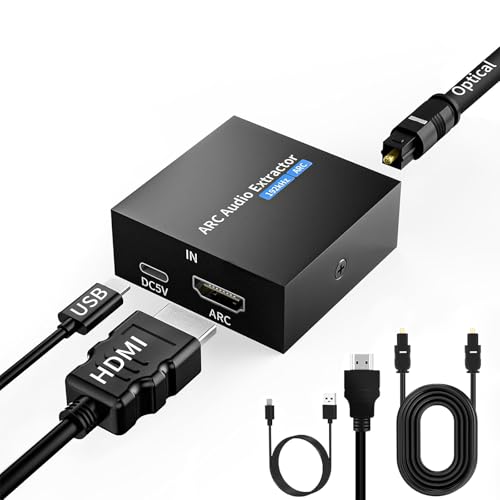
This device extracts audio from HDMI ARC input and outputs via Toslink/Optical and a 3.5mm AUX, aiming to minimize noise and interference. It is designed for TVs, set-top boxes, Blu-ray players, and game consoles, with simple plug-and-play operation and driver-free compatibility. It supports sampling rates up to 192 kHz and 24-bit SPDIF, including Dolby Digital and DTS formats. The unit emphasizes clean signal isolation to reduce magnetic interference and ensure synchronized audio with video. It is not intended for ARC/eARC passthrough in all configurations; check your TV’s compatibility.
Highlights to verify:
– ARC to Optical/3.5mm outputs; driver-free
– 192kHz/24-bit capable; supports Dolby/DTS 5.1 on optical
– TV volume can be controlled via connected audio device using CEC in some setups
– Not all setups support full eARC passthrough; test compatibility with your gear
PROZOR eARC/ARC to Optical Audio Extractor

The PROZOR extractor is designed to pull audio from eARC/ARC-enabled HDMI ports and deliver it via Optical Toslink to soundbars, amplifiers, or home theater gear. It highlights a high-resolution 192kHz/24-bit output and supports PCM 2.0, Dolby 5.1, and DTS 5.1 formats. It emphasizes eARC upgrade for improved lossless audio and guides proper port selection (use the dedicated HDMI port, not a standard input). The unit is intended for improved audio fidelity and easier wiring in a home theater setup.
Considerations:
– eARC/ARC compatibility and correct port usage are essential
– Optical output supports PCM and multi-channel formats
– TV and device control may vary by brand; verify CEC behavior with your system
Avedio Links 4K@60Hz HDMI To Optical And 3.5mm

This 4K@60Hz HDMI audio extractor splits HDMI audio for external receivers while providing Optical Toslink SPDIF and 3.5mm outputs. It supports ARC and 2.0/5.1 channel configurations, with a focus on high video quality (4Kx2K@60Hz, HDR10, HDCP2.2). The device outputs audio to an external sound system without requiring the TV to stay powered on. It is compatible with ARC functionality and can manage a range of formats, making it a straightforward option for home theater upgrades.
What to verify:
– 4K@60Hz compatibility and HDR support
– ARC functionality and compatibility with your TV
– Output mode options for your audio system (2.0, 5.1, ARC)
AUTOUTLET HDMI ARC Audio Extractor
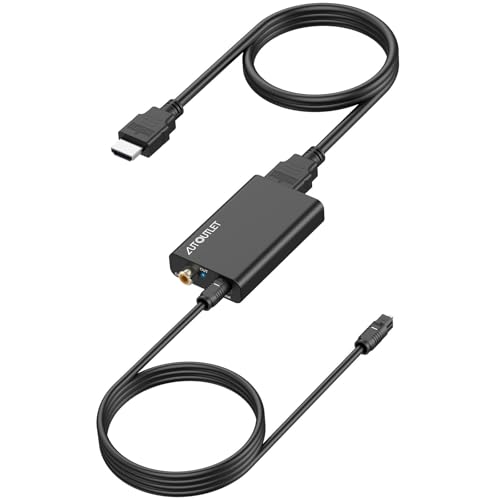
AUTOUTLET’s extractor supports ARC to Optical and Coaxial outputs, enabling simultaneous connections to multiple audio systems. It emphasizes simple setup via the TV’s HDMI ARC port and CEC, with a focus on letting the audio device handle volume control. The device aims to simplify home theater wiring and provide flexible output options for amplifiers, soundbars, and speakers. It’s a practical choice for users seeking straightforward integration with existing gear.
Important notes:
– ARC to Optical/Coaxial conversion is the main feature
– Ensure correct HDMI ARC port usage and TV CEC settings
– Volume control via the connected audio system can be advantageous for some setups
Buying Guide
When selecting an HDMI to Toslink audio extractor, consider these factors to fit your setup:
- Audio formats and compatibility: Look for devices supporting PCM, Dolby Digital, DTS, and 5.1/7.1 where relevant. Verify whether the unit handles Dolby Digital Plus or lossless formats via ARC/eARC if your system requires them.
- Output options: Decide if you need Optical Toslink, 3.5mm, and/or coaxial outputs. Some units offer multiple outputs simultaneously, which is helpful for feeding several audio devices.
- ARC/eARC support: If your TV uses ARC or eARC, ensure the extractor is compatible and placed in the correct HDMI port. Some devices explicitly note not to use standard HDMI inputs for certain functions.
- Video support and pass-through: If you want to preserve 4K/60Hz and HDR (HDR10), check that the extractor can pass video with minimal latency or degradation.
- Ease of setup and control: Driver-free operation and CEC compatibility can simplify use, especially when you want TV remote control to influence audio volume.
- Interference and signal integrity: Some models emphasize isolation from electromagnetic interference to maintain audio/video synchronization, especially in demanding environments.
- Brand and warranty: Consider brands with reliable support and return policies to ensure compatibility with your equipment over time.
In practice, choose a model that aligns with your existing gear—whether you need robust 5.1/Dolby support, multiple simultaneous outputs, or straightforward ARC passthrough. For households with multiple audio receivers or soundbars, a unit offering both optical and analog outputs can simplify wiring and give you flexibility for future upgrades.