For users with DisplayPort-equipped computers and HDMI displays, a reliable DP to HDMI cable is essential. These uni-directional cables transfer video (and in some cases audio) from a DisplayPort source to an HDMI display while avoiding the need for adapters or converters. The following selections emphasize 4K compatibility, solid build quality, and consistent performance across common setups such as desktops, laptops, and projectors. The list focuses on 6-foot to 10-foot cables designed for straightforward, one-way use from computer to monitor or TV.
| Product | Brand | Length | Max Resolution | Uni-directional |
|---|---|---|---|---|
| Amazon Basics DisplayPort to HDMI Cable, 6 ft | Amazon Basics | 6 ft | 4K@30Hz, 1920×1200, 1080p | Yes (DP to HDMI) |
| BENFEI 4K DisplayPort to HDMI 6 Feet | BENFEI | 6 ft | 3840×2160@30Hz, 1920×1080@60Hz | Yes |
| AVACON 4K DisplayPort to HDMI 6 Feet | AVACON | 6 ft | 3840×2160@30Hz, 1920×1080@60Hz | Yes |
| BENFEI 4K DisplayPort to HDMI 6 Feet (Gold Plated) | BENFEI | 6 ft | 3840×2160@30Hz, 1920×1080@60Hz | Yes |
| Anbear Display Port to HDMI Cable 6 Feet | Anbear | 6 ft | 1920×1200 / 1080P@60Hz | Yes |
Note: All cables listed are uni-directional, meaning they transmit from DisplayPort (computer) to HDMI (display). They are not designed to send signals from HDMI to DisplayPort, and some do not support USB or other alternate signals beyond DP++ compatibility.
Amazon Basics 6-Foot DisplayPort to HDMI Cable

The Amazon Basics 6-foot DisplayPort to HDMI cable offers a straightforward, plug-and-play connection from a DisplayPort-equipped computer to an HDMI display. It supports DP++ and ensures compatibility with many common monitors and projectors. The cable is designed as a unidirectional converter, delivering video (and compatible audio) from DP to HDMI without attempting to reverse direction. The build emphasizes durability with a standard-length cable suitable for desk setups, home theaters, and classroom environments.
BENFEI 4K DisplayPort to HDMI 6 Feet Cable

BENFEI’s 6-foot DP to HDMI cable emphasizes stable data transmission and reliable signal conversion from DisplayPort to HDMI. The unit uses a built-in advanced IC to convert DP signals to HDMI, delivering up to 3840×2160 at 30Hz or 1920×1080 at 60Hz. It also supports digital audio pass-through for multi-channel formats. The cable’s gold-plated connectors and rugged strain relief optimize durability, particularly for frequent plugging and unplugging in multi-device environments. Note that it remains a unidirectional cable from DP to HDMI and is not a DP-to-HDMI reverse adapter.
AVACON 4K DisplayPort to HDMI 6 Feet Cable
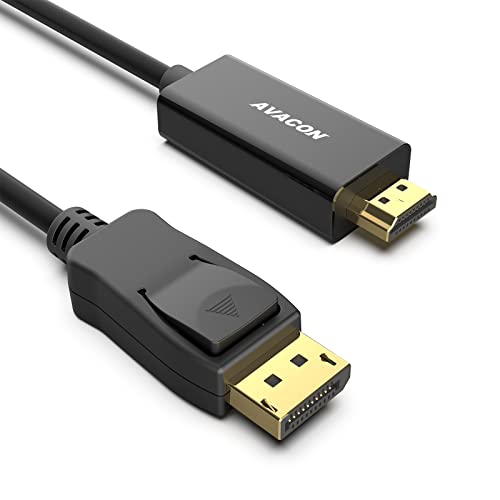
AVACON’s uni-directional DP to HDMI cable delivers 4K at 30Hz or Full HD at 60Hz, making it a flexible option for a range of devices and displays. The package highlights a straightforward 6-foot link between a DP-equipped computer and an HDMI display, with support for clear audio pass-through. The cable’s construction features a robust aluminum shell and shielding that helps minimize interference and maintain signal integrity across longer runs and busy desk setups.
BENFEI 4K DisplayPort to HDMI 6 Feet Cable (Gold Plated)

The second BENFEI option on this list reinforces the same general capabilities: a reliable DP to HDMI conversion with support for up to 3840×2160 at 30Hz and 1080p at 60Hz, plus uncompressed audio pass-through. Gold-plated connectors resist corrosion and abrasion, while molded strain relief increases the overall durability of the 6-foot cable. This is again a unidirectional DP to HDMI cable, suitable for connecting DisplayPort-equipped PCs to HDMI displays or projectors.
Anbear Display Port to HDMI Cable, 6 Feet

Anbear’s DP to HDMI cable provides a convenient way to connect DP-enabled desktops or laptops to HDMI displays. It supports up to 1920×1200 and 1080P at 60Hz, along with reliable audio pass-through. The design emphasizes straightforward functionality, with a compact 6-foot length that suits most desk or classroom setups. As with other entries on this list, it remains a uni-directional connection from DP to HDMI, and is not designed to operate in reverse or to support USB sources.
Buying Guide: Key Considerations For DP To HDMI Cables
Choosing the right DP to HDMI cable depends on several factors. Here are multiple perspectives to help you decide what matters most for your setup:
- Resolution and refresh rate: If you need 4K output, verify the maximum supported resolution and refresh rate. Most 4K cables support 3840×2160 at 30Hz, while Full HD 1080p commonly runs at 60Hz. Consider your display capabilities and intended use (video playback, gaming, or presentations).
- Directionality: All listed options are uni-directional (DP to HDMI). Do not expect HDMI-to-DisplayPort conversion unless stated otherwise. If you require two-way use, look for an active adapter designed for DP to HDMI or HDMI to DP conversions.
- Build quality: Look for gold-plated connectors, braided jackets, and molded strain relief for durability. Aluminum shells and shielding help reduce interference in busy environments with many cables or wireless devices nearby.
- Cable length: Affects signal integrity; longer cables can experience attenuation. Choose a length that matches your setup without excessive slack. Common lengths range from 6 ft to 10 ft in this category.
- Audio support: Some DP to HDMI cables carry digital audio in addition to video. If your HDMI display relies on audio from your PC, check for audio passthrough compatibility.
- Compatibility notes: Some DP to HDMI cables work best with specific graphics cards or computer brands. If you have a high-end GPU (NVIDIA or AMD) or a specific laptop brand, verify compatibility in product descriptions or customer questions.
- Brand reliability and warranty: Trusted brands and warranties can reduce risk, especially in enterprise or classroom deployments where reliability is critical.
- Price-to-performance: Not all premium-looking cables deliver proportionally better signal quality. Compare features like shielding, IC chips, and connector quality against price to determine value for money.
In practice, for typical home or office use, any of the listed options should reliably transfer video from a DisplayPort-equipped computer to an HDMI display. If you require 4K at 60Hz, you may need to verify specific models that advertise higher refresh rates, as the standard DP to HDMI path in several models targets 4K at 30Hz. For projector setups or conference rooms, 1080p at 60Hz is often sufficient and more widely supported.
When selecting, ensure the product page clearly states DisplayPort to HDMI conversion, DP++ compatibility, and the unidirectional nature. If possible, review user questions or end-user reviews for real-world performance with your specific hardware and display combination.