Choosing the right HDMI switch is essential for clean multi-monitor arrangements, whether you’re gaming, presenting, or streaming. This guide highlights top options that support 4K@60Hz, HDR, and multiple inputs so you can toggle between devices without cable chaos. Each product showcases reliable switching, built-in remotes, and compatibility with consoles, laptops, and media players. Read on to compare features and determine which switch best fits a multi-monitor workflow.
| Product | Brand | Key Features | Input/Output |
|---|---|---|---|
| Anker HDMI Switch (4K@60Hz, 2 in / 1 out) | Anker | 4K@60Hz, HDR, smooth switching with a single button | 2x HDMI input, 1x HDMI output |
| [Upgrade] HDMI Switch 3 in 1 Out (4K@60Hz) | NEWCARE | 3 inputs, 1 output, auto/manual switch, 4K@60 | 3x HDMI input, 1x HDMI output |
| GANA 3 in 1 Out HDMI Switch | GANA | Manual switching, 4K@30Hz, compact aluminum design | 3x HDMI input, 1x HDMI output |
| GANA 5 in 1 Out HDMI Switch | GANA | Remote control, 4K@60Hz, aluminum case, multiple devices | 5x HDMI input, 1x HDMI output |
| Anker 4-in-1 HDMI Switch (4K@60Hz) | Anker | 4-in-1 inputs, remote control, 4K clarity | 4x HDMI input, 1x HDMI output |
Across these options, you’ll find features like remote control, manual switching, HDR support, and compatibility with gaming consoles, PCs, and streaming devices. When choosing, consider the number of inputs you need, whether you require remote switching, and the maximum cable length you’ll use for optimal 4K performance. The products below are organized to help you compare quickly for a multi-monitor setup.
Anker HDMI Switch: 2 In / 1 Out, 4K@60Hz

Product Overview: Anker’s 2-in, 1-out HDMI switch offers simple one-button switching and supports up to 4K@60Hz. The device is designed for smooth media transitions between laptops, consoles, projectors, and TVs. It emphasizes broad compatibility and a clean finish suitable for desks with multiple displays. Note that it does not support HDMI CEC, so auto-switching between devices is not available. For multi-monitor setups, plan input distribution across the two sources you frequently use.
Key Features
- One-button switching minimizes cable fiddling during gaming or movie time.
- Supports 4K@60Hz with clear, immersive visuals when both input cables are short enough.
- Wide compatibility with laptops, PCs, consoles, and projectors.
NEWCARE HDMI Switch: 3 In / 1 Out, 4K@60Hz

Product Overview: This 3-in, 1-out switch supports 4K at 60Hz, 3D, and HDCP2.2, making it compatible with PS5, Xbox, Blu-ray players, and streaming devices. It uses a key-press switch with no external power requirement, and comes with a 2.6-foot HDMI cable. Ideal for classrooms, living rooms, or home offices where multiple devices feed a single display.
Key Features
- Push-button switching for quick device changes.
- No external power needed; plug-and-play design.
- Includes 2.6-ft HDMI cable and supports 4K@60Hz with HDR options.
GANA 3 In / 1 Out HDMI Switch, 4K@30Hz

Product Overview: The GANA 3×1 HDMI switch is a manual selector that streams from three sources to a single display. It emphasizes straightforward switching with LED indicators to show the active input. It supports 4K at 30Hz and is compatible with major consoles and players. Note that it cannot display two monitors simultaneously and requires manual switching.
Key Features
- Manual switch with clear LED indicators.
- Supports 4K@30Hz, 3D, and HDCP compatibility.
- Compact aluminum design suitable for entertainment centers.
GANA HDMI Switch: 5 In / 1 Out, 4K@60Hz

Product Overview: This aluminum 5-in, 1-out switch combines remote control with a manual switch for flexible device management. It supports 4K@60Hz, 4K@30Hz, HDR, and HDCP2.2, making it suitable for multiple gaming consoles and streaming devices. The remote control extends convenience across living rooms and dedicated media setups, while the manual option ensures you can switch devices without the remote if needed.
Key Features
- IR remote plus manual switch for versatile control.
- High-bandwidth 4K@60Hz with HDR support.
- 5 input ports to handle several devices from one location.
GANA Bidirectional 2 In / 1 Out, 4K@60Hz
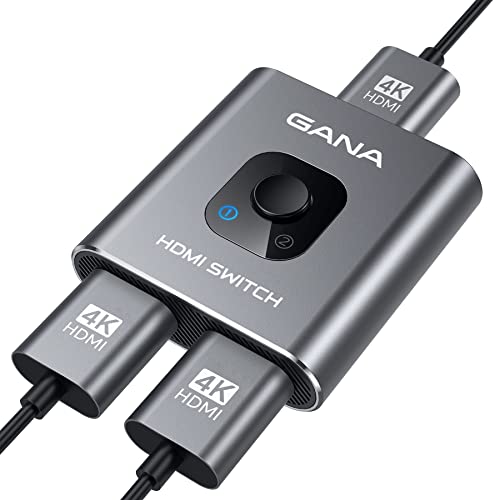
Product Overview: This bidirectional HDMI switch can connect two sources to one display or one source to two displays, with the caveat that only one display works at a time. It supports 4K@60Hz, 2K, and 1080p streams, with LED indicators to identify the active input. It is best for limited-connectivity desks where two displays share a single source during presentations or demonstrations.
Key Features
- Bidirectional design for flexible routing between displays and sources.
- 4K@60Hz support with 2K/1080p compatibility.
- LED indicators show the active port for quick confirmation.
Buying Guide: When selecting an HDMI switch for multi-monitor setups, consider the number of displays you want to feed, the total number of sources, and whether you need remote control versus manual operation. For gaming or cinema use, ensure support for 4K@60Hz and HDR, and verify that HDMI cables are of appropriate length to maintain signal integrity. If CEC is important for device coordination, look for switches that advertise CEC compatibility. Aluminum enclosures often provide better heat dissipation and durability for long-term use in living rooms or entertainment centers.
- Number of inputs: Choose 2–5 inputs based on your devices (laptop, console, media player, streaming stick).
- Output behavior: Remote control vs manual switching; consider auto-switching only if you need hands-free operation.
- Resolution support: Prioritize 4K@60Hz for modern displays; verify compatibility with HDR and HDCP2.2/2.3 as needed.
- Cable considerations: Shorter HDMI cables help maintain 4K quality; ensure total cable length meets recommended limits.
- Build and design: Aluminum housing is more durable and can help with heat management in busy setups.