Choosing the right HDMI switch or splitter helps you manage multiple sources and displays without cable chaos. This guide highlights top 4K-capable options, explaining how they handle switching, bidirectional inputs, and 4K at 60Hz. Each pick is evaluated on compatibility, ease of use, and build quality to help you decide what fits your home entertainment setup.
| Product | Brand | Key Benefit |
|---|---|---|
| Anker HDMI Switch, 4K@60Hz | Anker | Simple single-button switching and broad device compatibility |
| UGREEN HDMI Switch 5 in 1 Out | UGREEN | High capacity input/output with HDR and 4K@60Hz |
| UGREEN HDMI Switch 2 in 1 Out Bi-Directional | UGREEN | Compact 2×1 or 1×2 configuration with solid performance |
| VWRHar HDMI Switch 4K@60Hz 3 in 1 Out | VWRHar | Automatic and manual options with 4K support |
| GANA Bidirectional HDMI Switcher 2 in 1 Out | GANA | Bidirectional two-source, one-display configuration |
Note: All products listed support 4K at 60Hz where indicated, and most require standard HDMI 2.0 cables for best results. Some models include HDCP compatibility notes and may require careful cable length to maintain 4K performance.
Anker HDMI Switch, 4K@60Hz 2 in 1 Out

Anker offers a streamlined HDMI switch that supports 4K at 60Hz, enabling quick transitions between two HDMI sources to a single display. The primary advantage is a simple, single-button interface for easy switching without unplugging cables. This model emphasizes broad compatibility with laptops, game consoles, projectors, and TVs. For best 4K performance, ensure HDMI cables are within recommended lengths and employ high-quality cables. The device does not support HDMI CEC, so automatic device control features may be limited.
The switch prioritizes reliability and user experience, delivering smooth transitions and stable video. Its compact form helps minimize clutter, making it suitable for desks, media centers, or dorm setups. A potential drawback is the lack of CEC support, which means certain devices may not automatically turn on or switch inputs in concert with the display.
UGREEN HDMI Switch 5 In 1 Out 4K@60Hz

UGREEN’s five-input, one-output switch provides a versatile hub for multiple devices, including PS5, Xbox, Nintendo Switch, Roku, and laptops. It supports 4K@60Hz with HDR and HDCP2.2 compatibility, making it suitable for high-fidelity gaming and movie watching. The device uses a remote control for convenient switching and features USB-powered operation to ensure stable transmission, which helps reduce signal loss over longer cables. It supports 3D and dynamic HDR, offering a cinematic viewing experience when paired with capable displays.
Key considerations include ensuring the input devices and the output display are connected with HDMI cables that meet the recommended lengths (often around 3 meters for 4K60). While it handles a large input load, some users may require powered operation in setups with multiple high-bandwidth sources to avoid signal degradation during extended use.
GANA HDMI Switch 4K 2 in 1 Out (Black)

This aluminum-bodied bidirectional switch from GANA provides a durable 2×1 or 1×2 configuration, letting you feed two sources into one display or toggle a single source between two displays. It includes two LED indicators to show which input is active and supports 4K@60Hz. The device emphasizes fast, stable transmission, leveraging a robust aluminum chassis to dissipate heat and maintain performance. It’s well-suited for compact setups where desk space is at a premium and users want solid build quality alongside reliable 4K exposure.
Be mindful that, as with most bidirectional switches, only one display can run at a time when using this unit. Cable quality and length matter for garnering true 4K60 results, and users should pair it with HDMI 2.0/HDMI 2.0a cables to preserve the bandwidth required for 4K60. The compact form factor makes it easy to tuck into entertainment centers or behind wall-mounted TVs.
GANA Aluminum Bidirectional HDMI Switcher 2 In 1 Out
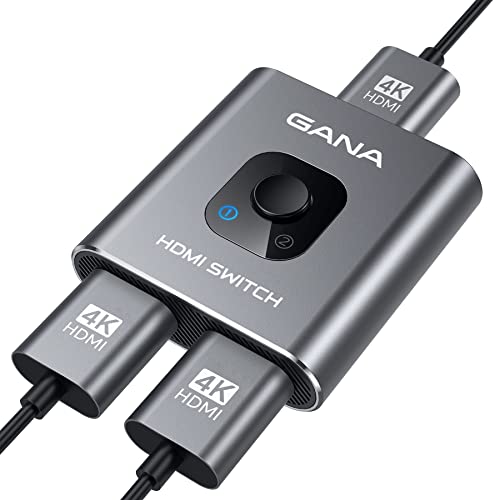
This GANA model mirrors the bidirectional concept in a slightly different color option, reinforcing the two-input-to-one-output setup with LED indicators for active source monitoring. The aluminum construction helps with heat management during extended gaming or streaming sessions. It supports 4K@60Hz and is backward compatible with 2K/1080p resolutions, making it flexible for various content and devices. As with other 2×1 switches, the key to optimal performance is ensuring your cables do not exceed recommended lengths and that you use HDMI 2.0 cables where possible to maintain 4K fidelity.
Buying Guide: Key Considerations For HDMI Switches And Splitters
- Resolution and refresh rate: Look for 4K@60Hz support to ensure smooth video and compatibility with modern consoles and streaming devices. Check HDCP compatibility (HDCP 2.2 is common for 4K content).
- Number of inputs vs. outputs: Choose based on how many devices you plan to connect. Common configurations include 2×1, 3×1, and 5×1. Bi-directional switches offer flexibility but may require careful device placement.
- Manual vs. automatic switching: Manual switches require button presses; auto-switching devices can detect the active input but may pose occasional switch delays or incompatibilities with some HDMI-CEC setups.
- Build quality and heat management: Aluminum chassis often provide better heat dissipation and durability, especially for long gaming sessions or high-bandwidth streams.
- Cable length and quality: For 4K60, keep HDMI cables within recommended lengths (commonly up to 3 meters for 4K60 with HDMI 2.0). Use high-quality HDMI 2.0/2.1 cables to avoid signal degradation.
- Power requirements: Some switches are passive (no external power needed) while others are USB-powered or require an external adapter. If you encounter instability, try a powered option or powered USB hub for stability.
- HDMI CEC support: If you want integrated device control (e.g., turning on a TV and switching inputs with a single remote), verify CEC support, though many switches do not support it.
- Physical size and aesthetics: Metal housings look sleeker and feel sturdy, while plastic housings may be lighter and cheaper but less durable.
- Remote control vs. on-device switching: Remotes add convenience, especially in multi-device setups, but on-device buttons offer quick access when a remote isn’t available.
In practice, your choice should balance the number of sources, the importance of 4K60, and whether you value automatic switching, remote control, or a compact form factor. For gaming setups, prioritize bandwidth, low latency, and consistent 4K performance. For media centers, consider ease of use, CEC presence, and whether the setup benefits from a larger input capacity.