Choosing the right HDMI splitter or switcher can simplify your AV setup, allowing you to share a single display among multiple sources or run multiple displays from one device. This guide highlights five reliable options and explains how to pick the best model for your gaming, streaming, or home cinema needs. Each product below is evaluated on compatibility, video quality, ease of use, and build quality, so you can make an informed choice without the guesswork.
Product Snapshot
| Product | Type | Key Strength | Video Support | Notes |
|---|---|---|---|---|
| GANA Bidirectional HDMI Switcher | 2 in / 1 out | Aluminum build, clear LEDs | 4K@60Hz | Bidirectional; manual switch |
| UGREEN 5×1 HDMI Switch | 5 in / 1 out | Remote control | 4K@60Hz, HDR | Broad device support |
| VWRHar Bi-Directional Switch | 2 in / 1 out | Plug-and-play | 4K@60Hz | No external power required |
| GANA 3×1 HDMI Switch | 3 in / 1 out | Manual switching | 4K@30Hz | Simple, compact |
| UGREEN 5×1 HDMI with Power | 5 in / 1 out | Remote + power adapter | 8K@60Hz / 4K@60Hz | HDMI 2.1 capable |
GANA Bidirectional HDMI Switcher Review
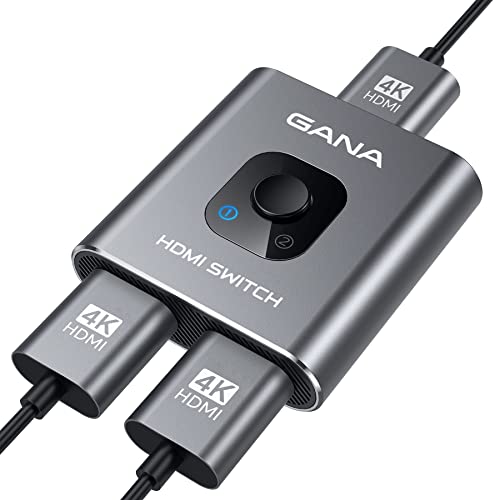
The GANA HDMI Switch 4k@60hz Splitter offers 3 HDMI ports and can connect two sources to one display or toggle a single source between two displays. It is built from aluminum for durability and includes two LED indicators to show which port is active. This is a bidirectional switch, meaning you can switch roles between input sources and displays as needed. It supports 4K at 60Hz and is backward compatible with 2K and 1080p, making it suitable for gaming consoles, Blu-ray players, and streaming devices. For best results, use a standard HDMI 2.0 cable and keep total cable length under 3 meters for vivid 4K video.
Key takeaways: robust aluminum housing, clear status indicators, and straightforward 2-in/1-out or 1-in/2-out operation. As with all such devices, it cannot display two outputs simultaneously, but it excels at clean switching with minimal lag when used within supported cable lengths.
VWRHar Bi-Directional HDMI Switch (2×1)
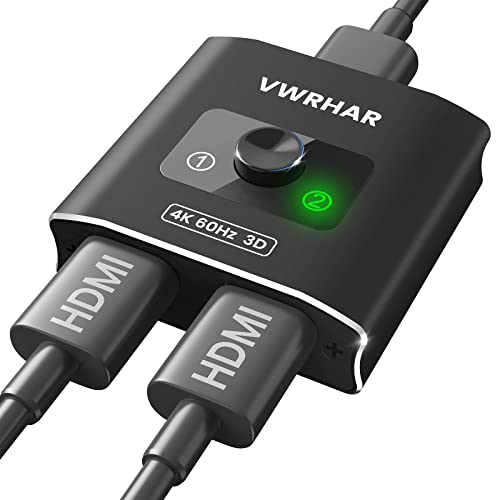
This bi-directional switch from VWRHar emphasizes plug-and-play simplicity with no external power required. It supports 4K at 60Hz and offers a 2×1 configuration, allowing you to route two sources into one display or share a single source across two displays. The setup is clean, with a straightforward button press to switch sources in under a second, and LEDs indicate the active input. While it lacks advanced features like remote control, it provides reliable, no-fuss performance for smaller living rooms or dorm setups.
GANA 3-in-1 HDMI Switch With Pigtail Cable

The GANA 3 in 1 Out HDMI Switch enables you to feed three HDMI sources into a single display. It’s a compact, manually operated device designed for quick switching among devices like Xbox, PS, Blu-ray players, or streaming boxes. Important notes include that two displays cannot be used at once, and the switch supports 4K at 30Hz. This makes it a practical option for users who prioritize simplicity and don’t require HDR or high-refresh-rate gaming at 4K. Cable management remains straightforward with a single device in the signal chain.
GANA 5-in-1 With Remote Control

This GANA model expands to five HDMI inputs or outputs and includes an IR remote for convenient switching from across the room. It supports 4K at 60Hz, backward compatibility with lower resolutions, and HDR. The device consolidates multiple devices—gaming consoles, streaming boxes, Blu-ray players—onto a single display, reducing cable clutter. It’s built with aluminum housing to manage heat and durability, making it suitable for longer-term home theater use. A power option is not always required for stable operation, depending on the devices connected.
GANA 2-in/1-out HDMI 2.1 Switch

The GANA 2×1 HDMI 2.1 switch emphasizes high bandwidth and modern compatibility, enabling 8K at 60Hz and 4K at 120Hz with support for VRR and Dynamic HDR. It’s designed for gamers and home theater enthusiasts who need rapid switching without sacrificing signal quality. The aluminum housing supports heat dissipation, and the unit can toggle between two sources to a single display via a simple push-button, with an LED indicator for the active input. Note that 2.1 features require compatible cables and devices to realize full capabilities.
Buying Guide: How To Choose An HDMI Splitter Or Switcher
When evaluating HDMI splitters and switchers, consider the following factors to ensure you pick a model that matches your setup and future needs:
- Number of inputs and outputs: Choose a model that matches how many devices you plan to connect and whether you need one or multiple displays.
- Video resolution and refresh rate: If you own 4K gaming consoles or 8K-capable devices, look for 4K@60Hz, 4K@120Hz, or 8K@60Hz support, depending on your TV and cables.
- HDMI version compatibility: HDMI 2.1 introduces higher bandwidth and features like VRR; ensure your devices and cables support the same standard.
- Power requirements: Some switches require external power for stable operation, especially long cable runs or high-bandwidth signals.
- Remote control vs. manual switching: Remotes offer convenience from the couch, while manual switches are simple and reliable but require direct access.
- Build quality: Aluminum housings usually dissipate heat better and resist wear, which is beneficial for long movie nights or gaming sessions.
- Cable length considerations: For best 4K performance, keep HDMI cables within recommended lengths (often about 3 meters for 4K @ 60Hz on many devices); check manufacturer guidance for your setup.
- Audio support: Ensure the device handles the audio formats you use, including HD audio and lossless formats if you have a high-end sound system.
- Brand and warranty: Reputable brands with clear return policies and warranties reduce risk if you encounter compatibility issues.
In practice, the best choice depends on your configuration. If you need to connect multiple consoles to one display and occasionally use two displays, a bidirectional switch with straightforward indicators is ideal. For a living room with a single display but many sources, a remote-controlled 5-in-1 switch provides convenience and future-proofing for high-resolution content. For gaming enthusiasts pursuing the newest formats, an HDMI 2.1-capable switch with robust bandwidth and low latency is worth the investment, especially when paired with compatible cables and devices.