Modern entertainment setups often require cleanly extracted audio from HDMI sources for headphones, soundbars, or amplifiers. The following products are designed to split HDMI video from audio, delivering a 3.5mm headphone jack or other analog/digital outputs. This guide compares capabilities like 4K support, EDID handling, and audio formats to help you pick a gateway between your TV, console, and audio system.
| Product | Brand | Output Options | Video Resolution Support | Key Benefit |
|---|---|---|---|---|
| VPFET HDMI Audio Extractor Splitter | VPFET | HDMI, 3.5mm AUX, RCA L/R | Up to 4K@30Hz | Auto EDID with PCM output, broad compatibility |
| biaze 4K HDMI Audio Extractor | biaze | HDMI, Optical SPDIF, AUX 3.5mm | Up to 4K@60Hz | Three audio modes; supports DTS/Dolby formats |
| Wonlyus HDMI Audio Extractor Splitter | Wonlyus | HDMI, 3.5mm, Coaxial, Optical | 4K@30Hz | Plug and play; no ARC/eARC |
| AMANKA HDMI Audio Extractor | AMANKA | HDMI, Optical, 3.5mm | 4K@30Hz | Multiple EDID modes; detailed audio option control |
| avedio Links HDMI Audio Extractor | avedio links | HDMI, Optical, SPDIF, L/R | 4K@30Hz | Pass-through and multiple audio routes |
Note: All devices listed are designed to extract audio from HDMI without requiring a separate driver. In some cases, enabling PCM output or adjusting EDID settings on the source device may be necessary to ensure compatibility with your audio system.
VPFET HDMI Audio Extractor Splitter

This device accepts one HDMI input and outputs HDMI plus AUX (RCA L/R) at 3.5mm. It supports 4K2K@30Hz, 3D, and 1080p family formats. The unit claims automatic EDID detection to optimize the audio/video link. It also notes that PS4 Pro and Xbox 360 typically output at 1080p limits, and advises setting the source to PCM for best compatibility. Users can send audio to an external receiver while the HDMI signal passes through to a display.
biaze 4K HDMI Audio Extractor Splitter
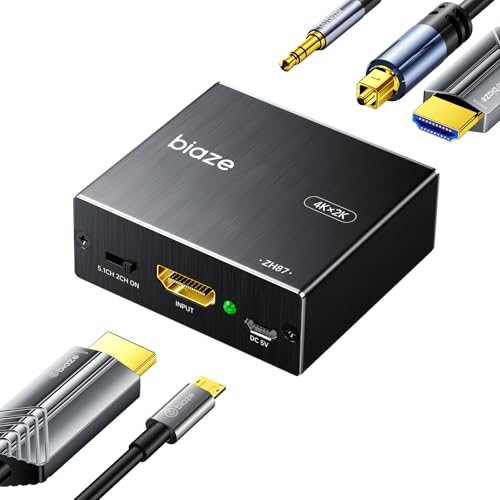
biaze’s model extracts audio via optical SPDIF or 3.5mm while passing the HDMI video through. It supports 4K@60Hz, HDMI 2.0, HDCP 2.2, and full HD 1080P with 3D and 36-bit color. Audio formats include DTS-HD, Dolby TrueHD, LPCM 7.1, DTS, and Dolby Digital, with three modes: PASS, 2CH, and 5.1CH. Notably, ARC is not supported by this extractor, which can influence setup decisions for certain soundbars.
Wonlyus HDMI Audio Extractor Splitter

Wonlyus offers 4K HDMI input to HDMI output plus a separate 3.5mm audio output. It supports 4K@30Hz RGB, 1080P@60Hz, and notes that ARC/eARC are not supported. The device emphasizes plug-and-play operation without drivers and aims to preserve video integrity while separating audio for external speakers or headphones.
AMANKA HDMI Audio Extractor

AMANKA’s extractor provides audio output through optical and 3.5mm outputs. It includes three EDID modes—2.0CH, 5.1CH, and PASS—to tailor the source’s audio behavior. It supports HDCP1.4 and 4K@30Hz video with Dolby/DTS 5.1 via optical and PCM/LPCM over the 3.5mm output. The device is designed for simplicity and broad compatibility, though 7.1-channel support is not included.
avedio Links 4K HDMI Audio Extractor

avedio links provides an HDMI to HDMI output plus Optical SPDIF and L/R stereo outputs. It supports 4K@30Hz, 3D, and 36-bit color. Like others, it offers three audio modes (PASS, 2CH, 5.1CH) and notes that ARC is not included. The device aims to simplify audio extraction for home theater setups, enabling connection to soundbars or amplifiers while preserving video quality.
Buying Guide: Key Purchase Considerations
When choosing an HDMI audio extractor with a 3.5mm output, consider these essential factors to ensure you select a model that fits your setup.
- Video resolution and bandwidth: If you have a 4K-compatible display, verify the extractor supports 4K@30Hz or 4K@60Hz as needed. Some models cap at 4K@30Hz, which can affect gaming or high-detail video.
- Audio formats: Look for support of PCM/LPCM, Dolby Digital, DTS, and Dolby TrueHD. If you plan to power a home theater with 5.1 or 7.1 channels, verify the device’s supported formats and mode options (e.g., 5.1CH output via optical).
- Output options: A 3.5mm headphone jack is common, but some units also provide RCA, optical, or coaxial outputs. Your choice should match your audio system inputs.
- EDID and source compatibility: Automatic EDID detection helps optimize audio/video synchronization. Some devices offer manual EDID modes to resolve compatibility with certain TVs or receivers.
- ARC/eARC support: If your TV relies on ARC/eARC to route audio back to a soundbar, verify whether the extractor supports ARC. Several models explicitly do not support ARC, which may require alternative wiring.
- Latency and synchronization: A well-designed extractor minimizes audio-video delay. If gaming or fast-action content is a priority, look for low-latency claims and user feedback.
- Power and setup: Most extractors are plug-and-play, but some may require a separate power source. Confirm the power delivery method and any compatibility notes for the connected devices.
- Build quality and reliability: Choose reputable brands with clear feature documentation and return options. This helps when troubleshooting compatibility with newer HDMI standards.
- Use-case alignment: If you only need to split audio occasionally, a simple 3.5mm output may suffice. For multi-room or high-end setups, consider models with multiple audio routes and better impedance handling.
In summary, select an HDMI audio extractor that matches your video resolution needs, supports the preferred audio formats, and provides compatible outputs for your speakers or headphones. Evaluating EDID options and ARC compatibility will help prevent common setup issues and ensure a seamless audio experience.