When you need to mirror a single HDMI source across two displays, choosing the right HDMI splitter is essential for clean video, synchronized audio, and reliable performance. This guide reviews five popular options that focus on mirror/duplication rather than extending or switching between sources. Each product is evaluated for compatibility, resolution support, power requirements, and ease of use to help American buyers make an informed decision.
| Product | Brand | Resolution Support | Power | Notes |
|---|---|---|---|---|
| avidio Links HDMI Splitter 1×2 | avedio links | 4K@30Hz, 1080p | USB powered | Mirror only; not for extension |
| Warrky HDMI Splitter 1×2 | Warrky | 4K@30Hz, 1080p | USB-C powered included | Mirror only; supports long cable runs |
| MT-VIKI 4K HDMI Splitter 1×2 | MT-VIKI | 4K@30Hz, 1080p | Powered | Mirror only; confirms 4K60 support note |
| OREI UHDS-104 | OREI | 4K@60Hz, 1080p | DC powered | 1×4 outputs; mirror only |
| KELIIYO 1×4 HDMI Splitter | Keliiyo | 4K@30Hz, 1080p | AC adapter | Mirror only; 1 input to 4 outputs |
Avedio Links 1×2 HDMI Splitter – Mirror Only

The avedio links 1×2 HDMI Splitter duplicates a single HDMI input signal to two displays, delivering both video and audio in sync on both screens. It is explicitly designed for mirror setups and does not extend content across displays. The device supports 4K at 30Hz and is backward compatible with 1080p resolutions. It is not a switcher or audio extractor, and it’s recommended to use HDMI 2.0 AWG 26 cables for optimal results, particularly at longer lengths. The included details emphasize that the two displays will show identical content, which makes it suitable for dual-room viewing or multi-display presentations.
Key considerations:
- Not for extending content; it duplicates one source to two displays.
- 4K at 30Hz; better results at 1080p with longer runs.
- Requires a reliable HDMI cable and, ideally, a stable power source for consistent output.
OREI SplitExtend 1×2 to 2 Monitors

The OREI SplitExtend is focused on providing a simple mirror function across two displays. It’s a 1×2 HDMI splitter with powered output, capable of duplicating a single HDMI input signal to two HDMI outputs at up to 4K@30Hz, with compatibility down to 1080p. It ships with a dual-voltage supply for international use and includes EDID management to help ensure compatibility with various displays. This model is positioned for users who want dependable duplication for multiple screens in small rooms, classrooms, or living spaces.
Important notes:
- Mirror-only operation; does not support content extension or switch inputs.
- 4K@60Hz support on some models, but confirm specific unit capabilities before pairing with 4K sources.
- Best used with HDMI cables under 30 feet to minimize signal degradation.
MT-VIKI 4K Splitter 1×2 – Dual Monitors

MT-VIKI presents a 1×2 HDMI splitter designed to duplicate a single source to two displays. The device emphasizes mirror/duplicate output with recommendations for 4K at 30Hz and 1080p at higher refresh rates. It supports HDMI 1.4/1.3/1.2 compatibility and HDCP 1.4. The product notes clearly state that it will not extend content to two separate screens and is intended for identical displays. Power is required for stable operation, and users should ensure their HDMI cables and displays support the expected resolution to avoid compatibility issues.
Key considerations:
- Not an extender or switcher; focuses on mirroring.
- Supports 4K at 30Hz, with 1080p variants offering higher refresh rates.
- Ensure both displays can handle the same resolution for best results.
KELIIYO 1×4 HDMI Splitter – Mirror Across Four Displays
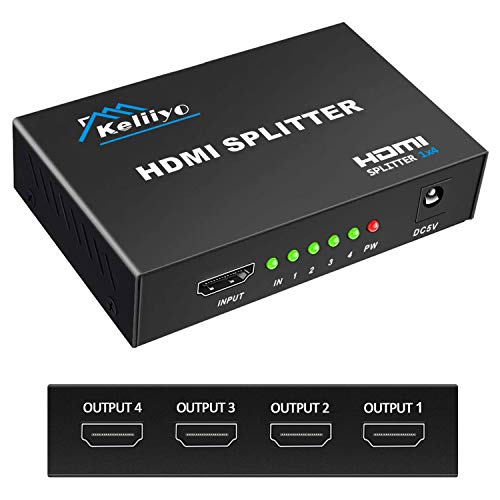
The KELIIYO splitter enables a single HDMI input to drive four HDMI outputs simultaneously for mirrored displays. It supports resolutions up to 4K@30Hz and 1080p, with 3D and various color depths. The device is not a switch or multimedia hub; it’s a pure duplication tool. An AC adapter is included to ensure consistent performance, especially when using longer HDMI cables or multiple displays. This unit is suitable for multi-room setups or shared presentation spaces where identical content must be shown on several screens at once.
Purchase notes:
- Mirror-only functionality; no extension or input switching.
- Requires a stable power supply for optimal performance.
- Verify cable length and display capabilities to avoid downscaling issues.
Buying Guide: Key Considerations For Choosing A Mirror HDMI Splitter
When selecting an HDMI splitter intended for duplicating screens, consider the following aspects to ensure reliable performance across different rooms, devices, and display types. This guide reflects common expectations for home theaters, classrooms, and office setups where identical content must appear on multiple displays.
Purpose: Mirror vs Extend
All products in this guide are designed for mirror/duplication. If you need to display different content on each screen, you’ll need an HDMI switch or multi-output matrix that supports extension. Confirm the device’s stated capability to avoid buying a product that does not meet your needs.
Resolution And Frame Rate
Typical mirror splitters support 4K at 30Hz or 1080p at higher refresh rates. If your source is 4K and you require smooth motion, verify whether the splitter can sustain 4K at 60Hz or if 30Hz is the practical limit. In some cases, downscaling may occur, so confirm the output specifications with the seller.
Power Requirements
Some splitters are powered via USB, while others use a dedicated AC adapter. A powered splitter generally delivers more stable performance, especially when multiple displays are connected or longer HDMI cable runs are used. Consider the distance between devices and your power access options.
Cable Quality and Length
High-speed HDMI cables (HDMI 2.0/2.1 compatible, AWG 26 recommended) help maintain signal integrity for 4K content. For longer runs, ensure the splitter’s recommended cable lengths align with your setup to prevent signal loss or artifacts.
Compatibility And EDID
Some models include EDID management to help displays negotiate resolution and refresh rate automatically. If you have a mix of devices (TVs, projectors, or monitors), consider a splitter with EDID handling to reduce compatibility issues.
Audio Handling
Most mirror splitters transmit audio alongside video to both outputs. If you plan to route audio differently or require separate audio devices, confirm that the splitter does not promise unsupported features like audio extraction, which is not common in mirror-focused devices.
Physical Build And Longevity
Metal shells, compact form factors, and reliable connectors contribute to durability in home or office environments. If you’ll frequently move the setup, consider a lighter unit with a robust build and stable connectors to reduce wear over time.
Platform And Driver Requirements
Most mirror splitters are plug-and-play, but some models may require driver support in particular multimedia configurations or advanced setups. For typical consumer use, a simple, powered splitter with clear specifications is usually sufficient.
Choosing the right HDMI splitter for duplicating screens hinges on matching your source capabilities with the displays you intend to use, while ensuring the device supports the required resolution and power options. Always review product pages for exact specs and confirm that the unit meets your room or workflow needs before purchasing.