Explore top 12-port HDMI splitters that duplicate a single source to multiple displays. This guide covers 5 reliable options, highlighting compatibility, resolutions, and setup considerations for venues like sports bars, exhibitions, classrooms, and retail displays. Learn what to prioritize—HDMI version, EDID management, and cable lengths—to ensure a stable, synchronized viewing experience.
| Product | Brand | Output Ports | Key Benefit |
|---|---|---|---|
| HDMI Splitter 1 in 12 Out, 4K@30Hz | TCNEWCL | 12 | High-density mirroring with long cable reach |
| OREI UHDS-1016 1 In 16 Out | OREI | 16 | Ultra HD 4K support for many displays |
| HDMI Splitter 1 In 10 Out | KAGO | 10 | Affordable 10-way mirroring for multiple screens |
| OREI 1 In 8 Out HDMI Splitter | OREI | 8 | Solid performance with EDID options |
| ROFAVEZCO HDMI 2.1 Splitter 1 In 2 Out | ROFAVEZCO | 2 | Future-ready HDMI 2.1 features for dual displays |
Note: The list emphasizes products that primarily duplicate one input to multiple outputs. If you need true switching between sources or a different mix of outputs, consider a dedicated HDMI matrix or a larger 12-in-1 switch in a separate guide.
HDMI Splitter 1 In 12 Out, 4K@30Hz Powered Video Splitter

TCNEWCL’s 1×12 HDMI splitter duplicates one input signal to twelve displays. It supports up to 4K at 30 Hz and 3D Blu-ray content, with multi-channel LPCM audio up to 24-bit/192 kHz. The device is designed for stable long-distance transmission using standard HDMI cables, with recommended input cable lengths up to 10 meters and outputs up to 15 meters. Note that the unit mirrors the signal; it does not extend desktops or create separate content across screens. HDCP and EDID considerations should be aligned with display compatibility to avoid handshake issues. This model is suitable for retail displays, event venues, and exhibition spaces where synchronized content is essential.
MT-VIKI 4K 1×8 HDMI Splitter

MT-VIKI’s 1×8 HDMI splitter provides four distinct characteristics relevant to multi-display setups: 4Kx2K resolution at 30 Hz, HDCP compliance, and an ability to mirror a single source across eight displays. It supports common devices like computers, Blu-ray players, gaming consoles, and streaming devices, with compatibility for 1080p and 3D content. The setup is straightforward: one input, eight identical outputs. This option is suitable for classrooms, retail windows, or small event spaces where a single source must be broadcast identically to multiple screens without content splitting or extension.
12-Port HDMI Switch 12 In 1 Out — 4K@30Hz
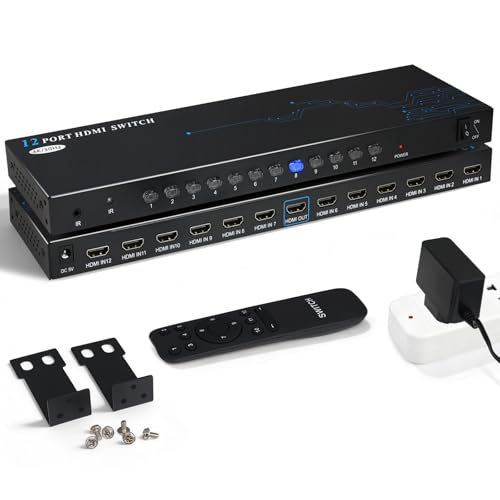
This 12-in-1 HDMI switcher is designed to consolidate multiple sources into a single display. It features an infrared remote, making it convenient to switch sources from a distance. While primarily a switcher, its 12-input capacity allows you to connect many devices such as gaming consoles, streaming players, and laptops into one display, then select the desired source. It supports up to 4K at 30 Hz and is built to deliver stable signal transmission with minimal interference. This unit is best for setups where multiple devices share a single monitor, TV, or projector and quick source selection is needed.
OREI UHDS-1016 1 In 16 Out HDMI Splitter

OREI’s UHDS-1016 HDMI splitter duplicates a single HDMI input across up to 16 outputs, supporting 4K at 60 Hz compatibility considerations aside, this model emphasizes broad output support and EDID handling. It is suitable for bars, churches, gyms, and venues needing to display identical content on many screens. Included dual-voltage support and international adapter options enhance versatility for installations in various countries. Note that the device does not extend displays; its primary function is mirroring. It supports a comprehensive range of audio formats and 3D content, making it appropriate for mixed-media environments with diverse audio requirements.
HDMI Splitter 1 In 10 Out — KAGO

KAGO’s 1×10 HDMI splitter supports up to 4K at 30 Hz across ten outputs, delivering synchronized content to multiple displays such as HDTVs, projectors, and monitors. It supports common audio formats, including LPCM and Dolby formats, ensuring compatibility with most modern AV setups. The device is designed for plug-and-play installation with straightforward cable connections and is well-suited for classrooms, retail displays, or public information kiosks where consistent, mirrored content across several screens is required. The compact form factor facilitates easy placement behind cabinets or AV racks.
ROFAVEZCO HDMI 2.1 Splitter 1 In 2 Out

ROFAVEZCO offers a 1×2 HDMI 2.1 splitter with support for 8K and 4K resolutions, including 120 Hz and 60 Hz variants. The device emphasizes HDMI 2.1 features such as VRR, ALLM, and HDR10, with EDID management and an optional downscaler function for compatibility with certain displays. It is designed for dual-monitor duplication with synchronized video and audio, suitable for gaming setups or multi-monitor presentations where high bandwidth and low latency are essential. Note that it is not a long multi-output splitter but a compact, future-ready option for two displays.
Buying Guide
When selecting a 12-port HDMI splitter or a high-port-count option, consider these factors to ensure reliable performance in commercial or public environments:
- Output count vs. input signal: If you truly need 12 outputs, verify that the device mirrors the input without extending content across screens.
- Resolution and refresh rate: Choose devices that support your target resolution (4K at 30 Hz, 60 Hz, or higher) and ensure compatibility with your source devices.
- HDMI version and EDID management: HDMI 2.0/2.1 support more features; EDID handling prevents display handshake issues and ensures consistent output across all connected displays.
- Audio formats: Check supported audio (LPCM, Dolby, DTS) to match your AV setup and speaker system requirements.
- Cable lengths: Note recommended input/output cable lengths to maintain signal integrity over long runs.
- Power supply: Powered splitters generally offer stronger signal stability across many outputs; consider wall-wart or rack-mount power options as needed.
- Latency and switching: For dynamic environments, ensure the device offers responsive switching with minimal lag or signal drop.
- Form factor and cooling: In venues with tight spaces, consider compact designs and ventilation to prevent overheating.
- Future-proofing: HDMI 2.1 ready units provide better compatibility with newer displays and gaming devices, especially for high-bandwidth content.
Selecting the right splitter or multi-output device depends on your application: venues requiring synchronized displays, retail environments with multiple screens, or educational spaces needing consistent content across many monitors. Evaluate the number of outputs, the desired resolution, and whether you need merely mirroring or additional features such as EDID control or downscaling to ensure a stable, uniform viewing experience across all displays.