In modern home theaters, surveillance setups, or live streaming rigs, a quad screen multiviewer helps you monitor multiple HDMI sources on a single display. This guide highlights five vetted options that balance seamless switching, multiple viewing modes, and reliable compatibility with common devices. Each product section includes key features to help compare performance and suitability for your needs.
Summary of Selected Products
| Product | Brand | Key Benefit | Resolution Support |
|---|---|---|---|
| OREI 4x HDMI Multiviewer Switch | OREI | Quad viewing with 5 display modes and IR remote | Up to 1080p |
| Portta 4×1 Multiviewer with PIP | Portta | Six viewing modes; RS232 control; strong upscaling/downscaling | Up to 1080p@60 |
| Groza 4×1 Quad Multiviewer | Groza | 4K 30Hz support; multiple mode options; seamless switching | 4K@30Hz / 1080p |
| ACHAVE 4×1 Multiviewer | ACHAVE | 10 display modes; versatile connectivity | up to 4K@30Hz |
| SIGRAPID 16×1 HDMI Multiviewer | SIGRAPID | Very high input count; multiple display modes | Various (up to 1080p) |
OREI HDMI Switcher 4 In 1 Out With Quad Multiviewer

The OREI device combines four HDMI inputs into a single display while offering a quad multiviewer configuration. It supports up to 1080p resolution and includes a VGA output for legacy displays. The unit is designed for fast, seamless switching with both IR remote and front panel controls. With five display modes, users can tailor the view to monitor all sources at once or focus on a primary source when needed. This model is especially suitable for home entertainment setups and small-scale monitoring tasks where quick source changes are essential.
Portta HDMI Multiviewer Switch 4×1 With PIP

Portta’s multiviewer focuses on flexible viewing modes, offering six different layouts, including PIP and full-screen options. It supports 1080p at 60Hz with downscaling and upscaling capabilities, making it suitable for gaming consoles, streaming boxes, and PCs. The device can be controlled via IR remote or RS232, enabling convenient operation from a distance. It emphasizes smooth switching across inputs, reducing latency during transitions and preserving image quality across modes.
Groza HDMI Multiviewer Switch 4×1
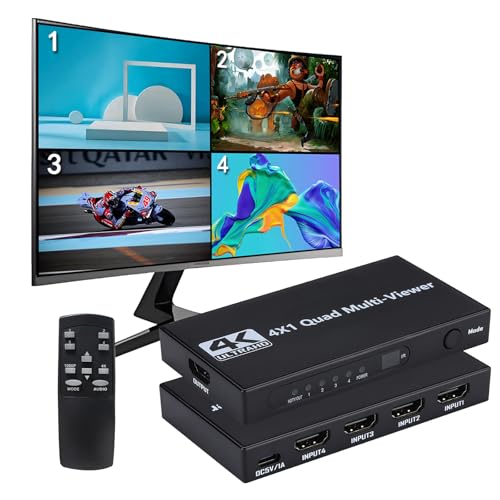
This Groza model supports 4K at 30Hz or 1080p at 60Hz, delivering robust performance for security cameras, gaming consoles, and media players. It features nine display modes for flexible monitoring, including quad view and larger single-source views. IR remote control enables easy switching, and the device maintains compatibility with common HDCP standards, ensuring broad device interoperability. The emphasis on high-resolution output makes it well-suited for tasks demanding clear image detail across multiple sources.
ACHAVE 4×1 HDMI Multiviewer Switch

ACHAVE presents a versatile 4×1 multiviewer with 10 display modes and 4K@30Hz output, alongside 1080p@60Hz. Its broad mode set supports quad, dual, and full-screen configurations, allowing users to tailor the visual arrangement to security feeds, gameplay, or media playback. The device aims to balance high-resolution output with flexible display options, broad device compatibility, and straightforward control via IR or other supported interfaces.
HAICHENTEX HDMI Multiviewer Switch 4×1

The Haichentex 4×1 multiviewer emphasizes 4K output at 30Hz or 1080p at 60Hz with seamless switching between four HDMI inputs. It supports multiple input devices such as security cameras, PCs, Blu-ray players, and game consoles. The unit offers various mode selections and is designed to synchronize audio with video signals, with a note about ensuring monitor compatibility to avoid display issues. The product notes highlight both performance and ease of use for multi-source viewing scenarios.
Portta 4K 4×1 Multiviewer With PIP

Another Portta entry combines four HDMI inputs with a choice of six display modes, including quad-view and PIP, and supports 4K at 30Hz or 1080p at 60Hz. This model continues Portta’s theme of flexible control via remote or RS232, designed for gaming, security, and entertainment setups that require simultaneous monitoring of multiple inputs. Keep in mind monitor compatibility for 4K at 30Hz to ensure a smooth experience across modes.
Buying Guide: Key Purchase Considerations For HDMI Quad Screen Multiviewers
- Display Modes and Layouts: Look for devices offering multiple viewing modes (quad, full screen, PIP, dual views) to match your use cases, whether security surveillance, gaming, or media juggling.
- Resolution and Scaling: Check supported resolutions (1080p vs. 4K) and whether the unit can scale inputs up or down to fit your display. Consider the frame rate compatibility (60Hz vs 30Hz) for your content.
- Input/Output Connectivity: Ensure the device provides enough HDMI inputs for your sources and a suitable output option (HDMI and, in some models, VGA). Some models add audio outputs or Toslink for integrated sound management.
- Control Methods: Preference for IR remote, front-panel buttons, RS232, or software control can influence ease of use in different environments (couches, control rooms, or mounted setups).
- HDCP and Compatibility: Verify HDCP support versions and compatibility with common devices like TVs, game consoles, media players, and cameras to avoid handshake issues.
- Seamless Switching: A key feature for live viewing; look for specs emphasizing minimal switching delay to maintain immersion and workflow continuity.
- Reliability and Build Quality: Consider chassis sturdiness, fan noise (if any), and vendor reputation. For surveillance or security use, long-term reliability may take precedence over flashy features.
- Future-Proofing: If you plan to upgrade displays or add more sources later, consider devices with higher input counts or bandwidth margins to minimize replacement cycles.