Choosing the right HDMI port expander can simplify living room setups, reduce cable clutter, and ensure smooth switching between game consoles, streaming devices, and PCs. The following article highlights five high-performing HDMI switches and splitters from well-known brands, each suited for TV use. We compare features such as 4K/8K support, HDMI 2.1 bandwidth, remote control, and multi-port configurations to help you pick the best option for your entertainment space.
Summary Of Selected Products
| Product | Brand | Key Benefit | Core Tech |
|---|---|---|---|
| HDMI Splitter 120Hz 4k – 5 in 1 Out 8K HDMI 2.1 Switch Box Port Expander | Tioleje | 5 inputs into 1 display with 8K/4K support | HDMI 2.1, 48 Gbps, 8K@60Hz |
| NEWCARE HDMI Splitter 1 in 4 Out | NEWCARE | Mirror 1 source to 4 displays, simple duplication | 4K, 1080p, 3D, HDR |
| ACASIS USB C Hub 10Gbps, 6-in-1 | ACASIS | HDMI output plus data and charging in one hub | 10Gbps USB-C, 4K@60Hz |
| OVAW HDMI Switch 3 in 1 Out | OVAW | Remote-controlled 3-source switching | 4K@60Hz, HDMI 2.0 |
| 8K HDMI Splitter 5 in 1 Out | clickfish | 5-port switch with 8K/4K support | HDMI 2.1, 48Gbps |
HDMI Splitter 5-In-1 With 8K Support

Provides up to five HDMI inputs feeding a single display, with LED indicators showing the active port. This 2.1 switch supports 8K at 60Hz and backward compatibility to 4K at 120Hz, HDR10, and 3D effects. It requires an HDMI 2.1 cable and a device that supports HDMI 2.1 for 8K output. A DC 5V power source ensures stable transmission and prevents frame drops during intense gaming sessions.
NEWCARE 1 In 4 Out HDMI Splitter

This splitter mirrors one HDMI source to four displays simultaneously, offering synchronized video and audio across multiple rooms. Note that it does not extend or vary the output across displays, and it does not support ARC/eARC. It supports up to 4K, HDR, and 3D, with typical ranges suitable for long cable runs up to 52 feet at 1080p or 16 feet at 4K using AWG26 cables. It’s ideal for sharing the same content in different spaces without latency.
ACASIS USB C Hub 6-In-1 With HDMI
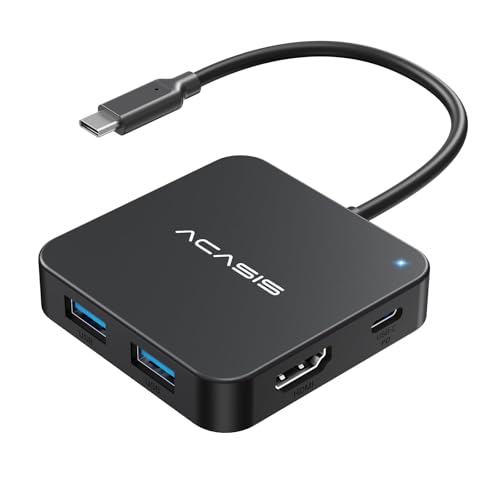
This 6-in-1 hub expands a single USB-C port into HDMI output plus multiple USB-A ports and a PD charging port. It’s suitable for MacBook, laptops, and tablets that support video over USB-C (USB4/Thunderbolt 3 or 4). The HDMI output delivers 4K at 60Hz for displays or projectors, and the hub’s USB-C PD port provides up to 100W for charging while in use.
OVAW 3-In-1 HDMI Switch With Remote

Designed for multimedia teaching, gaming, and PC setups, this switch offers remote control with a range of up to 33 feet. It supports 4K at 60Hz and is backward compatible with 4K at 30Hz. The device is compact and includes a switch button for manual control. Note that it cannot output to two displays simultaneously and the power adapter may be sold separately in some bundles.
Tioleje 3-In 1-Out HDMI Switcher Box

This 3×1 HDMI switcher supports 8K at 60Hz and 4K at 120Hz, with HDR10, 3D, and VRR for smoother visuals. It is backward compatible with lower resolutions and uses HDMI 2.1 to deliver up to 48 Gbps bandwidth. It’s suitable for PS5, Xbox, Switch, DVD players, and PC, and includes a remote for easy switching. For optimal performance, pair with HDMI 2.1 cables.
ClickFish 5-Port 8K HDMI Switch
With five ports, this HDMI switcher supports up to 8K at 60Hz and 4K at 120Hz, plus backward compatibility to lower resolutions. It enables HDR, Dolby Vision, CEC, and 3D, along with a wide range of audio formats. The aluminum build aids heat dissipation, and the device uses a 48Gbps bandwidth for reliable, lag-free switching. Ideal for households with multiple gaming consoles and media players.
Buying Guide: Key Considerations For Choosing An HDMI Port Expander
- Resolution and bandwidth: Look for HDMI 2.1 devices when you need 8K@60Hz or 4K@120Hz. Ensure your cables and displays support the same standards to avoid bottlenecks.
- Number of inputs vs. outputs: Decide between a splitter (one input to many displays) and a switch (multiple inputs to one display). If you plan to bridge several devices, a 5-in/1-out or similar configuration can simplify control.
- Control method: Remote control adds convenience for multi-seat living rooms; some models also offer manual switches. Consider range and battery life for remotes.
- Power requirements: Some HDMI switches require external power; verify whether a passive, powered, or USB-powered design matches your setup and cable lengths.
- Compatibility: Check for VRR, HDR formats, HDCP versions, and 3D support if you use gaming consoles and Blu-ray players. Ensure backward compatibility with your existing devices.
- Cable quality and length: Higher resolutions demand higher-quality cables (HDMI 2.1). Keep cable lengths within recommended ranges to minimize signal loss.
- Audio features: If you need ARC/eARC or advanced audio passthrough, verify that the splitter or switch supports the desired formats with your soundbar or AV receiver.
- Use case and environment: For classrooms or offices, prioritize remote access and stable power. For living rooms, prioritize compact form factor and ease of use.
In sum, a well-chosen HDMI port expander can consolidate devices, preserve picture quality, and streamline control. The products highlighted here offer a range of port counts, resolutions, and control options to fit typical TV setups, gaming rigs, and home theaters.