When you need reliable, low-latency HDMI transmission over LAN, choosing the right HDMI over IP extender is essential. This guide highlights leading options that support long distances, multi-display setups, and even keyboard-mouse control over a network. Each product below is evaluated on distance, video quality, network compatibility, and ease of installation to help you pick the best solution for your home theater, classroom, or small-to-medium office.
Summary of Selected Products
- PWAY PW-DT273P: 400 ft HDMI extender over Ethernet with POE, one-to-many via 100M/1000M switch, up to 1080p
- PWAY HDMI Extender 500ft No Delay: 500 ft, 1080p@60Hz, one-to-many over gigabit switch
- OREI EX-500-K: 4K@60Hz HDMI over IP, up to 400 ft, loop out, 1G switch required
- AV Access 4K HDMI USB KVM Extender: 120M (390 ft) over LAN, 4K@30Hz or 1080P@120Hz, USB hub and KVM
- Mirabox HDMI Extender 400ft: 1080p over IP, 1-to-many, robust network distribution
PWAY 400ft HDMI Extender Over Ethernet

The PW-DT273P model enables HDMI signals to travel up to 400 feet via Cat5e or Cat6 cables, making it suitable for large rooms, conference halls, or theater setups without running new fiber. It supports multi-video output when paired with an Ethernet switch, enabling flexible distribution across a network. The system is compatible with Power over Ethernet (POE) switches, reducing the need for extra power adapters and simplifying installation. Ideal for installations where a single source must reach multiple displays with minimal latency.
Key considerations for this option include ensuring a capable Gigabit network switch to handle multiple streams and confirming PoE compatibility if you want to minimize power cables at the transmitter or receiver locations. The PW-DT273P emphasizes reliability and scalability, particularly in environments that demand easy reconfiguration through network equipment rather than direct wired runs.
PWAY HDMI Extender 500ft No Delay Over Cat5e/6
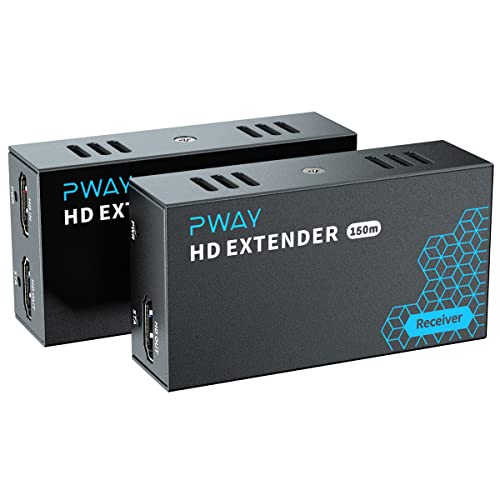
This model extends a single HDMI source up to 500 feet using standard Cat5e/Cat6 cables and supports 1080p at 60 Hz with audio. It’s designed for one-to-many distribution when connected to a gigabit switch, making it suitable for classrooms, retail displays, or event venues where a single source must reach several screens. The solution avoids signal degradation common with long HDMI runs while maintaining synchronized playback across displays.
Considerations for deployment include cable quality and distance limits, as longer runs can introduce latency or dropouts if the network path isn’t properly wired. This PWAY kit emphasizes straightforward installation with familiar Ethernet components, which can simplify procurement and maintenance for AV teams.
OREI 4K HDMI Extender Over IP CAT6 (EX-500-K)

The EX-500-K supports 4K HDMI over IP, delivering 4K@60Hz with 4:4:4 color at distances up to 400 feet over Cat6 or Cat7. It supports one-to-many connections via a 1G switch (sold separately) and includes IR control from the receiver to the transmitter, which is helpful for adjusting sources remotely during presentations. A high-quality Cat6 cable is recommended and required for optimal performance, and the device must be paired with a compatible 1G switch to enable multi-display distribution.
For users prioritizing resolution and future-proofing, this OREI option offers 4K capabilities, low latency, and the ability to monitor or control the source from the display location. It’s well-suited for professional AV installs, corporate presentations, and digital signage that demand crisp, high-resolution video over IP networks.
AV Access 4K HDMI USB KVM Extender Over TCP/IP

The AV Access kit extends 4K HDMI and USB devices over TCP/IP with single-cable simplicity. It supports up to 120 meters (approximately 390 feet) via Cat5e/6/6a/7 Ethernet and delivers 4K at 30 Hz or 1080p at 120 Hz, depending on the resolution selected. A built-in 3-port USB hub on the transmitter and receiver enables keyboard and mouse signals, enabling a true KVM experience over the network. The DIP switch system allows up to 16 network sets, which is useful for larger deployments with multiple users or workstations sharing a single video source.
Key deployment considerations include ensuring adequate network bandwidth for multiple streams and understanding that performance can vary with network traffic. This AV Access model is designed for environments needing local control and flexible routing, with practical support for cross-room or cross-desk operation without direct cable connections.
Mirabox HDMI Extender 400ft Over IP LAN Switch

Mirabox’s 400-foot HDMI over IP extender converts HDMI signals into standard TCP/IP over Cat5e/6/7 with one-to-many distribution supported by network switches. This kit supports distances up to 164–400 feet depending on cable quality and network infrastructure, providing a practical solution for schools or venues that require multiple displays from a single source. It emphasizes flexible distribution while maintaining full HD video and audio, suitable for signage, classrooms, or corporate displays.
When implementing Mirabox, consider the need for proper switch configuration and network planning to prevent congestion. The solution stands out for its scalable approach, enabling a growing number of receivers as needed without changing the core transmitter.
Buying Guide: Key Purchase Considerations For HDMI Over IP Extenders
- Distance and video format: Verify the maximum distance per link (often 100–400 ft) and the required resolution (1080p, 4K@60Hz). Higher resolutions generally demand higher-quality Cat6/7 cables and robust network switches.
- One-to-many vs. point-to-point: Decide whether you need distribution to multiple displays or a direct link. Many-to-many setups require a gigabit switch and possibly additional receivers, which affects cost and network planning.
- Power and POE: Some extenders support Power over Ethernet, reducing clutter from power adapters. POE capability is advantageous in large installations with centralized power management.
- Latency and synchronization: Seek low-latency designs for interactive presentations or KVM use. Check for features like loop-out, which helps monitor the source locally without consuming extra ports.
- KVM and USB support: If keyboard/mouse control is needed, choose models with USB hubs and reliable KVM functionality. Confirm supported USB versions and hub counts if multiple devices are needed.
- Networking requirements: Ensure a dedicated or properly segmented network for video streams to minimize interference and bandwidth conflicts. Avoid mixing high-bandwidth video with general LAN traffic on the same switch when possible.
- Installation practicality: Look for models with simple pairing (some use DIP switches) and clear instructions. Consider whether you need loop-out capability or IR control from the receiver for remote operation.
- Future-proofing: If 4K or higher refresh rates are anticipated, prioritize 4K-capable extenders with robust drivers and clear support for 60 Hz or higher and 4:4:4 chroma.
Across these options, the common thread is reliable, scalable video delivery over standard Ethernet networks. For classrooms, corporate environments, or home theaters, the right extender will balance distance, resolution, and control features with your network infrastructure and future needs.