Streaming, presenting, and sharing content from Android phones to larger displays has never been easier. The following curated selections help you mirror or extend your screen with reliable connections, supporting 1080p and 4K where available. Each option covers a range of ports, charging needs, and compatibility to fit homes, classrooms, and small business setups. Below, discover five top picks and a practical buying guide to help you choose the right HDMI adapter for Android devices.
| Product | Brand | Key Benefit |
|---|---|---|
| FIGYK Universal 3-in-1 HDMI Mirroring Cable | FIGYK | One cable, three interfaces: USB-C, Micro USB, Lightning; 2K/1080p mirroring |
| TASUMATO MHL 4K HDMI Cable | TASUMATO | 4K@60Hz capable, USB-C/HDMI, widespread Android compatibility |
| Weton 2-in-1 USB Type C to HDMI | Weton | Mirroring with charging, 1080p to 4K support |
| AUKOKIOULA USB C to HDMI Adapter | AUKOKIOULA | 4K/30Hz, Mirror and Expansion modes, Thunderbolt 3/4 compatible |
| KEJOG 3-in-1 HDMI Cable | KEJOG | Android-only MHL to HDMI with charging, 1080p |
FIGYK Universal 3-in-1 HDMI Mirroring Cable
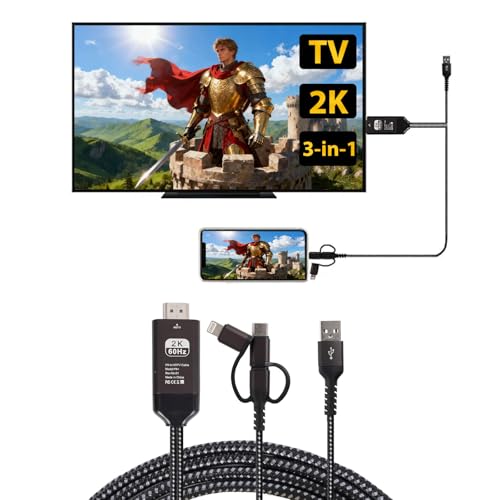
The FIGYK 3-in-1 HDMI mirroring cable offers universal compatibility across iOS and Android devices, including Type-C, Micro USB, and Lightning interfaces. This all-in-one adapter supports connecting to TVs, monitors, and projectors with HDMI inputs for easy screen mirroring. Its nylon braided design enhances durability and reduces tangling, making it suitable for frequent travel or classroom use.
Android setup is straightforward: connect your phone via a data cable, enable USB debugging, attach the adapter to the TV via HDMI, and then switch the TV input to HDMI. A dedicated app QR code appears on screen to finalize the connection. For iPhone or iPad users, the process is similar but often requires fewer steps, with screen mirroring enabling directly from the device settings.
Features at a glance include: three interfaces in one purchase, broad device compatibility, and a durable build. This makes it a versatile choice for home entertainment, meetings, or educational demonstrations where multiple device types need to share a screen quickly.
TASUMATO HDMI Adapter USB Type C Cable MHL 4K

The TASUMATO MHL to HDMI cable is designed for Android devices with USB-C ports that support DP Alt Mode. It supports up to 4K at 60Hz on compatible displays and is backward compatible with 1080p. The product emphasizes a plug-and-play experience, with no software or drivers required, and offers seamless casting to TVs, monitors, or projectors for meetings, presentations, or media viewing.
In addition to standard video output, this adapter highlights charging compatibility and broad device support, including many Samsung Galaxy phones and LG models. The user experience is described as smooth, with the ability to drive content from mobile devices to larger displays for both work and leisure. It pairs well with devices needing a single-cable solution for screen sharing and video playback.
Weton 2-in-1 USB Type C to HDMI

The Weton 2-in-1 cable combines USB-C port mirroring with a built-in charging option. It supports 1080p mirroring and can extend to 4K in some configurations, depending on host device capabilities. This flexibility makes it suitable for Android smartphones and tablets that require continuous power while screen sharing, reducing the need for separate power adapters during demonstrations or streaming sessions.
Installation steps emphasize enabling USB debugging or following standard connection prompts, with a QR-based app pairing method similar to other Android-to-TV solutions. The product particularly notes suitability for home entertainment, business presentations, and classrooms where charging while mirroring is advantageous.
USB C to HDMI Adapter 4K [AUKOKIOULA]

This USB-C to HDMI adapter is designed for USB-C smartphones, PCs, tablets, and other devices with DP Alt Mode. It supports 4K at 30Hz and up, as well as 2K at 60Hz and 1080p at 60Hz. The adapter highlights compatibility with Thunderbolt 3/4 or DP Alt Mode on the USB-C source, making it suitable for MacBooks, iPads, and many Android devices needing a reliable large-screen output.
Two modes—Mirror and Expansion—provide flexibility for different use cases, whether duplicating your phone’s screen or extending your workspace to a larger display. It’s positioned as a practical choice for professionals and educators who require a dependable, high-resolution display connection without hassle.
KEJOG 3-in-1 HDMI Cable

KEJOG’s 3-in-1 HDMI cable focuses on Android devices with MHL support, offering conversion from mobile devices to HDMI-enabled displays. It includes a charging option to maintain power during use and supports 1080p output for clear, sharp content on larger screens. While some streaming apps may impose HDCP restrictions, this adapter targets everyday mirroring needs for meetings, education, or home viewing.
Users should check compatibility with their specific apps and services, as some high-bandwidth streaming platforms require compatible DRM or client-side support. The product emphasizes stable, straightforward mirroring and a practical plug-and-play setup for quick screen sharing from Android phones to TVs or projectors.
Buying Guide: Key Purchase Considerations
When choosing an HDMI adapter for Android phones, consider the following factors to ensure the best fit for your devices and how you plan to use them:
- Compatibility: Confirm your Android phone supports HDMI output via USB-C (DP Alt Mode) or if you need a USB-C, Micro USB, or Type-C adapter. Some devices also require USB debugging enabled for Android mirroring.
- Resolution and refresh rate: Decide whether 1080p is sufficient or if 4K output is important. Note that not all devices and adapters support 4K at 60Hz; some are limited to 30Hz or 4K at 30Hz.
- Power delivery: Many adapters require or benefit from a separate power source during mirroring. Look for models with built-in charging or USB-C power input to prevent device shutdowns mid-use.
- Docking and portability: If you travel or need to present often, choose a compact, durable cable or a 3-in-1 solution that covers multiple ports to simplify packing.
- Mirroring vs. extending: Decide between mirror mode (duplicate phone screen) and extend mode (use the TV as a second display). Some adapters offer both, which is ideal for versatile use in meetings or classrooms.
- App requirements: A few adapters require companion apps or QR codes for connection. Check whether apps are necessary for your workflow and if they are available for your device.
- Durability and build: Look for braided cables and sturdy connectors to withstand frequent plugging and unplugging, especially in educational or corporate settings.
- Pricing and bundles: Some 3-in-1 cables cover multiple interfaces, consolidating purchases. Consider whether you need a single versatile cable or separate adapters for each port type.
The selections above reflect a range of Android-friendly options, emphasizing ease of use, reliability, and compatibility with common display devices. For environments that require continual screen sharing and charging, prioritize models offering power delivery along with high-resolution output.