Discover high-performance HDMI over Ethernet extenders that deliver true 4K experiences across long distances. This guide reviews top models that support 4K@60Hz or 4K@30Hz, HDR, HDCP, IR control, and power over cable, helping you choose the right solution for home theaters, conference rooms, or digital signage. Each option uses CAT5e/6/7 cables to extend HDMI signals with reliable performance and minimal latency.
The following summary table highlights the chosen products and their key strengths. Use it to compare at a glance before diving into detailed sections.
| Product | Brand | Max Resolution / Range | Key Feature |
|---|---|---|---|
| EX-170C | OREI | 4K @ 30Hz over 164 ft | 4K transmission over CAT6/7 with loop-out and IR |
| UltraHD Over Cat6/7 | OREI | 4K @ 60Hz over 164 ft | HDR, EDID management, one-way IR |
| EX-HDBaseT 4K | J-Tech Digital | 4K @ 60Hz up to 130 ft (over Cat6/7) | HDBaseT, EDID, RS232, IR, PoC |
| UHD-EXB400R-K | OREI | 4K @ 60Hz up to 400 ft | POC, loop-out, HDR, RS-232 |
| EX-230C | OREI | 4K @ 30Hz up to 130 ft; 1080p up to 230 ft | POC, loop-out, wide range |
OREI 4K HDMI Over Ethernet Extender EX-170C

Transmit 4K HDMI and Full HD 1080P signals over 50 meters (164 ft) via CAT6/7 to a remote display while maintaining a local loop-out for monitoring. Supports 4K @ 30Hz and 1080P, with M-JPEG compression for efficient processing. Includes dual voltage power supply and international adapter. Ideal for home or office setups with PCs, game consoles, Blu-ray players, and media players. IR control is supported through the system for convenient source operation from the remote location.
OREI UltraHD HDMI Extender Over Cat6/Cat7 4K@60Hz

Extend 4K @ 60Hz HDR or non-HDR signals up to 164 feet (50 meters) over Cat6. This unit supports HDMI 2.0, HDCP 2.2, and EDID management with one-way IR control. A dual-voltage power supply is included for global use, and it’s well-suited for home theaters, conference rooms, and digital signage with reliable, long-distance performance.
J-Tech Digital 4K HDBaseT Extender Over Cat5e/6

Supports 1080P up to 230 feet and 4K @ 60Hz (4:2:0) up to 130 feet on Cat5e/6, with uncompressed HDBaseT video. Includes wide audio compatibility (LPCM, DTS HD, Dolby TrueHD), EDID management, HDCP 2.2/1.4 compliance, RS232, and bi-directional IR. Industrial-level reliability makes this suitable for professional installations and multi-display setups.
OREI 4K HDMI Over Ethernet Balun UHD-EXB400R-K

Long-range 4K HDMI transmission over CAT5e/6/7 with zero latency using HDBaseT. HDR10+, 18 Gbps bandwidth, CEC, and PoC support enable versatile deployment. Features HDMI loop-out, RS-232 control, and dual voltage supply with international adapters. Ideal for large display installations across distances up to hundreds of feet while maintaining 4K quality.
OREI 4K HDMI Over Ethernet EX-230C
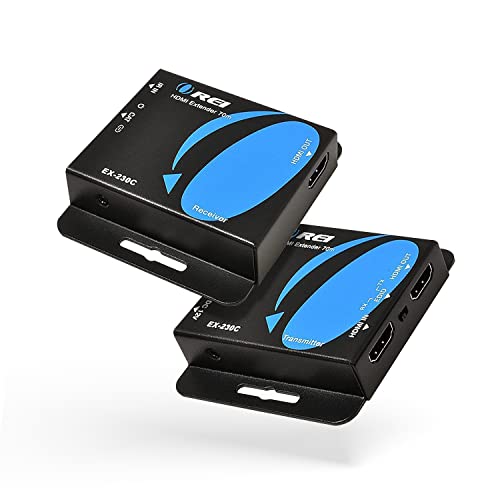
Transmits 4K @ 30Hz up to 130 ft and 1080P up to 230 ft over CAT6/7. Supports loop-out for a local display, Power over Cable (PoC), and a dual-voltage power supply with international adapters. A solid option for long-run 4K distribution with flexible installation scenarios.
OREI 4K Over Ethernet EX-165-K Splitter/Extender

Distributes one HDMI source to four displays via Cat6, delivering 4K @ 30Hz up to 165 ft and 1080P up to 230 ft. The transmitter includes four Cat6 outputs and a local HDMI loop-out. IR remote control is supported with forward commands over a dedicated DDC channel, enabling flexible multi-display setups.
Buying Guide: Key Considerations For Selecting A 4K HDMI Over Ethernet Extender
When choosing a 4K HDMI over Ethernet extender, consider the following factors to ensure you get the right fit for your setup:
- Resolution and refresh rate: Match the extender’s maximum supported resolution and frame rate (e.g., 4K @ 60Hz vs 4K @ 30Hz) to your display and content needs. HDR support improves color and contrast on compatible displays.
- Distance and cable type: Check the maximum transmission distance over CAT5e/6/7 and whether shielded cables are recommended to minimize interference in your environment.
- HDCP and EDID management: Ensure compatibility with your source devices and displays. EDID management helps prevent handshake issues and ensures stable resolutions.
- Power delivery: Decide between power over cable (PoC) and separate power adapters. PoC simplifies wiring but requires compatible transmitters/receivers.
- Bi-directional vs one-way IR: If you need to control the source from the remote location, select models offering IR pass-through or IR control.
- Loop-out functionality: A local display at the transmitter end can be important for monitoring or administrative purposes, especially in surveillance or digital signage setups.
- Reliability features: Look for HDBaseT support, latency considerations, and robust construction for commercial environments.
- Installation context: For home theaters, prioritize aesthetics and cable runs; for offices or classrooms, prioritize scalability and multi-display capabilities (splitters, matrixing).
These extenders are designed to provide reliable long-range HDMI extension via existing network cabling, enabling seamless distribution of high-quality audio and video across rooms or buildings without sacrificing signal integrity.