HDMI adapters are essential for connecting modern laptops, desktops, and USB-C devices to older or alternative display inputs. This guide highlights five reliable adapters designed to deliver crisp video and audio, whether you’re extending a desktop to a larger monitor, delivering a presentation, or gaming on a bigger screen. Below you’ll find quick product highlights and a buying guide to help you choose the right adapter for your setup.
| Product | Connection Type | Resolution Support | Best For |
|---|---|---|---|
| Highwings DP to HDMI | DisplayPort to HDMI | 4K@30Hz | Desktop GPUs, DP-enabled PCs |
| BENFEI DP to HDMI | DisplayPort to HDMI | 3840×2160@30Hz | Portability, presentations |
| Moread HDMI to VGA | HDMI to VGA | 1080p@60Hz | Projectors, older monitors |
| BENFEI HDMI to VGA | HDMI to VGA | 1080p@60Hz | Legacy displays |
| SWITCHFLUX HDMI to VGA | HDMI to VGA | 1920×1080@60Hz | Film/video playback |
Each product here emphasizes straightforward plug-and-play operation, reliable signal conversion, and compatibility with a range of devices. Note that many adapters are uni-directional; they convert from HDMI or DisplayPort to VGA or HDMI but not in reverse. Consider your source device and target display when selecting an adapter.
Highwings 4K DisplayPort To HDMI Adapter

The Highwings adapter offers uni-directional conversion from DisplayPort sources to HDMI displays. It supports up to 4K at 30Hz with backward compatibility for 1440p/2K at 60Hz and 1080p. It includes audio synchronization to ensure video and audio stay in sync during streaming or gaming. The device is passive and designed for DP to HDMI connections, making it a cost-effective choice for graphics cards from AMD or NVIDIA and for desktops with DisplayPort outputs. A note: it does not support HDMI input or dock-station passthrough, so only DP sources should be used.
Key considerations for this model include its compatibility with Dell, HP, Lenovo, and similar systems, and the understanding that it won’t convert signals in the reverse direction. For users seeking a straightforward path from a DP-enabled PC to a modern HDMI monitor or TV, this adapter provides reliable performance within its specified resolution range.
BENFEI 4K DisplayPort To HDMI Adapter
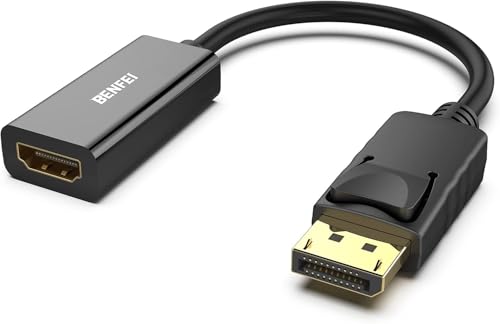
The BENFEI uni-directional DP to HDMI adapter is designed to connect a computer or laptop with DisplayPort to a monitor or TV with HDMI. Its compact form makes it ideal for on-the-go presentations or travel setups. It supports up to 3840×2160 at 30Hz and 1080p at 60Hz, with gold-plated DisplayPort connectors to resist corrosion and improve signal stability. The adapter is not bidirectional, so HDMI sources cannot be fed into a DP monitor. Its robust construction and reliable performance make it a solid choice for Windows or compatible systems that rely on DP outputs.
Consider this option if you frequently deliver presentations or extend desktops to HDMI displays and want a portable, easy-to-carry solution. Always confirm your target display’s input capabilities and ensure your source device can output the required DP signal and resolution.
Moread HDMI To VGA Uni-Directional Adapter

The Moread HDMI to VGA adapter converts digital HDMI signals to an analog VGA output. It is uni-directional and not suitable for VGA to HDMI conversion. This makes it a practical choice for using newer HDMI sources (laptops, desktops, or media devices) with older or legacy projectors and monitors that only support VGA. The adapter supports up to 1920×1080 at 60Hz and uses gold-plated connectors to resist corrosion and improve signal transmission. A VGA cable is required for the other end, as it is not supplied.
When planning use in classrooms or meeting rooms, verify that your VGA display can accept 1080p input and that the HDMI source can provide sufficient power or bandwidth for smooth playback. For displays that require audio, note that VGA does not carry audio; use a separate audio solution if needed.
BENFEI HDMI To VGA, Gold-Plated Adapter

This Benfei HDMI to VGA adapter mirrors the same core function: convert HDMI signals to VGA with a compact design suitable for travel. It features a gold-plated HDMI connector for enhanced signal transmission and abrasion resistance, and it relies on an internal IC to manage the conversion. It is not bi-directional, so it cannot convert VGA back to HDMI. The adapter supports 1080p at 60Hz and extends compatibility to 720p, 1600×1200, and 1280×1024 for broader monitor support. A durable, portable option for presenting on legacy displays.
In environments where older projectors or monitors are still in use, this adapter provides a simple transition path from modern HDMI sources without requiring a dedicated VGA board or extra equipment. Verify you have a compatible HDMI source and a VGA-capable display before use.
SWITCHFLUX HDMI To VGA Cable

The SWITCHFLUX HDMI to VGA cable emphasizes ease of use and a crisp 1080p@60Hz output. It is a unidirectional cable that converts HDMI signals to VGA without requiring drivers. The cable is designed with a metal case and nylon braiding for durability and reliability during travel or daily use. It does not transmit audio via VGA, as VGA carries video only; use a separate audio path if needed. This solution is well-suited for connecting HDMI-equipped laptops or media players to older VGA displays.
When evaluating this option, consider your display’s input; if audio is needed, you’ll need an alternative route. The cable’s plug-and-play design reduces setup time and makes it a practical choice for classrooms, conference rooms, and home entertainment systems that still rely on VGA displays.
Buying Guide: What To Look For In HDMI Adapters
- Directionality: Most DP-to-HDMI and HDMI-to-VGA adapters are uni-directional. Confirm the signal path from source to display to avoid compatibility issues.
- Resolution And Refresh Rate: Check the maximum supported resolution (e.g., 4K@30Hz, 1080p@60Hz). If you’re gaming or streaming high-quality video, ensure the adapter can meet the display’s capabilities.
- Source And Display Compatibility: Ensure your device has DisplayPort or HDMI output and that your target display has HDMI or VGA inputs. Some devices require DP++ or dual-mode DisplayPort for compatibility.
- Signal Quality Features: Gold-plated connectors and built-in ICs can improve signal stability and durability. Consider passive vs. active adapters based on signal length and power availability.
- Portability: For presentations and travel, compact designs are valuable. Pocket-sized adapters or cable assemblies reduce clutter in a bag or briefcase.
- Power Requirements: Some HDMI-to-VGA adapters are passive and do not require external power, while others may benefit from external power for stable performance, especially at higher resolutions.
- Audio Considerations: VGA carries video only; if you need audio, pair the adapter with a separate audio path or use HDMI where supported to carry both audio and video.
- Bi-Directionality Limitations: Most adapters are not bi-directional; ensure you’re not trying to drive a DisplayPort display from an HDMI source with a DP-to-HDMI adapter, for instance.
Choosing the right HDMI adapter depends on your device ecosystem and display needs. For modern laptops and desktops with HDMI or DP outputs, a DP-to-HDMI adapter can unlock large-screen viewing on HDMI displays. If you’re working with older projectors or monitors, HDMI-to-VGA adapters provide a straightforward upgrade path without replacing legacy displays. Always verify your source output capabilities and the input expectations of your display before purchasing.