Finding a reliable HDMI 5.1 audio decoder helps you expand legacy receivers, improve surround sound from gaming consoles, Blu-ray players, and media PCs, or extract high‑quality audio from modern HDMI sources. The following five products offer a range of input options, multi‑channel outputs, and compatibility with Dolby Digital, DTS, and PCM formats. This guide highlights how each device handles HDMI to analog/digital conversion, EDID control, and practical setup notes for American home theaters and AV enthusiasts.
Summary Of The Selected Products
| Product | Brand | Key Capability | Output Options | HDMI Support |
|---|---|---|---|---|
| HDCCDM HDMI 5.1 Audio Decoder | HDCCDM | Auto convert HDMI to 5.1 channel analog | 3.5mm headphone, analog 5.1 | Up to 4K@30Hz |
| SOUTHSKY 5.1/2.1 Audio Rush | SOUTHSKY | Digital optical/coaxial to analog 5.1/2.1 | 6 RCA outputs | HDMI not required for output |
| 5.1CH Digital Sound Decoder (Zopsc) | Zopsc | HDMI/optical/coaxial to 5.1 | 6-channel analog | Supports HDCP 2.3/4K |
| AllAboutAdapters 4K HDMI to Optical + PCM 5.1/7.1 | AllAboutAdapters | Transcodes LPCM/HDMI audio to optical/analog | Optical, 3.5mm, multiple channels | HDMI 1.3/HDCP1.2 |
| ViewHD HDMI Audio Extractor (VHD-H2HADi) | ViewHD | HDMI audio extractor with EDID control | SPDIF/TOSLINK and 3.5mm analog | HDMI up to 1080p |
HDCCDM HDMI 5.1 Audio Decoder

The HDCCDM device is designed to automatically convert HDMI input into 5.1 channel analog audio output, including Dolby AC-3 and DTS 5.1 RAW streams. It provides three audio modes—PASS, 2.0CH, and 5.1CH—with synchronized volume control for six channels. It supports 4K image quality with high-definition color, and HDMI resolutions up to 3040×2160 at 30Hz or 4096×2160 at 30Hz. This makes it suitable for home theater setups with legacy receivers or amplified speakers that rely on analog inputs.
SOUTHSKY 5.1/2.1 Audio Rush Digital Sound Decoder
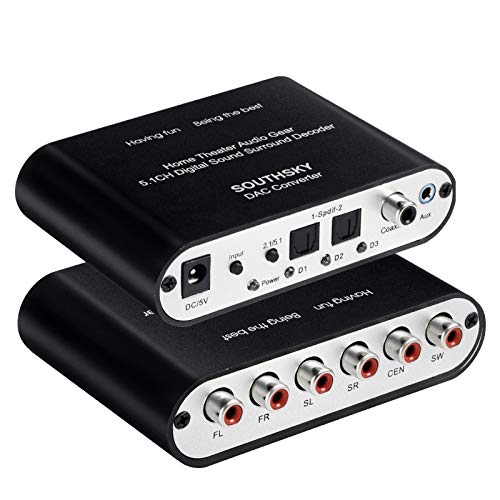
The SOUTHSKY unit focuses on converting digital optical (Toslink) and coaxial signals to 6 RCA outputs for 5.1 channel or 2.1 channel audio. It supports Dolby, DTS/AC-3 decoding for home theater use and includes a simple one‑key switch to toggle between 5.1 and 2.1 modes. With two SPDIF inputs, a coaxial input, and multiple aux connections, this decoder is designed for older AV receivers that need flexible digital‑to‑analog conversion with reliable signal memory after restart.
5.1CH Digital Sound Decoder (Zopsc)

The Zopsc decoder supports multiple formats including HDCP 2.3, 2.2, and 1.4, with decoding for DTS, DTS ES, DTS WAV, AC3, FLAC, APE, and more. It handles sampling at up to 24-bit/192kHz and outputs 5.1 independent channels via HDMI input sources, optical, coaxial, USB, and other sources. It’s designed to reproduce detailed surround sound from a high‑definition feed while maintaining compatibility with various player devices and digital formats.
AllAboutAdapters 4K HDMI to Optical + PCM 5.1/7.1
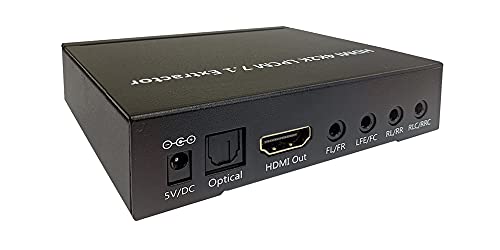
This device provides a robust solution for transcoding uncompressed LPCM 5.1/7.1 to analog surround formats. It can extract compressed audio such as Dolby Digital, AC3, and DTS 5.1/7.1 from HDMI, outputting through optical audio and analog channels. It features EDID dip switches for format control, and supports HDTV resolutions up to 4K and beyond. It’s a practical option when upgrading an older home theater that relies on optical or analog outputs for surround sound.
ViewHD HDMI Audio Extractor With 5.1CH Decoder

The ViewHD model provides an HDMI input with pass-through and an audio extractor that outputs SPDIF/TOSLINK and a 3.5mm stereo analog signal, plus six-channel analog outputs to support 5.1 Dolby Digital and DTS. It supports HDMI up to 1080p at 60Hz and 3D, making it a versatile option for systems that need clean audio extraction without changing the video path. EDID control helps protect source compatibility across devices in mixed setups.
VPFET HDMI Audio Extractor 4K To Optical + 3.5mm

The VPFET HDMI Audio Extractor supports 4K HDMI input with 4K@30Hz and HDCP1.4, providing 2.0/5.1 modes and a Pass mode for flexibility. It outputs via optical and 3.5mm, allowing use with both high‑definition AV receivers and simple stereo setups. It explicitly notes compatibility limits with ARC/eARC and certain devices, so users should verify their source and display capabilities before purchasing.
Buying Guide: Key Considerations For HDMI 5.1 Audio Decoders
- Channel formats and outputs: Determine whether you need dedicated 5.1 analog outputs, a 6‑channel RCA arrangement, or a single digital optical output. Some devices offer both analog and digital paths, which is ideal for mixed gear.
- Source compatibility and formats: Check whether the decoder handles Dolby Digital, DTS, DTS‑HD, AC3, LPCM, and HD formats. If your equipment uses HDCP, ensure the unit supports the necessary version (2.2/2.3 as applicable).
- HDMI and video passthrough: If you want video to continue through the same switch or receiver, confirm the HDMI pass‑through bandwidth and maximum support (4K/30Hz, 4K/60Hz, 1080p, etc.). Some models omit HDMI passthrough entirely.
- EDID control: Exact formats and memory behavior during restarts can affect whether audio remains synced with video. EDID dip switches or automatic negotiation can improve compatibility with a wide range of TVs and sources.
- Latency and synchronization: Some decoders emphasize tight lip-sync alignment; read user reviews for notes about delay or lip-sync issues in gaming or fast‑paced content.
- Ease of setup and compatibility with legacy gear: If you’re upgrading an older AV receiver, prioritize devices with multiple analog outputs and robust optical/coaxial inputs to minimize cabling complexity.
- Power and physical footprint: Check whether the unit is compact enough to fit in your AV rack and whether it requires external power adapters or can be powered via USB, if applicable.
- Reliability and support: Look for devices with clear documentation and accessible customer support, especially if you’re integrating with other brands or complex EDID configurations.
- Price-to-performance balance: Compare supported formats, number of outputs, and ease of use across models to determine the best value for your setup.
These factors help you select an HDMI 5.1 audio decoder that aligns with your home theater’s input sources, receiver capabilities, and preferred audio streaming formats. When integrating such a device, plan your cabling to minimize noise and ensure the highest fidelity between source and output channels.