When you need to duplicate a single HDMI source on two displays, a 1×2 HDMI splitter is the go-to solution. This guide highlights reliable options that mirror content without extending it, supporting resolutions up to 4K in many cases. Below you’ll find concise product overviews, a quick buying table, and a buyer’s guide covering key considerations such as HDCP, power requirements, and cable length.
| Product | Brand | Key Feature |
|---|---|---|
| Avedio Links HDMI Splitter 1×2 | avedio links | Mirrors one input to two displays; 4K @ 30Hz; not for extended displays |
| OREI HDMI Splitter 1 In 2 Out (HD-102) | OREI | Mirror only; up to 4K/30Hz; HDCP not bypassed |
| Marmoin HDMI Cable Splitter | Marmoin | 1×2 mirror; supports 1080p; signal router style |
| MT-VIKI 4K HDMI Splitter 1×2 | MT-VIKI | Mirror only; 4K 30Hz; supports 4K/30, 1080p/60 |
| J-Tech Digital HDMI Splitter 1×2 | J-Tech Digital | Multi-resolution output; 4K@60Hz; mirror only |
Avedio Links HDMI Splitter 1×2 In 2 Out

The avedio links HDMI Splitter duplicates a single HDMI input to two displays simultaneously. It is designed for mirror/same-screen output rather than extending to two different desktops. The device supports 4K at 30Hz and is backward compatible with 1080p and lower resolutions. It requires a HDMI 2.0 cable for optimal 4K performance and supports up to certain cable lengths for 4K and 1080p signals. It does not act as an audio extractor or a switcher, and it should be used only for mirror functionality.
OREI HDMI Splitter 1 In 2 Out – Ultra HD 4K @ 30Hz

The OREI HDMI Splitter duplicates one HDMI input to two identical outputs. It is not designed to extend displays. It supports resolutions up to 4K at 30Hz and 1080p, and includes a dual-voltage power setup along with an international adapter. It remains HDCP compliant and does not bypass HDCP, ensuring compatibility with most source devices such as Blu-ray players, game consoles, and streaming devices. This makes it a solid option for simple mirror setups.
Marmoin HDMI Cable Splitter 1 In 2 Out
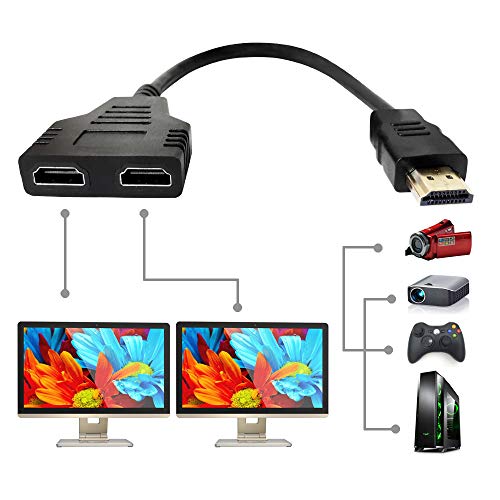
The Marmoin HDMI splitter is designed to duplicate a single signal to two outputs. It functions as a signal router for scenarios where two rooms share one source. It commonly supports up to 1080p, and its documentation notes that it does not support HDCP or certain devices (like MacBooks). The device is compact and straightforward, ideal for simple mirror setups in multiple rooms. It is best used with devices that require two screens showing identical content.
MT-VIKI 4K HDMI Splitter 1 In 2 Out

MT-VIKI offers a 1×2 HDMI splitter capable of delivering 4K at 30Hz and 1080p at 60Hz to two displays simultaneously. It emphasizes that it is a splitter, not a switch, and does not extend content. It supports HDMI 1.4/1.3/1.2 and HDCP 1.4, with a plug-and-play setup. It is suitable for duplicating one source to two TVs or monitors for synchronized viewing across rooms or setups requiring identical displays.
OREI HDMI Splitter 1 In 2 Out – Mirror Only

The OREI HD-102 splitter mirrors a single HDMI input to two displays without extending to multiple monitors. It supports up to 4K at 30Hz and 1080p, requires a compliant HDMI connection, and does not bypass HDCP. The package describes compatibility with common devices such as Blu-ray players, gaming consoles, and streaming boxes, with a focus on reliable, identical display output across two screens.
Buying Guide: Key Considerations For HDMI 1 In 2 Out Splitters
- Mirror vs. Extend: All products reviewed are mirror-only splitters. They duplicate one source to two displays, not extend to different content on separate screens.
- Resolution and Refresh Rate: If you need 4K output, verify the maximum supported by the splitter (some are 4K/30Hz, while others may offer 4K/60Hz). For most living room setups, 1080p at 60Hz is sufficient, but check your displays and source device compatibility.
- HDCP Handling: Most splitters preserve HDCP. Some models explicitly do not bypass HDCP; ensure compatibility with your Blu-ray player, gaming console, or streaming device.
- Power Requirements: Some splitters are powered and come with adapters; others are passive. For reliable 4K performance or longer cable runs, use a powered splitter.
- Cable Length and Quality: Cable length affects performance, especially at 4K. Shorter, high-quality HDMI 2.0/2.1 cables generally yield best results. Adhere to manufacturer guidance on maximum cable lengths for 4K vs. 1080p.
- Compatibility: While most splitters work with common devices (Xbox, PS, Blu-ray, streaming devices), check for any noted device limitations (HDCP, HDCP 2.3, HDCP bypass, HDCP compliance).
- Use Case: If you intend to display identical content in two rooms or on two TVs in a home theater, ensure the splitter’s outputs can drive the displays adequately without signal degradation.
In sum, the best HDMI 1 In 2 Out splitters offer reliable mirror output with varying support for 4K resolutions and HDCP. Your choice should align with whether you need 4K at 30Hz or 1080p at higher refresh rates, and whether you require powered operation or simple passive duplication.