Choosing the right HD TV capture card is essential for gamers, content creators, and educators who want to stream high-quality gameplay, footage, or presentations. This guide highlights five reliable options that balance 1080p and 4K capabilities, low latency, and wide compatibility. Each product is suitable for connecting consoles, cameras, and PCs to stream to platforms like OBS, Twitch, and YouTube. Read on to compare features and find the best fit for your setup.
Summary of Selected Products:
- Rybozen Capture Card — 1080p60, USB 3.0, plug-and-play, 4K input support
- Guermok Video Capture Card — 1080p60, USB 3.0, 4K input, portable aluminum body
- acer USB 3.0 Video Capture Card — 4K loop-out, 1080p60, mic-in, plug-and-play
- Audio Express AXHDCAP 4K HDMI Capture Card — 4K input, 1080p output, ultra-low latency
- UGREEN 2K@30Hz Video Capture Card — 2K output, 4K input, USB-C/USB-A, low latency
Rybozen Capture Card Nintendo Switch, 1080P 60FPS USB 3.0
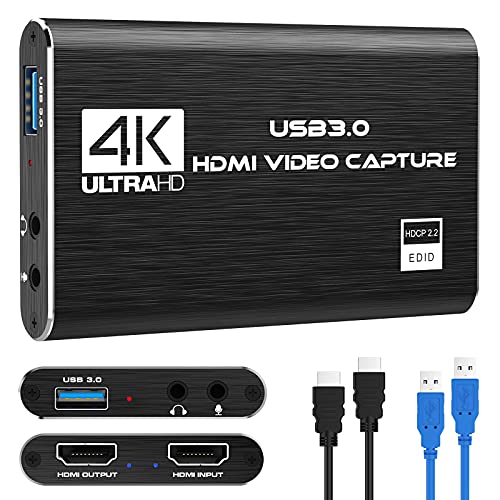
The Rybozen capture card supports 1080p high-definition recording and streaming from HDMI sources such as gaming consoles, cameras, and set-top boxes. It lists video input at 4K30/60Hz and 1080p120/144Hz, with output up to 2K30Hz. It is designed for plug-and-play use without drivers and works with Windows and Mac OS via USB 3.0, making it suitable for OBS, Twitch, YouTube, and other platforms. Optional audio capture is available, and the device should automatically optimize input/output settings for streaming workflows.
Guermok Video Capture Card, 4K USB3.0 HDMI to USB C

The Guermok capture card provides 1080p60 recording via USB 3.0 with input up to 4K@30Hz and output up to 2K@30Hz or 1080p@60Hz. It supports Type-C and USB interfaces for broad device compatibility and emphasizes ultra-low latency for real-time streaming and recording. It is designed for easy plug-and-play use, enabling quick capture for game recording, live-streaming, online meetings, and teaching sessions.
acer USB 3.0 Video Capture Card — 4K Loop-Out & 1080P 60Hz

The acer USB 3.0 capture card supports 4K input with loop-out and 1080p@60Hz output. It uses YUY2 technology for richer color and reduced latency, and includes a microphone input for live commentary. The device is plug-and-play with no drivers required and is suitable for gaming, online teaching, and conference recording. It works with Windows and Mac OS, and is targeted toward streamers and educators who need reliable performance in a portable package.
Audio Express AXHDCAP 4K HDMI Video Capture Card

The Audio Express AXHDCAP captures up to 4K input with 1080p output at 30Hz, delivering enhanced real-time previews and ultra-low latency for streaming, recording, and video conferences. It supports wide compatibility across platforms and devices, enabling live gaming, classroom teaching, and professional broadcasts. The device emphasizes reliable audio-visual synchronization and straightforward setup with USB 2.0/3.0 interfaces depending on model and OS support.
UGREEN 4K@30Hz HDMI Capture Card — 2K Output, USB 3.0

Note: This UGREEN card supports 4K@30Hz input with 2K@30Hz output, which helps preserve original video quality for post-production while delivering broad compatibility with 1080p 60fps. It offers USB-A and USB-C interfaces for wide device compatibility, supports MJPEG and YUY2 formats, and provides low-latency performance for streaming and gaming. It is suitable for Switch, PS5, Xbox, PC, and Mac use, with limitations on 4K capture and iPhone support due to protocol constraints.
UGREEN 2K@30Hz Video Capture Card — USB-A / USB-C
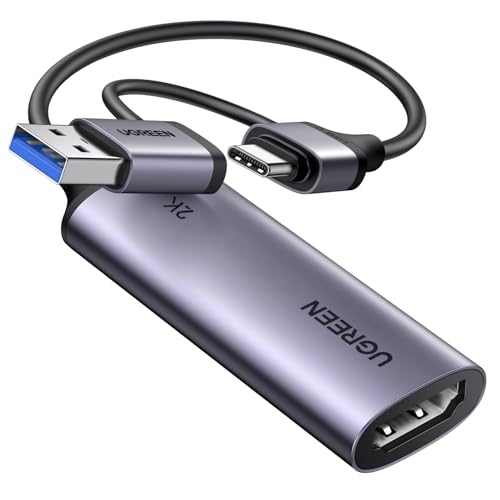
This UGREEN model supports 2K at 30fps with 4K input, offering flexible USB-A and USB-C connectivity and low-latency performance for streaming and recording. It is backward compatible with 1080p 60fps and designed for broad compatibility with Switch, Xbox, PS4/PS5, PC, and cameras. Note that it only supports HDMI input to USB output in one direction, which suits live streaming workflows while maintaining portability for on-the-go setups.
4K HDMI Capture Card USB 3.0 — 1080P 60FPS

The 4K HDMI Capture Card offers 4K input with 1080p60 output and loop-out functionality, designed for gaming and streaming across PS5, PS4, Xbox, Switch, OBS, PC, and Mac. It emphasizes plug-and-play operation, low latency, and broad software compatibility with OBS Studio, Streamlabs, and XSplit. This card targets users who prioritize high-quality video capture with straightforward setup and reliable performance for live streams and recordings.
Newhope Video Capture Card — 4K to USB-C 3.0
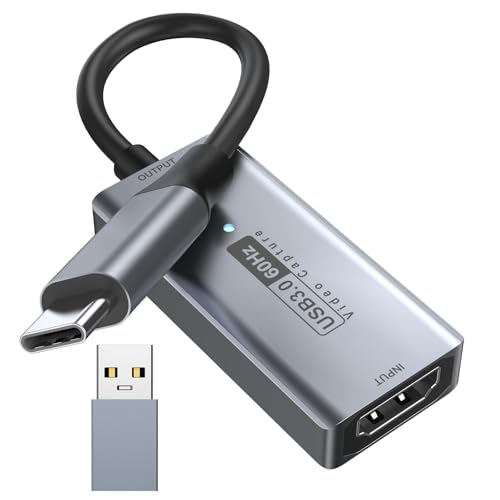
The Newhope card supports up to 3840×2160@30Hz input and 1920×1080@60Hz output, delivering 1080p 60fps recording and streaming. It emphasizes real-time preview with ultra-low latency, turnkey compatibility with Windows, Android, and MacOS, and easy connection to cameras, Switch, PS5/PS4, and smartphones for streaming or conferencing. It is designed for users who need reliable live broadcasting with straightforward software integration.
Buying Guide
- Resolution and frame rate: Choose based on your needs—1080p60 is common for streaming, while 4K input can future-proof setups and allow higher-quality captures; ensure the device supports your source’s output without bottlenecking.
- Latency and pass-through: Look for ultra-low latency models to minimize delay between your play or presentation and on-stream monitoring. Pass-through quality matters if you want to play games while streaming without input lag.
- Interface and compatibility: USB 3.0/3.1 connections provide higher bandwidth; check compatibility with Windows, macOS, and Linux, plus your capture software (OBS, XSplit, etc.). USB-C models offer broader device support.
- Inputs and outputs: Confirm HDMI input support (HDMI 2.0/HDMI 1.4) and whether the card offers loop-out or passthrough. Some models include microphone input for live commentary.
- Portability and power: For on-the-go recording, a compact, powered or plug-and-play unit adds convenience. Internal power is rare—most devices draw power from the host computer via USB.
- Software and usability: Plug-and-play devices reduce setup time, but some require capture software for advanced features like instant recording, overlays, or multi-source mixing. Check for compatibility notes and driver-free operation.
- Use-case alignment: For console gaming, ensure the device handles game capture with minimal frame drops. For cameras or DSLRs, verify compatibility with your camera’s HDMI output and the camera’s power options.
- Budget versus features: Higher-end units offer 4K input, loop-out, and broader OS support; mid-range options provide solid 1080p60 performance with simple setups for beginners.
- Security and reliability: Read reviews for adverse effects like color banding, driver conflicts, or USB bandwidth contention. A device with consistent firmware updates reduces long-term risk.
- Future-proofing: If you plan to upgrade consoles or move toward higher-quality streams, consider devices with 4K input and reliable 60Hz or 4K60p output in your preferred workflow.